There is no single best project management platform.
A freelancer tracking client deliverables, a marketing team coordinating approvals across campaigns, and a software team managing sprints are solving different problems. The tool that fits one can add friction for another.
This guide compares eight widely used platforms — ClickUp, Asana, monday.com, Teamwork, Wrike, Smartsheet, Trello, and Jira — by the decisions that actually change software fit: workflow complexity, client involvement, time tracking, resource planning, approvals, reporting, and the amount of setup a team is willing to manage.
The goal is not to rank every tool on one universal scale. It is to help you identify which type of system makes sense for the way your team works.
Quick Picks: Best Project Management Software by Use Case
- ClickUp — best for teams that want a highly configurable all-in-one workspace and are willing to invest in setup.
- Asana — best for structured cross-functional teamwork and teams that value clear process over maximum customization.
- monday.com — best for visual, customizable workflows that nontechnical teams can shape around their own process.
- Teamwork — best for agencies, consultants, and other client-service businesses managing billable work.
- Wrike — best for marketing and creative operations with heavier approval, reporting, and resource-planning needs.
- Smartsheet — best for complex planning and spreadsheet-oriented organizations.
- Trello — best for simple project tracking where low setup overhead matters more than advanced portfolio features.
- Jira — best for software and technical teams that need backlog, dependency, and workflow control.
Project Management Software Comparison
Treat this table as a decision summary, not a substitute for checking the plan that contains the capabilities you need.
| Tool | Best For | Complexity | Client Work | Resource Planning | Time Tracking | Free Option |
|---|---|---|---|---|---|---|
| ClickUp | Flexible all-in-one workflows | Higher setup effort | Good for configurable client workflows | Yes — paid plans | Yes — paid plans | Yes — Free Forever |
| Asana | Structured cross-functional teams | Moderate | Good guest and approval workflows | Advanced-tier capability | Advanced-tier capability | Yes — Personal, up to 2 users |
| monday.com | Visual, customizable workflows | Moderate | Useful guest access; billing rules matter | Available on higher tiers | Yes — Pro | Yes — up to 2 seats |
| Teamwork | Client-service businesses | Moderate, client-focused | Strong — clients, billable work, retainers | Available on higher tiers | Yes — native and billable | Yes — up to 5 users / 5 projects |
| Wrike | Marketing and creative operations | Higher | Useful for structured review workflows | Advanced depth on Pinnacle | Advanced depth on Pinnacle | Yes — Free plan available |
| Smartsheet | Complex spreadsheet-style planning | Higher at scale | Guest access on Business | Workload on Business | Not a core native feature | Trial rather than a permanent free plan |
| Trello | Simple project tracking | Low | Not a core focus | Not a core focus | Not native — integrations/Power-Ups | Yes — up to 10 collaborators / Workspace |
| Jira | Software and technical teams | Higher for nontechnical teams | Not a core focus | Cross-team planning rather than classic resourcing | Yes — native work logging | Yes — up to 10 users |
How We Evaluated These Tools
We compared the tools on eight buying factors that change the decision most: adoption, workflow flexibility, client collaboration, time tracking, resource planning, approvals, reporting, and total value.
Product facts are based on current vendor documentation and pricing information. Public user feedback is used only to identify recurring patterns around usability, complexity, and operational friction. This is not presented as hands-on testing or a proprietary benchmark.
The 8 Decision Factors
Ease of adoption. How much setup, training, and ongoing administration does the tool require before a team can use it consistently?
Workflow flexibility. Can the software adapt to unusual processes, or does it work best when teams follow a predefined structure?
Client collaboration. Can external stakeholders participate without making access or licensing unnecessarily expensive?
Time tracking. Is time tracked natively, and does it matter to billing or utilization?
Resource planning. Can leaders see capacity and workload across people and projects?
Approval and proofing. Can teams review work, collect feedback, and move it through an approval path without relying on email?
Reporting. Can managers see project status and risk across multiple workstreams without rebuilding reports manually?
Price and value. What matters is not only the starting subscription price, but also plan gates, seat and guest rules, implementation effort, and whether the team will actually use the advanced features it pays for.
Why Different Teams Need Different Tools
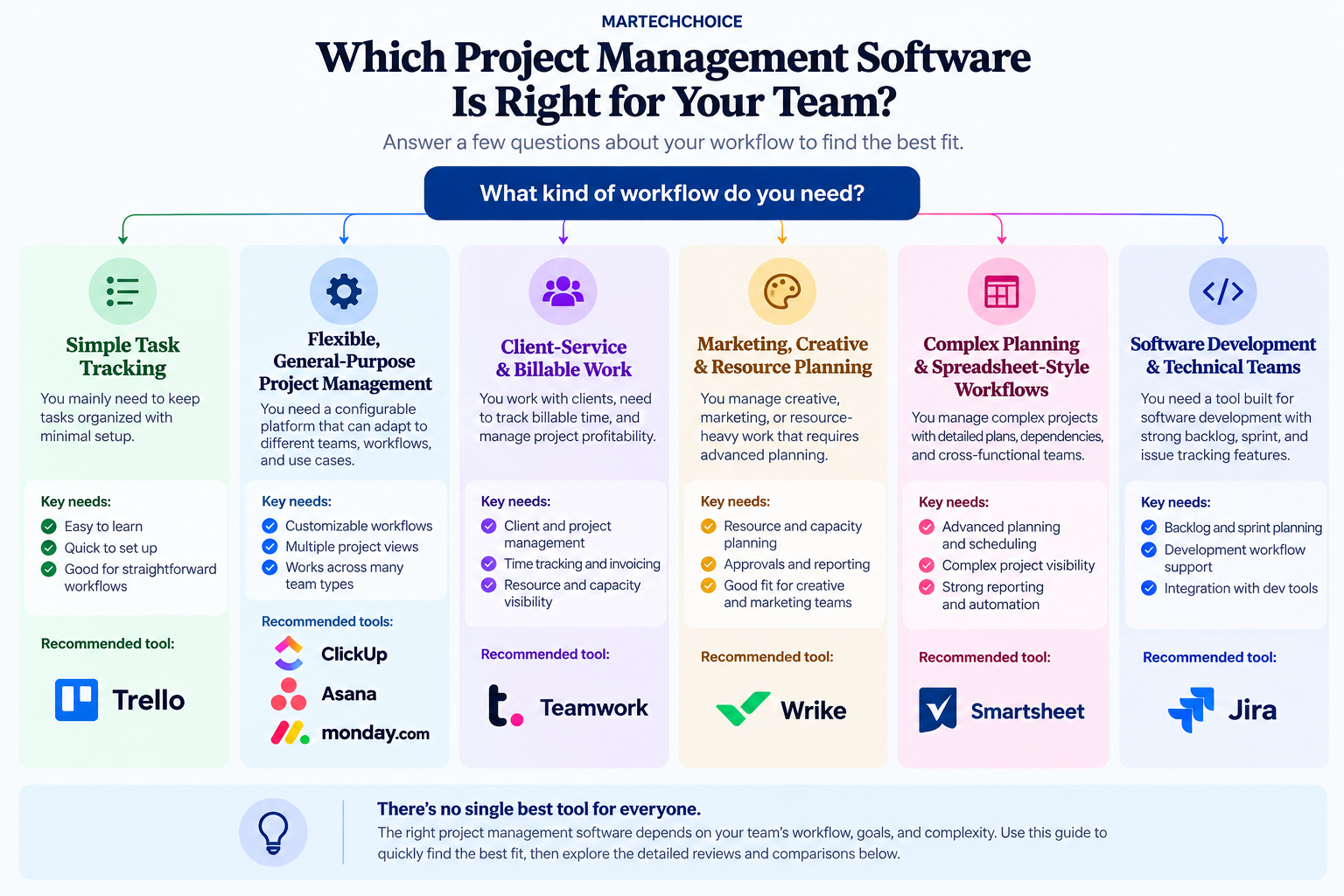
The same feature can be essential to one buyer and irrelevant to another.
For freelancers, setup and maintenance time directly competes with client work, so simplicity and price/value usually carry more weight. Marketing teams tend to care more about approvals, campaign visibility, and reporting across contributors. Consultants often care about billable time, utilization, and client visibility. Construction teams may need schedule control, dependencies, document governance, and deeper operational systems.
Creative teams often benefit from proofing and workload visibility, while technical teams may need backlog, sprint, issue, and dependency control.
That is why “more features” is not a useful definition of “better.” The strongest choice depends on which problems the software needs to solve without creating unnecessary overhead.
The 8 Best Project Management Software Tools
ClickUp — Best for Highly Flexible All-in-One Project Management
ClickUp is strongest when a team wants one configurable operating layer and is willing to invest in designing it.
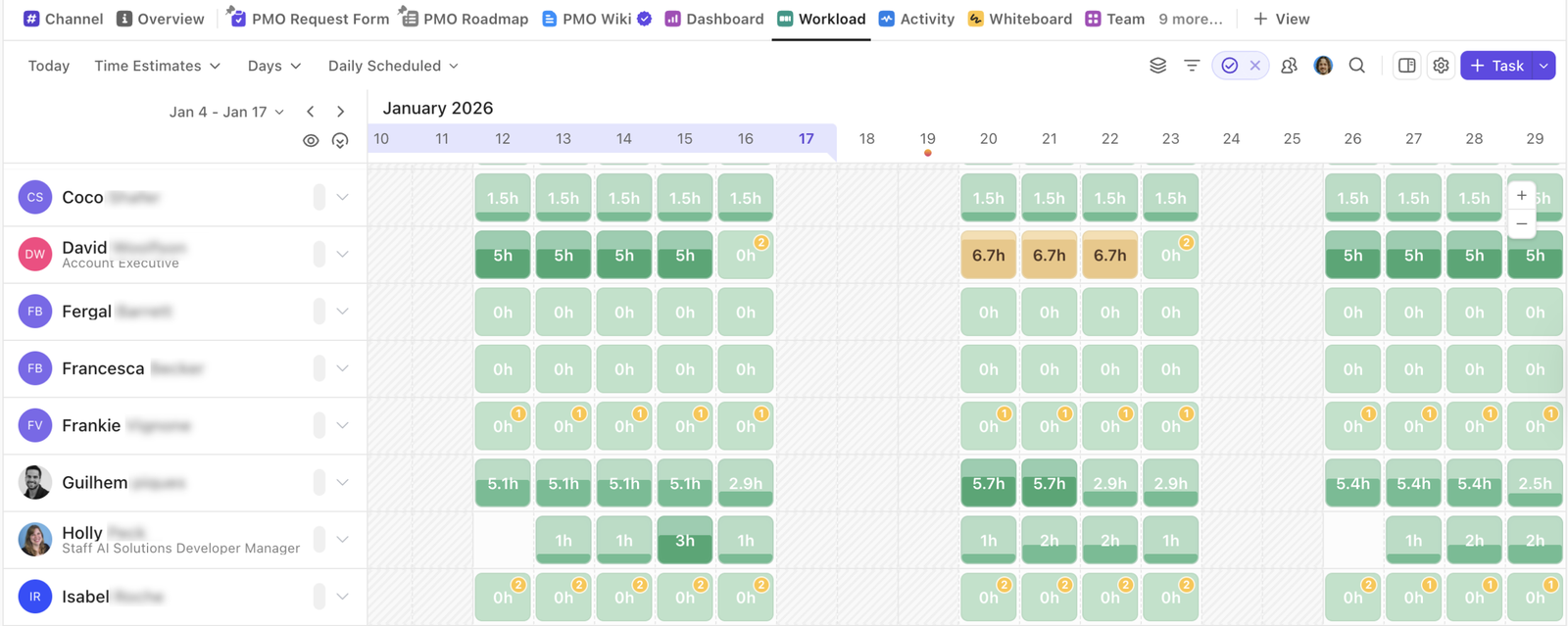
Its current pricing page shows a Free Forever tier, with the Unlimited plan starting at $7 per user per month when billed annually and Business at $12. Native time tracking and resource-management capabilities are available on paid plans, while Business adds deeper workload management and unlimited proofing. See ClickUp pricing for current plan details.
The appeal is breadth. Teams can combine task management, time tracking, dashboards, reviews, and highly customized workflows instead of stitching together several separate systems.
That flexibility also creates a management requirement. Public feedback repeatedly points to a meaningful learning and configuration curve, especially when workspaces accumulate custom views, fields, and processes over time. The practical implication is simple: ClickUp tends to work better when someone owns the system design.
It is a strong candidate for teams that expect their workflow to evolve and want a platform they can keep adapting. Teams that want a nearly ready-made system with minimal setup may get less value from that flexibility.
Asana — Best for Structured Cross-Functional Teams
Asana fits teams that want clear, structured coordination across departments without designing every workflow from scratch.
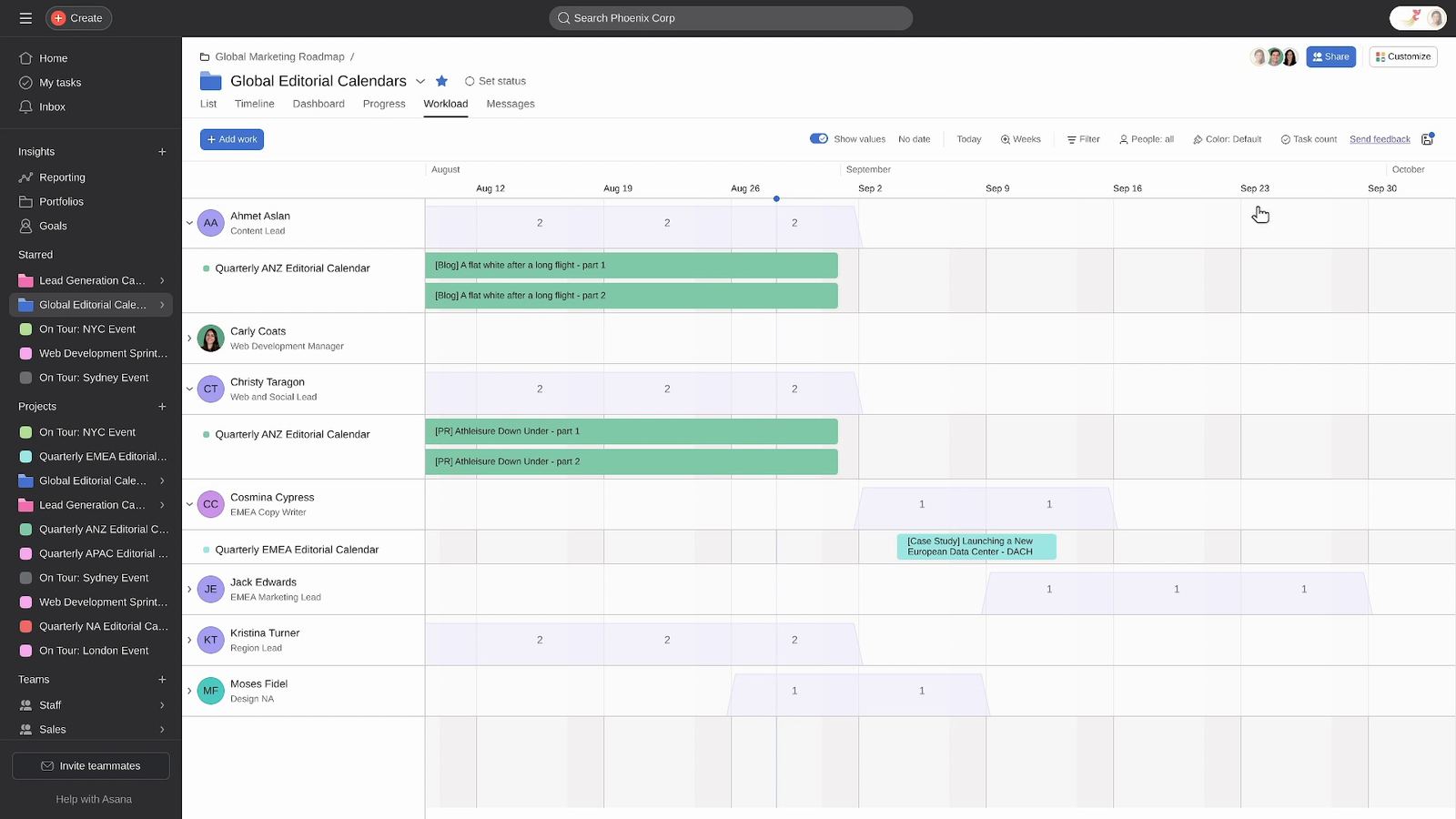
Its pricing page currently lists Starter at $10.99 per user per month when billed annually. Starter includes Timeline/Gantt, reporting dashboards, automations, and guest access. Higher-level capabilities such as resource management, approvals and proofing, time tracking, portfolios, and goals sit in Advanced. See Asana pricing.
That distinction matters because Asana can look affordable at the starting tier while the real buying decision depends on whether the team needs advanced workload and management features.
Asana is especially compelling for cross-functional work where structure, ownership, dependencies, and reporting matter more than maximum customization. It is less compelling when the required capabilities only appear in a plan the team cannot justify, or when the workflow revolves around billable client work and invoicing rather than internal coordination.
monday.com — Best for Visual and Customizable Workflows
monday.com is built around visual boards that teams can shape around their own processes. The current work-management product includes boards, timeline and Gantt views, automations, integrations, guest access, AI features, and higher-tier capacity-planning capabilities. See monday.com pricing.
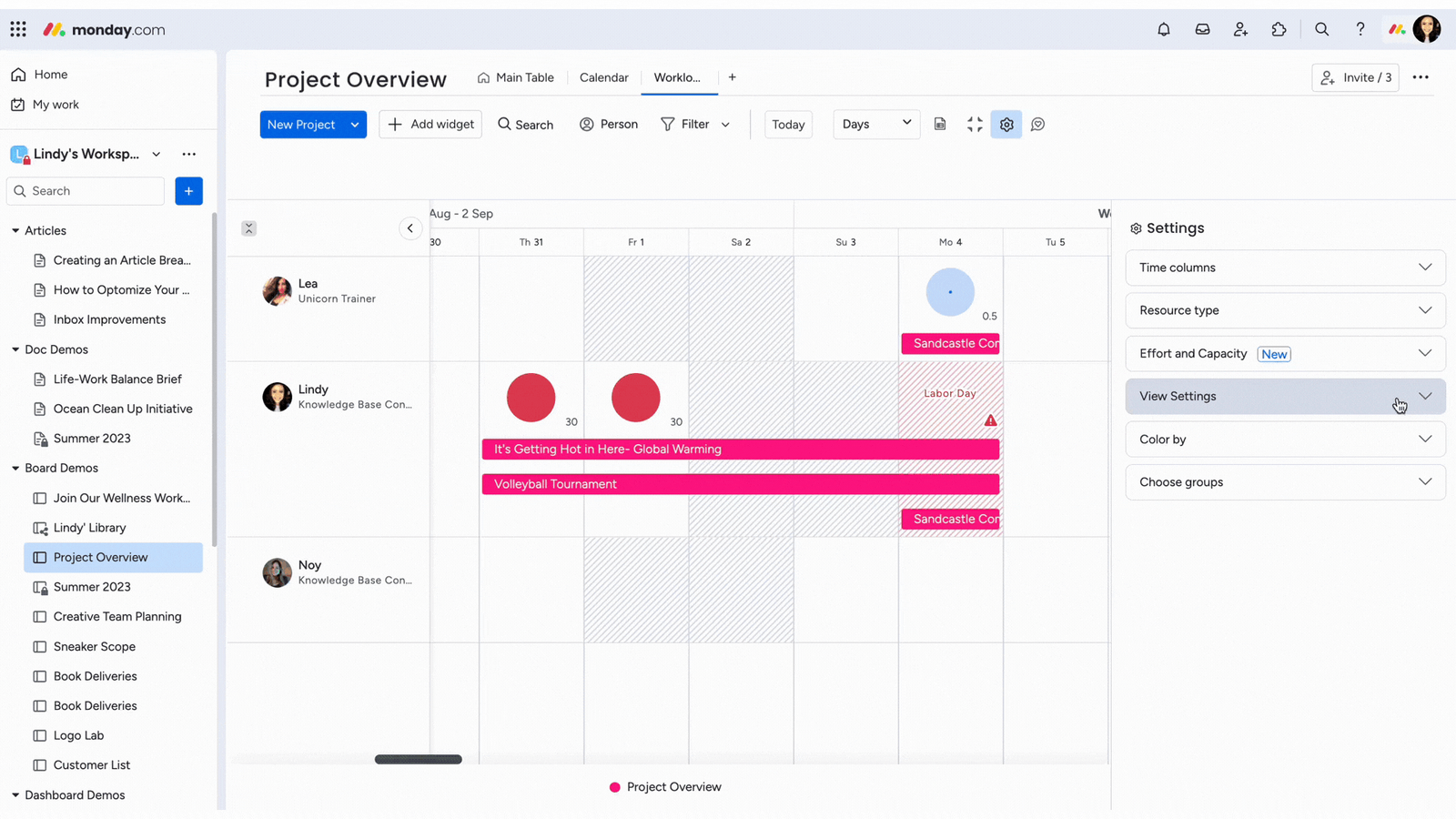
Its main advantage is approachable customization. Teams can model campaigns, pipelines, project stages, and recurring workflows without adopting a highly technical system.
The important caveat is licensing economics. Teams with many outside collaborators should evaluate guest, seat, and billing rules using their real headcount rather than relying only on the headline plan price.
monday.com is a strong fit for marketing, creative, real estate, and other teams that want visual workflows and moderate-to-deep customization. It becomes less attractive when outside participation creates a licensing structure that does not match the workflow.
Teamwork — Best for Client-Service Businesses
Teamwork stands apart because client economics are part of the product rather than an afterthought.
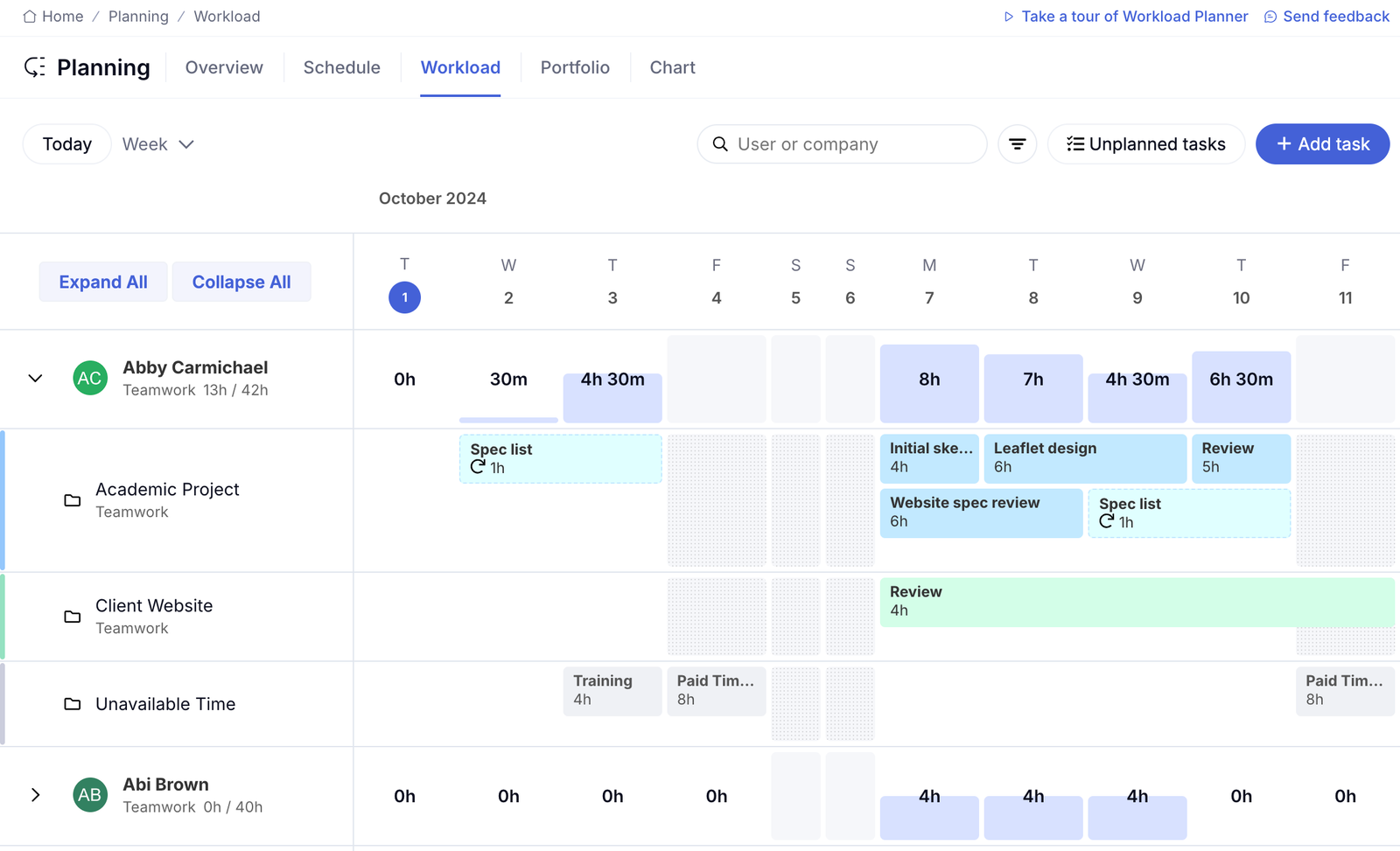
Its platform supports native time tracking, billable time, clients, capacity planning, retainers, invoicing, and profitability workflows. The current Free plan supports up to 5 users and 5 projects. Basics is listed at $9.99 per user per month when billed annually, while Accelerate is $24.99. See Teamwork pricing.
For agencies and consultants, that changes the buying decision. The software is not only tracking tasks; it can connect delivery activity with the commercial side of client work.
If a team needs to know whether a retainer is being consumed too quickly, whether a project is profitable, or how much time is billable, Teamwork addresses those questions more directly than a task-only platform.
For an internal-only team with no billable-client workflow, much of Teamwork’s differentiation simply does not enter the buying decision. In that case, a simpler general-purpose system may be easier to justify.
Wrike — Best for Marketing and Creative Operations
Wrike is a strong fit for teams whose project-management problem has become an operations problem.
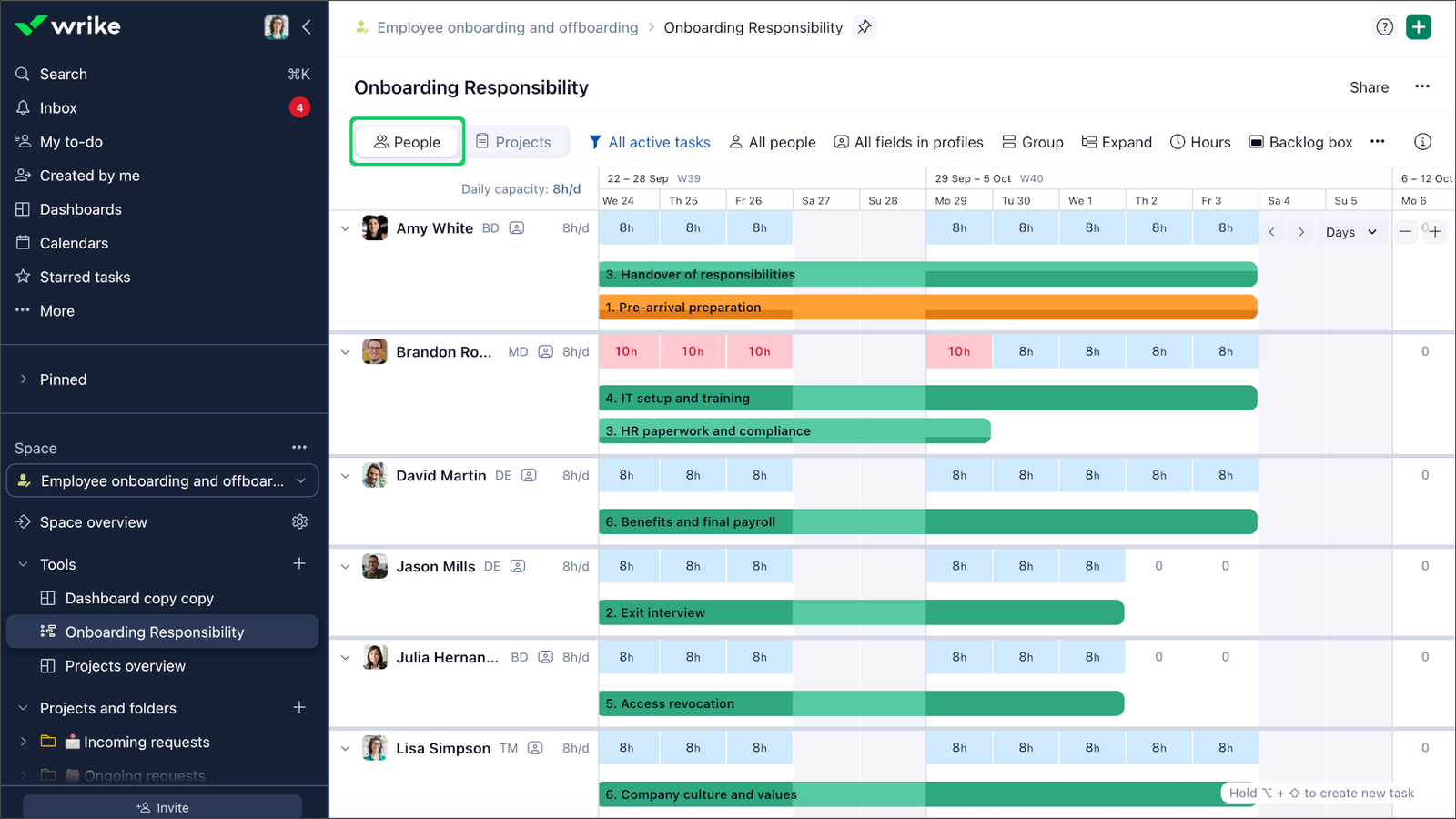
It combines Gantt planning, customizable workflows, dashboards, and reporting, with deeper resource and capacity capabilities at higher tiers. Wrike currently lists Business at $25 per user per month, while advanced resource and capacity planning, time-tracking capabilities, budgeting, and advanced BI/reporting sit in Pinnacle. See Wrike pricing.
That plan boundary matters. The version of Wrike that solves a serious resourcing or operational-governance problem is not necessarily the public mid-tier plan.
Wrike becomes more compelling as requests, reviewers, shared resources, and reporting requirements increase. A small team that mostly needs a shared task list may find that same operational depth unnecessary.
Smartsheet — Best for Complex Planning and Spreadsheet-Style Workflows
Smartsheet works especially well for organizations that already think in rows, columns, formulas, and structured planning.
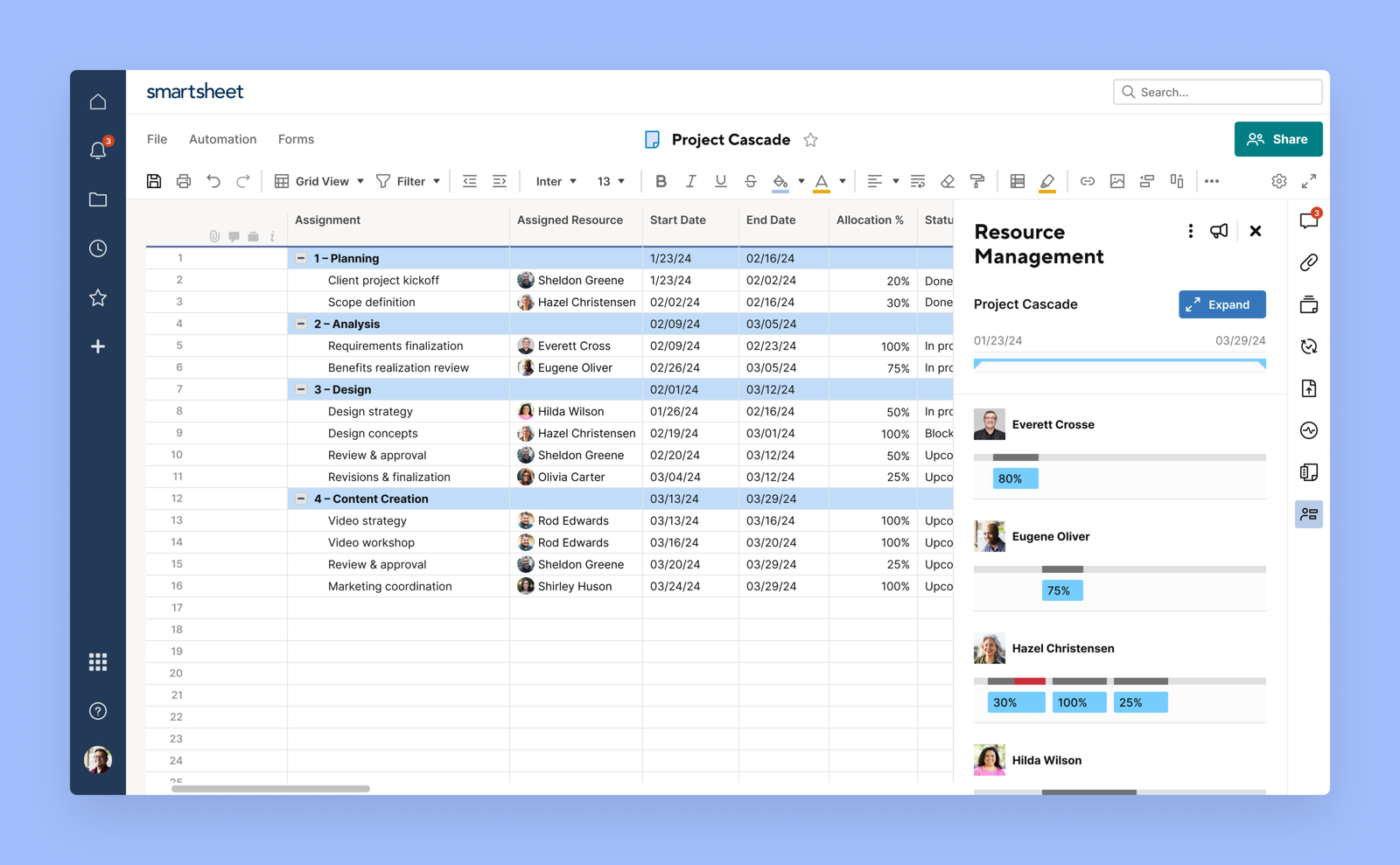
Its current plans include Table, Gantt, Board, and Calendar views plus automation. The Business tier adds Timeline, Workload tracking, unlimited free guests, and unlimited automations. Current pricing lists Pro at $9 per member per month when billed annually and Business at $19. See Smartsheet pricing.
That spreadsheet-style model can reduce initial adoption friction for teams coming from Excel or Google Sheets, but it does not automatically reduce long-term administration. Public feedback repeatedly points to the risk of sheet sprawl and increasingly complex governance as implementations grow.
Smartsheet is a strong fit when the team values structured planning and is willing to govern the system over time. Teams that mainly want a lightweight board or have no one to maintain the setup may be better served elsewhere.
Trello — Best for Simple Project Tracking
Trello’s advantage is not feature depth. It is low setup overhead.
The Free plan currently supports up to 10 collaborators per Workspace and up to 10 boards. Standard is listed at $5 per user per month when billed annually, while Premium adds additional views and more advanced Workspace controls. See Trello pricing.
Its board-based model presents less configuration overhead than the more customizable platforms in this comparison. That makes it useful for freelancers, small teams, and straightforward pipelines where people need to see what is next without managing a complex system.
Public feedback shows a recurring boundary: Trello works well while the work stays relatively simple, but becomes less attractive as dependency management, cross-project reporting, and portfolio complexity grow.
Choose Trello when simplicity is the goal. Do not choose it expecting the same system to become a deep portfolio-management environment later.
Jira — Best for Software and Technical Teams
Jira is built around software delivery and technical workflow control.
Its current Free plan supports up to 10 users. Standard is listed at $7.91 per user per month and Premium at $14.54, with Premium adding deeper cross-team planning, dependency management, and customizable approval processes. See Jira pricing.
For engineering and technical teams, backlog management, workflow states, issue tracking, and dependencies are central to the job. That is where Jira’s structure earns its complexity.
The same control is harder to justify when the job is simply assigning owners, due dates, and shared work across a nontechnical team. Public feedback repeatedly points to fields, statuses, and workflow controls feeling heavier than necessary outside technical environments.
Jira is strongest when the team genuinely needs technical workflow control rather than when it is simply looking for a powerful task manager.
Which Project Management Software Fits Your Team?
Best for Freelancers
Freelancers usually need to minimize administrative overhead before they add advanced structure.
Trello works well when a visual board is enough. ClickUp is more attractive when time tracking, customization, and room to grow matter enough to justify more setup. If the real problem is contracts, invoicing, client onboarding, or running a solo service business, dedicated freelancer platforms may fit better than either.
For a deeper comparison, see Best Project Management Software for Freelancers in 2026.
Best for Marketing Teams
Marketing teams often need recurring campaign workflows, cross-functional coordination, approvals, reporting, and visibility across several contributors.
Asana offers more structure, monday.com emphasizes visual customization, and Wrike becomes more attractive as approval and capacity-management demands grow. The deciding question is not which one has the longest feature list, but how much process and resource governance the team actually needs.
See 10 Best Marketing Project Management Software for 2026 for the deeper comparison.
Best for Creative Teams
Creative teams often care more about review cycles, proofing, workload visibility, and approvals than generic task management.
Wrike is a strong candidate when creative operations have real resourcing pressure. monday.com fits teams that want a visual, configurable process, while Asana suits teams that prefer a more structured campaign and approval model.
See Best Creative Project Management Software for 2026 for a dedicated comparison.
Best for Consultants
Consultants usually need project management to connect to client visibility, billable time, utilization, and profitability.
Teamwork is well aligned with that model because client and billable-work workflows are part of the platform. ClickUp is the more flexible general-purpose alternative when the team wants to configure its own system rather than adopt a more service-business-oriented model.
See Best Project Management Software for Consultants: 8 Tools Compared for Client Work for the deeper decision guide.
Best for Construction Teams
Construction teams often need more than general project tracking. Schedule control, dependencies, field coordination, document governance, and specialist systems can matter more than a general task interface.
Smartsheet can suit teams that plan in spreadsheet-style structures, while monday.com offers a more visual general-purpose alternative. But complex contractors may need construction-specific systems rather than either.
See Project Management Software for Construction for the full construction workflow analysis.
Best for Real Estate Teams
Real estate teams span very different workflows.
A brokerage, property operations team, or internal project group may only need a flexible pipeline-style system. Developers and capital-project teams often need much deeper budgeting, forecasting, portfolio reporting, and construction controls.
For lighter workflows, Trello, monday.com, or ClickUp may be enough. For development and capital-project needs, the software category changes significantly.
See Best Real Estate Project Management Software in 2026 for the specialized-vs-general breakdown.
How to Choose Project Management Software
Start With Workflow Complexity
Begin with the work you already have, not the feature list you might need one day.
If a team manages a few projects with simple statuses, a board-based system may be enough. If it manages dependencies, several projects sharing the same people, formal approvals, and reporting across workstreams, the decision moves toward more capable platforms.
Overbuying creates real cost because additional capability also creates setup and administration.
Decide Whether Client Access Matters
If clients or outside stakeholders need to participate, test access rules before choosing a product.
Guest access exists across several platforms in this guide, but guest limits, seat rules, permissions, and billing models differ. A workflow that looks inexpensive for 10 internal users can become far less attractive when 30 clients or contractors need access.
Check Time Tracking and Billable Work
If time is tied to revenue, native time tracking becomes a buying requirement rather than an optional extra.
Teamwork treats billable time as part of a broader client-service workflow. ClickUp and Asana also support time tracking on paid tiers, but the surrounding billing and profitability model differs.
If the team does not bill by time, paying for a deep time-and-utilization layer may add little value.
Evaluate Resource Planning Needs
Resource planning matters when the same people serve several projects and overload becomes a recurring problem.
Wrike, Smartsheet, and Asana become more compelling when workload and capacity visibility matter. ClickUp, monday.com, and Teamwork also provide resource-oriented capabilities at various tiers.
For a small team with simple work allocation, these features may be unnecessary.
Consider Approval and Proofing
Teams producing creative, client-facing, or regulated work should ask how review actually happens.
If approvals are currently scattered across email, comments, and chat, moving feedback into a structured workflow can reduce version confusion. If review is informal and rare, paying for deeper proofing may not change the outcome enough to justify a higher tier.
Compare Adoption Cost, Not Just Subscription Price
The subscription price is only one cost.
Setup time, training, workflow design, migration, and ongoing administration also matter. A flexible platform without an owner can create more operational cost than a more expensive system that matches the team’s process immediately.
Compare the plan that contains the capabilities you actually need, then add the cost of operating the system.
Simple vs Flexible vs Specialized Project Management Tools
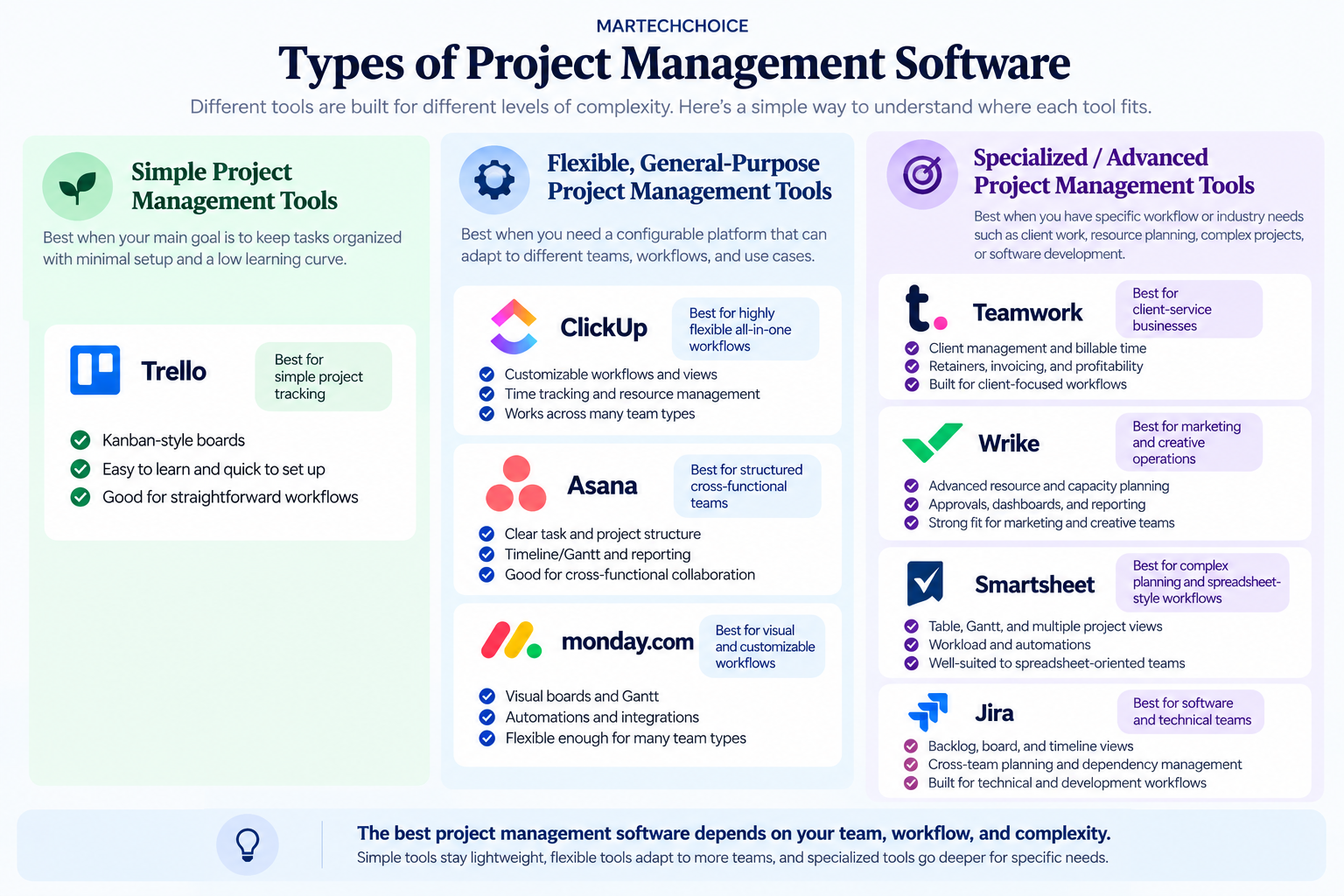
This is not a quality ranking. It is a way to narrow the category.
Simple: Trello. Best when a visual board solves the problem and the team values low setup overhead.
Flexible / general-purpose: ClickUp, Asana, monday.com. These cover many team types. ClickUp emphasizes configurability, Asana emphasizes structure, and monday.com emphasizes visual customization.
Specialized / advanced: Teamwork, Wrike, Smartsheet, Jira. Their strongest value appears when the workflow matches the specialization: billable client work, creative operations and resourcing, complex spreadsheet-style planning, or software delivery.
A specialized tool used outside its natural context can add overhead without adding much value.
Free vs Paid Project Management Software
Free plans can be enough for individuals and small teams with straightforward workflows.
ClickUp, Asana, monday.com, Teamwork, Trello, Jira, and Wrike currently offer free entry points of some kind, although their limits differ. Smartsheet currently relies on a trial rather than a permanent free plan. Confirm current limits on the vendor pricing pages before budgeting.
The features that most often push teams into paid or higher-tier plans are resource and workload planning, deeper reporting, portfolios, approvals and proofing, time tracking, additional automation capacity, and more flexible external access.
Upgrade when a specific operational problem appears. Paying for a longer feature list before the team has that problem usually creates cost without creating much additional value.
Common Mistakes When Choosing Project Management Software
Buying based on feature count. A longer list can mean more setup and more to maintain. Buy for the capabilities the team will actually use.
Ignoring onboarding complexity. A powerful platform has limited value if the team avoids it or uses only a small fraction of the system.
Ignoring client-access needs. External participation can change both workflow fit and real licensing cost.
Paying for resource planning that is not needed. Workload and capacity features often sit in higher plans. They are valuable only when resource contention is a real problem.
Choosing developer-first software for nontechnical teams. Jira is powerful because of its technical workflow controls. That same structure can be unnecessary overhead for ordinary business collaboration.
Choosing lightweight software for complex multi-project work. Trello is effective while the work stays simple, but it is not designed to become a deep portfolio-management platform.
Related Project Management Guides
For deeper comparisons by workflow and team type:
- Best Project Management Software for Freelancers in 2026
- 10 Best Marketing Project Management Software for 2026
- Best Creative Project Management Software for 2026
- Best Project Management Software for Consultants: 8 Tools Compared for Client Work
- Project Management Software for Construction
- Best Real Estate Project Management Software in 2026
- 10 Best ClickUp Alternatives for 2026: Which One Should You Switch To?
- Best Project Management Software for Remote Teams in 2026
- ClickUp vs Monday: Which Fits Your Team?
Frequently Asked Questions
What is the best project management software for small teams?
It depends on how much structure the team needs. Trello is the lightest option in this comparison, while Asana adds more process structure and ClickUp adds more configuration. Teamwork becomes more relevant when the team bills clients.
What is the easiest project management software to use?
Trello has the simplest model in this comparison because it is centered on boards and cards rather than deeper configuration. Ease changes as workflow complexity grows, though, because a tool that is simple at the start can become limiting when the team needs dependencies, reporting, or cross-project management.
Is ClickUp better than Asana?
Neither is better in every context. ClickUp offers more configuration freedom and a broader all-in-one model. Asana is more structured and can be easier to standardize across cross-functional teams. Choose based on whether the team values flexibility or a more opinionated workflow model, then compare the plan that contains the capabilities you need.
Is project management software worth paying for?
Often not immediately. A free plan may be enough until the team hits a specific constraint such as workload planning, reporting, approvals, automation limits, or billable-time requirements. Paying becomes easier to justify when it removes a problem the team can clearly name.
What should I look for in project management software?
Start with workflow complexity, then evaluate client access, time tracking, resource planning, approvals, reporting, and total value. The best product is the one that matches the way the team operates without forcing unnecessary complexity.
Conclusion
Start from the workflow rather than from a ranking.
If your needs are simple, a board-based tool such as Trello may be enough.
If you need a flexible general-purpose platform, compare ClickUp, Asana, and monday.com based on how much customization, structure, and visual workflow control your team wants.
If your work has a specialized operating model, match the software to that context: Teamwork for billable client work, Wrike for resource-heavy marketing and creative operations, Smartsheet for complex spreadsheet-style planning, and Jira for software delivery.
The best project management software is not the platform with the most features. It is the one whose complexity matches the complexity of the work.