Disclosure: Some links in this article may be affiliate links. We may earn a commission if you purchase through them, at no additional cost to you.
Creative work rarely breaks down because someone forgot to create a task. The bigger problems usually happen between the brief and final approval: feedback arrives in different places, priorities change halfway through production, clients review the wrong version, or managers discover too late that the team is overloaded.
That is why creative teams often need more than a conventional project-management tool. The right platform should help organize requests, production, feedback, approvals, workloads, and client communication without adding another layer of process that the team has to maintain.
We compared seven platforms that approach this problem in different ways. Some are broad work-management systems, some are better suited to agencies or enterprise teams, and one—Filestage—is much more focused on review and approval. The best choice therefore depends less on which product has the longest feature list and more on where your current creative workflow is actually breaking down.
Quick Picks
Best Overall: Wrike
Choose Wrike if you want project management, proofing, approvals, and resource planning in the same system—and your team is comfortable with a more structured platform.
Best for Flexible Creative Workflows: monday.com
A better fit when your team wants to design its own workflows rather than adapt to a predefined project structure.
Best for Marketing & Campaign Teams: Asana
Strong for teams coordinating campaigns across marketing, design, content, and other departments.
Best for Creative Agencies & Client Work: Teamwork.com
Particularly useful when client projects, billable time, budgets, and profitability matter alongside task management.
Best for Highly Customizable Workflows: ClickUp
Best for teams willing to spend more time configuring the system in exchange for deeper control over how work is organized.
Best for Enterprise Creative Operations: Adobe Workfront
Designed for larger organizations that need formal resource planning, governance, and coordination across multiple departments.
Best for Creative Review & Approval: Filestage
The specialist option when feedback and approval are the main bottleneck and you already have another system for project management.
Creative Project Management Software Comparison
| Software | Best For | Proofing & Approval | Resource Management | Client Collaboration |
|---|---|---|---|---|
| Wrike | Best overall | Strong | Strong | Good |
| monday.com | Flexible workflows | Moderate | Workload on Pro; advanced on Enterprise | Good |
| Asana | Marketing & campaigns | Strong on Advanced | Workload available | Good |
| Teamwork.com | Agencies & client work | Built-in proofing | Strong | Excellent |
| ClickUp | Custom workflows | Strong | Good | Good |
| Adobe Workfront | Enterprise operations | Strong | Advanced | Strong |
| Filestage | Review & approval | Excellent | Limited vs. full PM tools | Excellent |
These products are not identical. Wrike, monday.com, Asana, Teamwork.com, ClickUp, and Adobe Workfront are broad project or work management platforms. Filestage is more specialized around creative review and approval, so it is most relevant when feedback workflows are the primary problem rather than end-to-end project management.
How We Evaluated Creative Project Management Software
We focused on how each platform fits a real creative workflow rather than ranking products by the number of features they advertise.
This guide is based on research into current product documentation, pricing information, feature availability, and the way each platform approaches creative work. Where a capability depends on a particular plan, we try to make that distinction clear. We do not present researched product information as hands-on testing when we have not personally tested that feature.
We compared the products across seven areas:
Creative briefs and intake: How easily a team can collect requests, requirements, deadlines, and supporting information before production begins.
Proofing and approvals: Whether reviewers can leave precise feedback and formally approve work without pushing the process back into email or chat.
Workflow flexibility: How easily the platform can adapt to design production, content workflows, campaign delivery, video review, or agency work.
Client and stakeholder collaboration: Whether external reviewers can participate without gaining unnecessary access to internal projects.
Resource and workload management: How well managers can see capacity, balance workloads, and identify bottlenecks before they affect delivery.
Integrations: How well the platform connects with the communication, storage, design, and marketing tools already used by the team.
Pricing and usability: Whether the features that matter to creative teams are available at a sensible plan level, and whether the complexity of the software matches the team using it.
1. Wrike — Best Overall for Creative Project Management
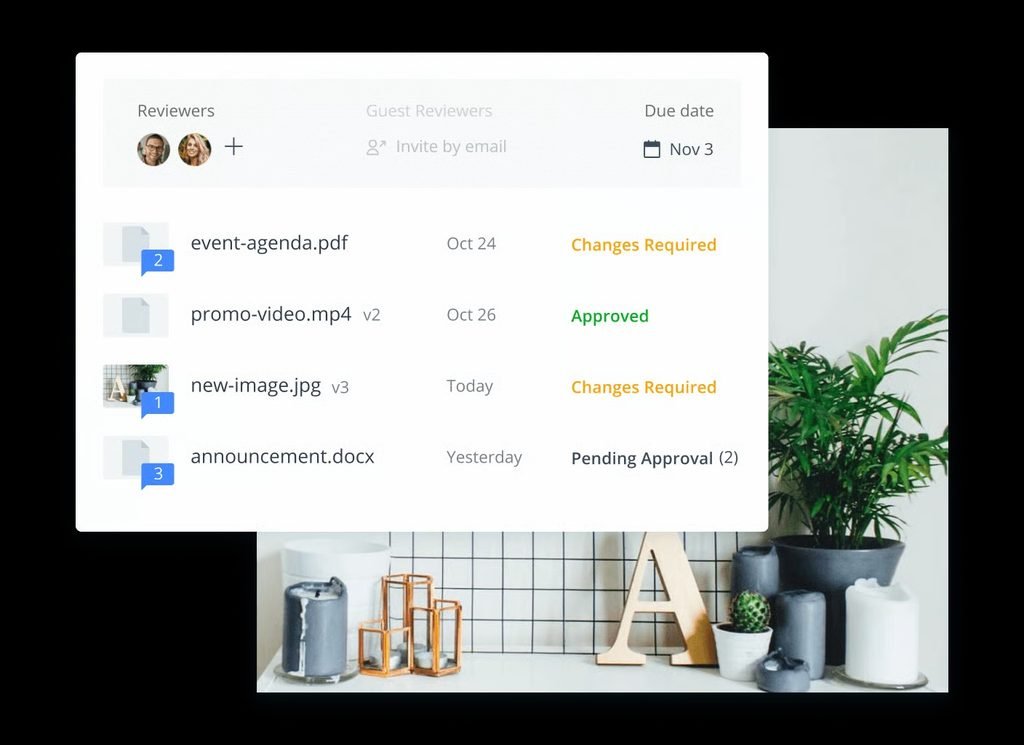
Wrike is the strongest all-round option in this list for teams that need more than task tracking. Its biggest advantage is how closely project planning, proofing, approvals, reporting, and workload management can sit inside the same system.
That makes the most sense when a creative team is juggling multiple projects, reviewers, and deadlines at once. If your main problems are approval bottlenecks, resource conflicts, or keeping complex work visible across teams, Wrike has a clear advantage. For a very small team with a simple workflow, however, the extra structure can feel heavier than necessary.
Wrike currently lists its Business plan at $25 per user/month when billed annually. Higher Pinnacle and Apex tiers add more advanced capabilities, including resource and capacity planning, budgeting, and expanded reporting.
Pros
- Strong balance of project management and creative workflow features
- Suitable for complex multi-project environments
- Advanced resource and capacity planning available
- Good fit for teams that need more structure than a basic task manager
Cons
- More complex than lightweight project management tools
- Some advanced functionality requires higher plans
- May be excessive for very small creative teams
Best for: Creative teams that want one structured platform for projects, approvals, workloads, and reporting.
2. monday.com — Best for Flexible Creative Workflows
monday.com is a better fit for teams that want to shape the software around their own process instead of adopting a more rigid project structure.
Its visual boards, custom fields, views, automations, and templates make it easy to build workflows for design requests, content production, campaign planning, and client work. That flexibility is the main reason to choose it. The trade-off is that teams often need to spend more time deciding how the workspace should be organized before the system really feels efficient.
Current work-management pricing starts with a free plan for up to two seats. Annual pricing is listed at $9 per seat/month for Basic, $12 for Standard, and $19 for Pro. Standard adds guest access, integrations, automations, Timeline and Gantt views, while Pro adds features such as time tracking. More advanced resource-management capabilities are concentrated in higher tiers.
Pros
- Highly customizable visual workflows
- Strong range of templates and project views
- Useful automation and integration options
- Easy to adapt to different creative processes
Cons
- Important functionality is spread across pricing tiers
- Heavy customization creates additional setup work
- Less specialized around creative proofing than dedicated review platforms
Best for: Creative teams that value flexibility and want to design project workflows around the way they already work.
3. Asana — Best for Marketing & Campaign Teams
Asana is particularly strong when creative work is part of a larger marketing or cross-functional campaign rather than a standalone production process.
It works well when design, content, marketing, product, and other teams need to coordinate requests, deadlines, dependencies, approvals, and launch milestones in the same plan. Compared with more configurable tools, Asana usually requires less workspace design, which can make it easier for non-technical teams to adopt.
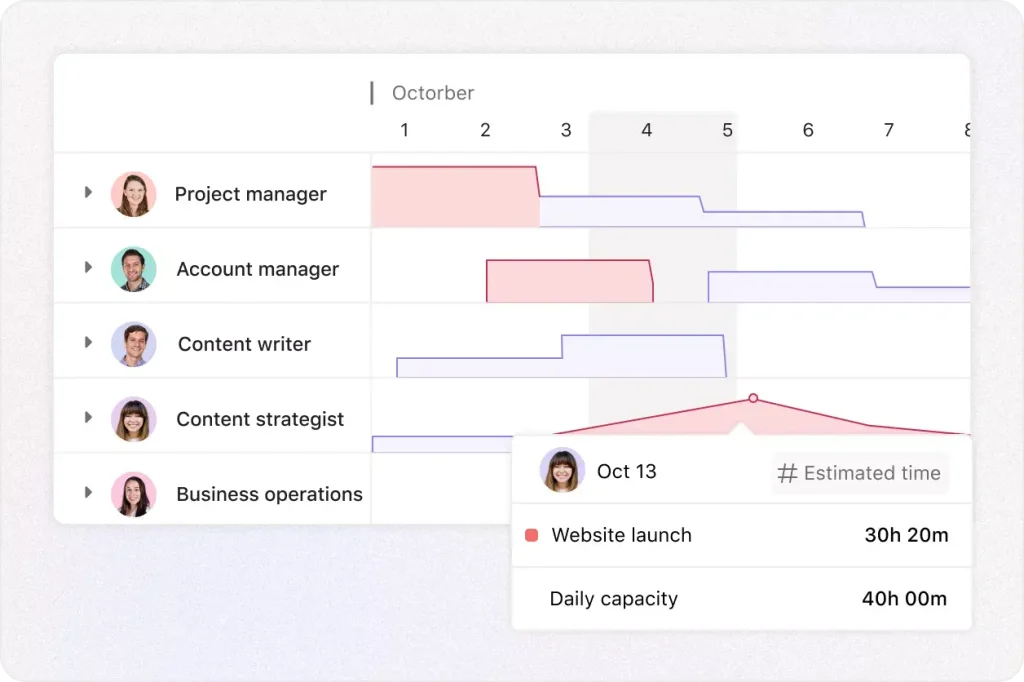
The limitation is that several features that matter most to creative teams sit on the Advanced plan. Asana currently lists Advanced at $24.99 per user/month when billed annually, including Workload, Approvals and Proofing, time tracking, portfolios, and additional forms and reporting capabilities.
Pros
- Strong for campaign and cross-functional coordination
- Good forms and automation capabilities
- Advanced plan includes approvals, proofing, and workload
- Relatively straightforward for non-technical teams
Cons
- Important creative-management features require Advanced
- Not a dedicated creative asset-management platform
- Costs increase quickly for larger teams
Best for: Marketing and creative teams managing campaigns, launches, dependencies, and approvals across departments.
4. Teamwork.com — Best for Creative Agencies & Client Work
Teamwork.com is the clearest fit in this list for agencies and other client-service businesses.
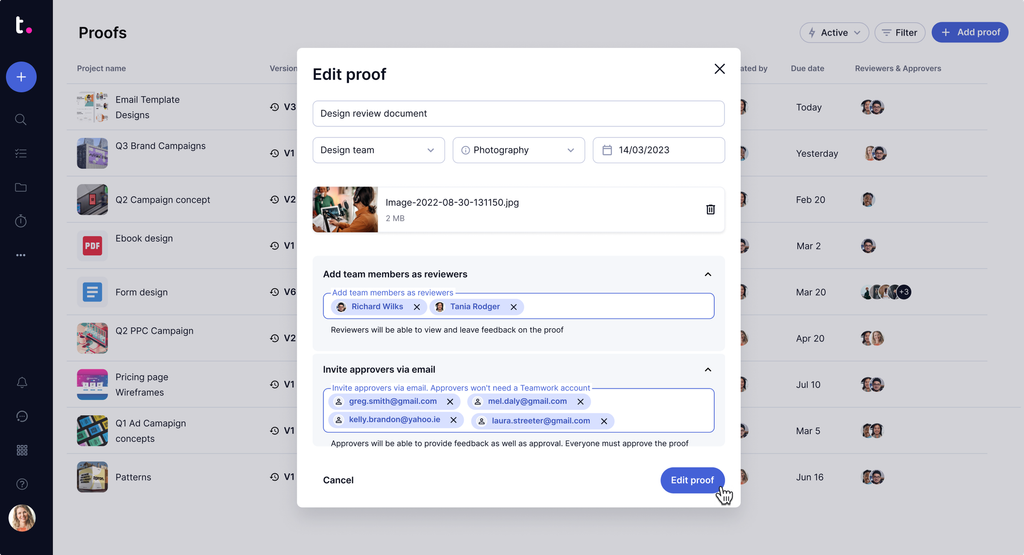
Its advantage is not simply project management. It connects delivery with the commercial side of client work, including time tracking, budgets, workload planning, client collaboration, and profitability. That makes it more useful when a creative team is responsible not only for finishing projects, but also for keeping client work financially sustainable.
The trade-off is focus. Internal creative departments that do not bill clients or track project profitability may not get as much value from that agency-oriented structure.
Current annual pricing lists a free plan, Basics at $9.99 per user/month, and Accelerate at $24.99 per user/month, with higher plans using custom pricing.
Pros
- Strong fit for client-service businesses
- Built-in time and financial-management capabilities
- Good client collaboration features
- Designed around agency-style project delivery
Cons
- More agency-focused than some general-purpose alternatives
- Advanced profitability and forecasting features require higher plans
- May be unnecessary for small internal creative departments
Best for: Creative agencies that want client projects, time, budgets, capacity, and profitability connected in one system.
5. ClickUp — Best for Highly Customizable Creative Workflows
ClickUp is best suited to teams that want a high degree of control over how work is organized.
Custom fields, forms, dashboards, dependencies, automations, multiple views, and detailed task settings make it possible to build very specific creative-production workflows. ClickUp also supports proofing and annotations on visual files, which gives it more creative-workflow relevance than a basic task manager.
That flexibility comes with a cost: the more a team customizes the workspace, the more discipline is required to keep the system understandable. For teams that enjoy building their own operating system, that can be a strength. For teams that want something immediately simple, it can become friction.
ClickUp is therefore most attractive when customization is a priority rather than something the team wants to avoid.
Pros
- Extensive customization options
- Wide range of views and workflow controls
- Supports creative proofing workflows
- Good fit for teams trying to consolidate several work-management functions
Cons
- Large number of features can feel overwhelming
- Requires more configuration than simpler tools
- Over-customization can make team processes harder to maintain
Best for: Creative teams that want extensive workflow customization and are comfortable spending more time configuring their workspace.
6. Adobe Workfront — Best for Enterprise Creative Operations
Adobe Workfront is aimed at a very different buyer from most of the tools in this guide.
It is designed for larger organizations coordinating work across departments, resource pools, approval layers, and formal governance structures. Its strengths become more relevant when creative operations involve capacity planning, financial management, enterprise permissions, and complex cross-team workflows.
Workfront also makes particular sense for organizations already deeply invested in Adobe’s broader creative ecosystem. For a small or midsize creative team, however, the platform is usually far more complex than necessary.
Pricing is quote-based rather than presented as a simple public per-user subscription.
Pros
- Strong resource and operational management
- Designed for complex enterprise workflows
- Good fit for Adobe-centric organizations
- Advanced governance and planning capabilities
Cons
- Considerably more complex than lightweight PM platforms
- No simple public pricing
- Too heavy for many small or midsize creative teams
Best for: Enterprise creative departments that need structured resource planning, governance, and coordination across large organizations.
7. Filestage — Best for Creative Review & Approval
Filestage is the specialist option in this comparison.
Unlike the broader project-management platforms above, it is focused primarily on creative review and approval. Its value is most obvious when the project itself is being managed reasonably well, but feedback is still scattered across email, chat, PDFs, shared links, and multiple file versions.
Filestage brings reviewers, comments, versions, review stages, and approvals into a more structured process. That narrower scope is both its strength and its limitation: it can solve a painful approval problem very well, but it is not intended to replace a full project-management system.
For teams already using another PM platform, Filestage is best viewed as a specialized review layer rather than an all-in-one work-management replacement.
Pros
- Highly focused on review and approval
- Useful for structured stakeholder feedback
- Good fit for teams working with many external reviewers
- Easier to understand than a broad enterprise PM platform when approval is the main problem
Cons
- Not a full replacement for project-management software
- Limited resource-management capabilities compared with Wrike or Workfront
- May become an additional subscription alongside an existing PM system
Best for: Teams whose primary bottleneck is creative asset feedback and approval rather than project planning itself.
How to Choose Creative Project Management Software
The best tool depends on where your workflow is actually slowing down.
If requests are chaotic, prioritize forms, intake workflows, templates, and clear ownership. This matters most for teams receiving work from several departments or clients.
If feedback is the bottleneck, focus on proofing, annotations, version control, and formal approvals. A platform with excellent task management will not solve a review process that still happens in email and chat.
If workload is the problem, look beyond basic task counts. Teams managing many simultaneous projects may need capacity planning, workload views, and resource forecasting.
If you work with clients, pay closer attention to guest access, permissions, time tracking, budgets, and profitability. These features matter far more to an agency than to a small internal design team.
If your team already has a mature tool stack, integrations can matter more than adding another feature-rich platform. Connections with Adobe tools, Figma, Slack, Google Drive, and other existing systems can reduce manual handoffs.
Before committing, shortlist two or three products and run the same real project through each one. That usually reveals more than comparing feature lists alone.
Creative Project Management Software vs. Digital Asset Management
Creative project management software and digital asset management software solve related but different problems.
Project management software manages the work around an asset: briefs, tasks, owners, deadlines, feedback, approvals, workloads, and delivery.
Digital asset management software (DAM) manages the asset itself: storage, metadata, search, permissions, brand control, and distribution.
A small creative team may be able to use project-management software with basic file management. Larger organizations managing thousands of brand assets may need both a PM platform and a dedicated DAM.
Frequently Asked Questions
What is the best project management software for creative teams?
Wrike is our overall pick because it combines project management, proofing, approvals, and resource planning in one system. That said, the best choice depends on the workflow problem you are trying to solve. Agencies may prefer Teamwork.com, while larger enterprise teams may be better suited to Adobe Workfront.
Is monday.com or Asana better for creative teams?
monday.com is generally the better fit for teams that want highly customizable visual workflows. Asana is stronger for campaign-oriented teams that need to coordinate dependencies, requests, approvals, and cross-functional work with less setup.
Do creative teams need built-in proofing?
Not always. But if your team reviews images, PDFs, video, or other creative assets frequently, built-in proofing can reduce scattered feedback, version confusion, and approval delays.
Can creative project management software replace a DAM?
Usually not for organizations managing large asset libraries. Project-management software manages the work around an asset, while a DAM is designed to store, organize, control, and distribute the asset itself.
What should creative agencies prioritize?
Client access, time tracking, budgeting, workload planning, proofing, and profitability deserve more attention than they would for a typical internal team. For agencies, project management and commercial performance are closely connected.
Final Recommendation
There is no single best platform for every creative team.
Choose Wrike if you want the strongest overall balance of structured project management, approvals, proofing, and resource planning.
Choose monday.com if flexibility matters most and your team is comfortable building its own workflows.
Choose Asana for campaign-heavy marketing teams, Teamwork.com for agencies and client work, ClickUp for deep customization, Adobe Workfront for enterprise creative operations, and Filestage when review and approval is the main bottleneck.
The most useful way to choose is to start with your biggest workflow problem, shortlist two or three tools that address it, and test the same real project in each before making a final decision.