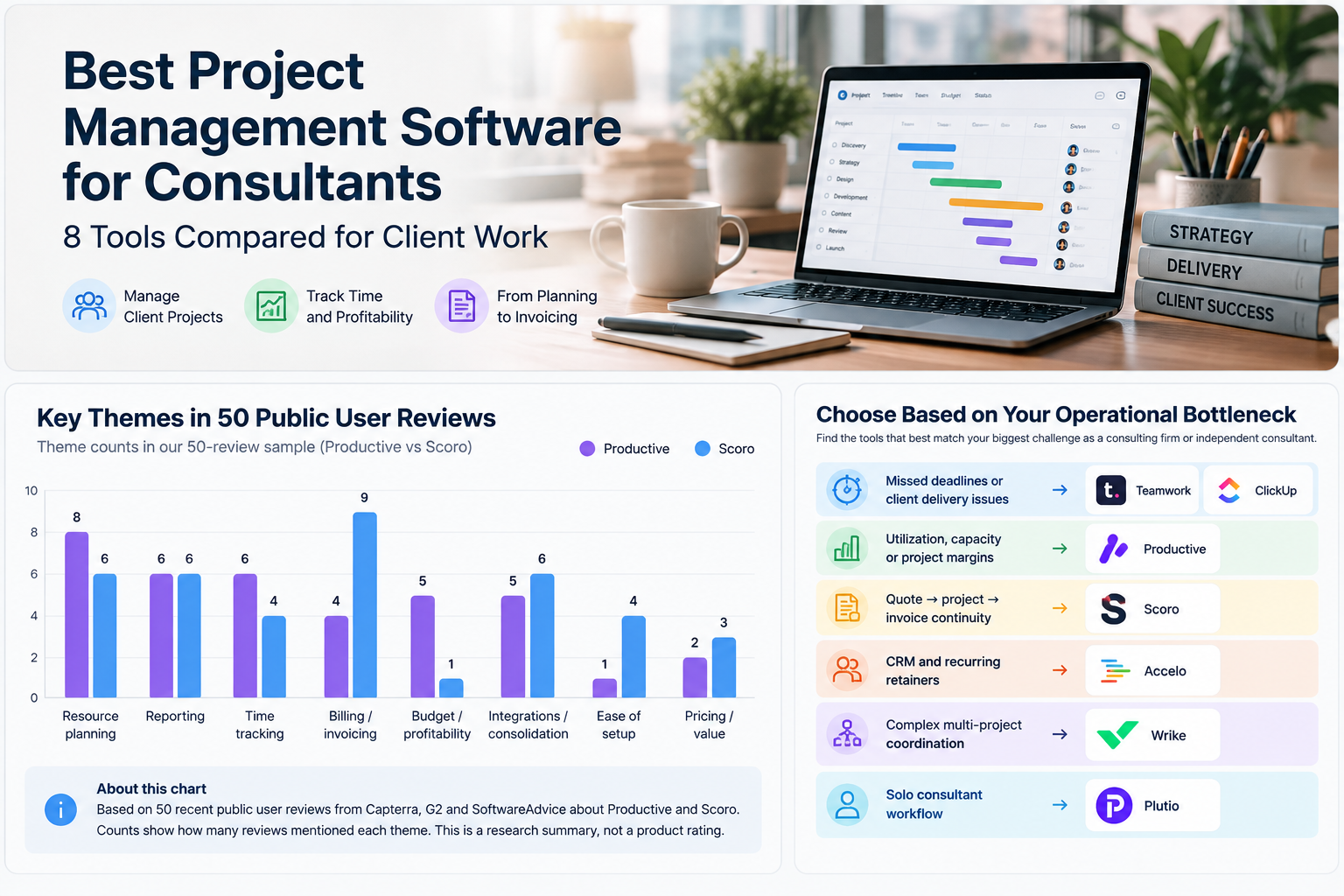
For a consulting business, “project management software” is really shorthand for something bigger: the system that holds client work, staff time, budgets, and invoicing together. A tool that’s great at task lists can still leave a consultancy blind on utilization, margin, or where a retainer stands.
The useful question is not which app has the longest feature list. It’s how much of client delivery, billable time, resource planning, and profitability you want living in one system — versus how much you’re willing to stitch together with a CRM, a spreadsheet, and an invoicing tool on the side.
Two products were selected for deeper analysis in this guide: Productive and Scoro. Both are built around consulting and agency-style operations rather than general task tracking, so this guide gives them deeper treatment, including recurring patterns from a structured sample of 50 publicly available user reviews (25 for each product). The remaining six tools are covered more briefly around the workflow each one fits best.
Quick Recommendations by Consulting Workflow
| Workflow priority | Recommended tool |
|---|---|
| Delivery operations, staffing, and profitability in one place | Productive |
| Quote-to-cash: pipeline, quoting, delivery, and invoicing in one continuous flow | Scoro |
| Client-facing delivery teams that need collaboration and billable time | Teamwork |
| CRM + projects + retainers + invoicing in a PSA-style stack | Accelo |
| Flexible project management without committing to a full PSA platform | ClickUp |
| Larger or more complex multi-project consulting teams | Wrike |
| Solo consultants who want proposals, projects, and invoicing together | Plutio |
| Budget-conscious teams that mainly need core project tracking | Zoho Projects |
None of these is a universal winner. A small strategy boutique and a multi-practice consultancy can be solving very different operational problems even if both call the category “project management.”
What Consultants Should Look for Before Choosing
A consultancy evaluates project software differently from an internal product team. Consultancies have a different set of pressures, because the software also has to represent the business to the client. That changes the evaluation criteria.
For a broader view of available platforms, see our project management software comparison before narrowing your shortlist to consultant-specific requirements.
Multi-client visibility
Can you see workload, deadlines, and status across every active client at once — not just inside one project at a time? This matters more as headcount and client count grow past what one person can track in their head.
Billable time and utilization
Is time tracking built for billing, not just for logging hours? That means separating billable from non-billable time, tying time to specific engagements or retainers, and rolling it up into utilization by person or team.
Resource and capacity planning
Can you see who’s overbooked and who has room before you commit to a new project, or does that live in a separate spreadsheet?
Budgets and project margins
Does the system connect time and cost data to a budget so you can see margin as work happens, or only after the fact when someone reconciles it manually?
Quotes, retainers, and invoicing
Does the commercial side — quoting, retainers, invoicing — live in the same system as delivery, or does it require exporting data into a separate finance tool?
Client access and communication
Can clients see relevant project status, approve deliverables, or view invoices without you assembling a status update by hand?
Reporting
Can you generate client-ready and internal reports (utilization, profitability, project health) without manual spreadsheet work — and how much configuration does that take?
Integration depth
Does the tool connect to the accounting, calendar, and communication tools your firm already runs on, or does it expect you to move everything into its ecosystem? Integration depth varies meaningfully by product and plan, so this should be checked against the specific tools a consultancy already uses.
Setup and operational overhead
Some of these platforms are close to plug-and-play; others require real configuration time before they reflect how your firm actually works. That overhead is worth weighing against the depth you get in return.
Comparison Table
The table below is meant to show workflow fit rather than every feature each vendor sells. Current plan structure and feature availability were checked against vendor materials.
| Tool | Best for | Time tracking | Resource planning | Billing / invoicing | Profitability / budget visibility | Client-facing workflow | Setup complexity |
|---|---|---|---|---|---|---|---|
| Productive | Delivery operations + profitability | Built in | Built in | Invoicing is built in; recurring budgets require Professional or Ultimate | Strong focus on budgets, cost, and profitability | Supports client-facing time and service workflows | Moderate–high |
| Scoro | Quote-to-cash consulting workflow | Built in | Built in | Core strength through Time-billing and Quote to Cash combinations | Margin and commercial reporting are core parts of the platform | CRM, pipeline, quoting, and delivery connect in one workflow | Moderate–high |
| Teamwork | Client-service delivery | Billable time tracking in Basics | Workload/capacity planning from Accelerate | Client invoices from logged time from Accelerate; deeper financial controls in Optimize | Financial budgets and profitability insights in Optimize | Client Users do not count as paid seats and can join up to five active projects | Low–moderate |
| Accelo | PSA-style CRM + projects + retainers | Built around billable services | Capacity forecasting is part of the platform | Supports projects, retainers, and invoicing | Profitability and margin reporting are part of the professional-services model | CRM-led client workflow | Moderate–high |
| ClickUp | Flexible PM without a full PSA stack | 100 basic time-tracking uses on Free Forever; unlimited basic tracking from Unlimited | Resource management from Unlimited; broader workload management in Business | Not a core quote-to-cash focus | Not a core profitability focus | Flexible permissions and guest collaboration | Low |
| Wrike | Larger, more complex consulting teams | Time tracking from Business; advanced controls on Pinnacle | Advanced resource and capacity planning on Pinnacle | Not positioned as a native quote-to-cash platform | Budgeting, bill/cost rates, and billable hours on Pinnacle | Stronger for coordination, approvals, and enterprise workflows | Moderate–high |
| Plutio | Solo consultants and very small practices | Included on all plans | Lightweight rather than team-capacity oriented | Proposals, contracts, invoices, and payments are core | Basic compared with PSA-style tools | Client portal is included across plans | Low |
| Zoho Projects | Budget-conscious core PM | Time logs/timesheets from Premium | Workload reporting is plan-dependent | Billing is typically handled through Zoho Books, Invoice, or Billing integrations | Project budgets are available from Premium | Client Users are available as paid add-ons on paid plans | Low |
Productive — Best for Delivery Operations and Profitability
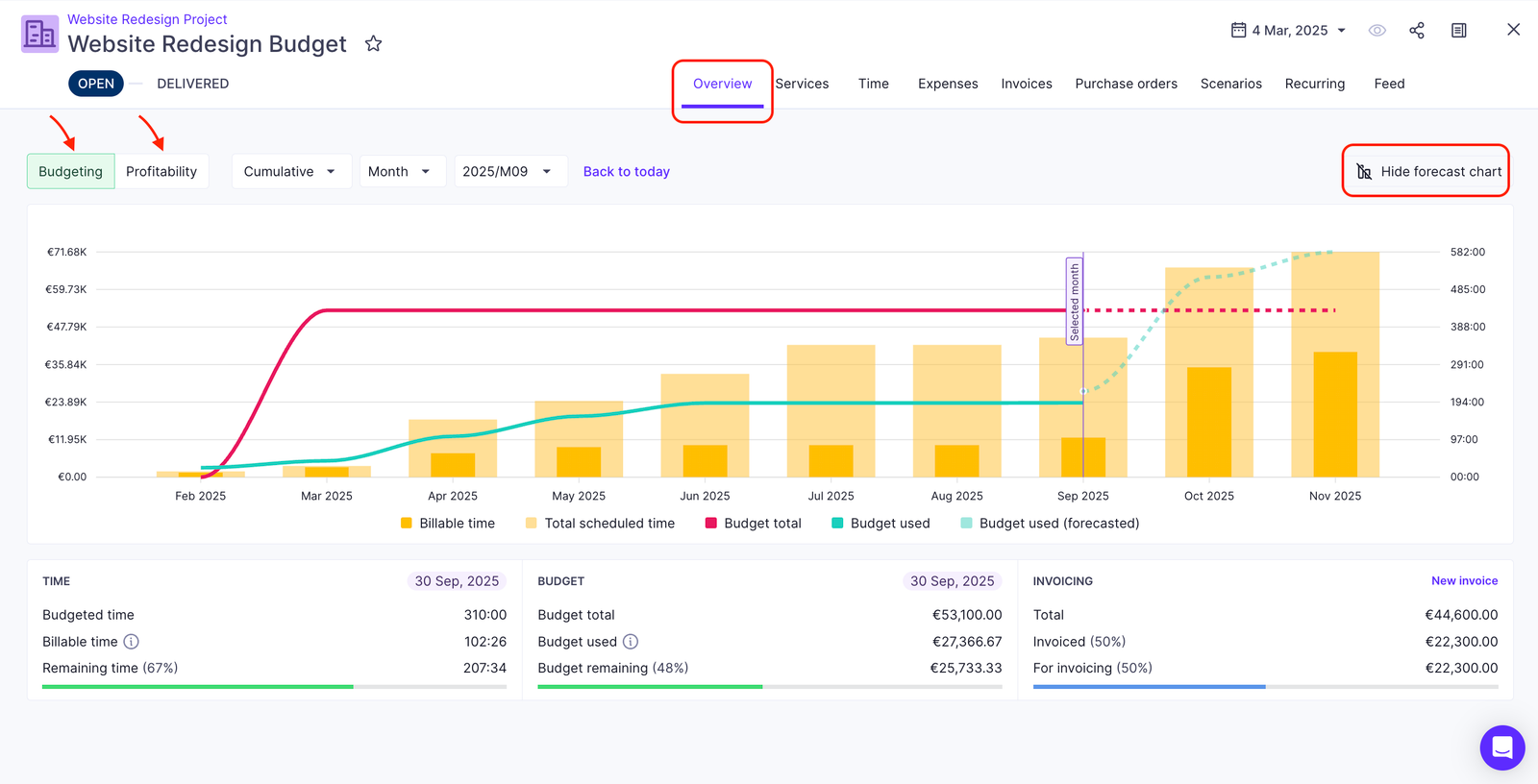
Productive starts to make sense when a consultancy is maintaining one view for projects, another for capacity, another for timesheets, and a spreadsheet to work out whether the client is still profitable. Its appeal is not that it adds another task board. It is that delivery, staffing, time, budgets, and profitability can be managed from the same operating layer.
That makes it especially relevant to firms that have already outgrown lightweight project management but do not want finance and resource planning to live in separate systems.
What the review sample revealed
We analyzed 25 publicly available Productive review records, 22 of them tagged as highly relevant to consultants or professional-services teams. This is a curated public-review sample, not a survey, and it should be read as directional evidence rather than a measure of overall user satisfaction.
Resource planning was the strongest recurring theme. Reviewers in operations and delivery roles repeatedly described using Productive to connect staffing decisions with active project work. Capacity forecasting and resourcing were often discussed alongside budgets or profitability rather than as isolated scheduling features.
Time tracking and reporting were tied among the next most frequent themes. Several reviewers described straightforward day-to-day time entry and client-facing timesheet workflows, while others used reporting to connect project activity with financial or resourcing decisions.
Budget and profitability visibility were another recurring strength. Multiple agency and consulting users described value in seeing project cost, budget, and margin signals without rebuilding them manually at month-end.
Where Productive works especially well
The strongest fit is a consultancy that wants delivery managers to see more than tasks and deadlines. If staffing, utilization, logged time, budgets, and project margin all affect day-to-day decisions, Productive’s broader operating model is more relevant than a conventional PM tool.
The same is true for firms replacing several smaller tools. Consolidation appeared repeatedly in the sample, particularly where teams wanted project management, time, budgeting, and operational reporting in one environment.
Where users reported friction
The breadth that creates the value also creates the main trade-offs.
Some reviewers described onboarding or setup effort before the system matched their workflow. Reporting was not uniformly praised: some users found it actionable, while others called parts of the reporting experience clunky or said certain views required workarounds. A smaller number mentioned bugs, integration gaps, or cost increasing as seats and features expanded.
When Productive is the stronger fit
Productive is the more natural choice when the main operational question is:
“Are we staffing and delivering client work profitably?”
A consultancy that only needs tasks, deadlines, and basic collaboration may not need this much operational depth. A firm that actively manages utilization, resourcing, budgets, and project margin is much more likely to benefit from it.
Scoro — Best for Quote-to-Cash Consulting Workflow
Scoro becomes more interesting when project management starts before the project itself. A lead can move into a quote, the quote into delivery, logged time into billing, and the same commercial record can continue into reporting.
That matters most to consultancies where quoting, pipeline, fixed-fee work, and invoicing are part of the same operational problem as project delivery. In that environment, a conventional PM tool can solve only the middle of the process.
Scoro currently starts at $17 per user per month on its US pricing view and requires a minimum of five users. Its modular structure lets firms combine capabilities such as Time-billing, Projects & Resources, and Quote to Cash depending on the workflow they need.
From quote to delivery to invoice
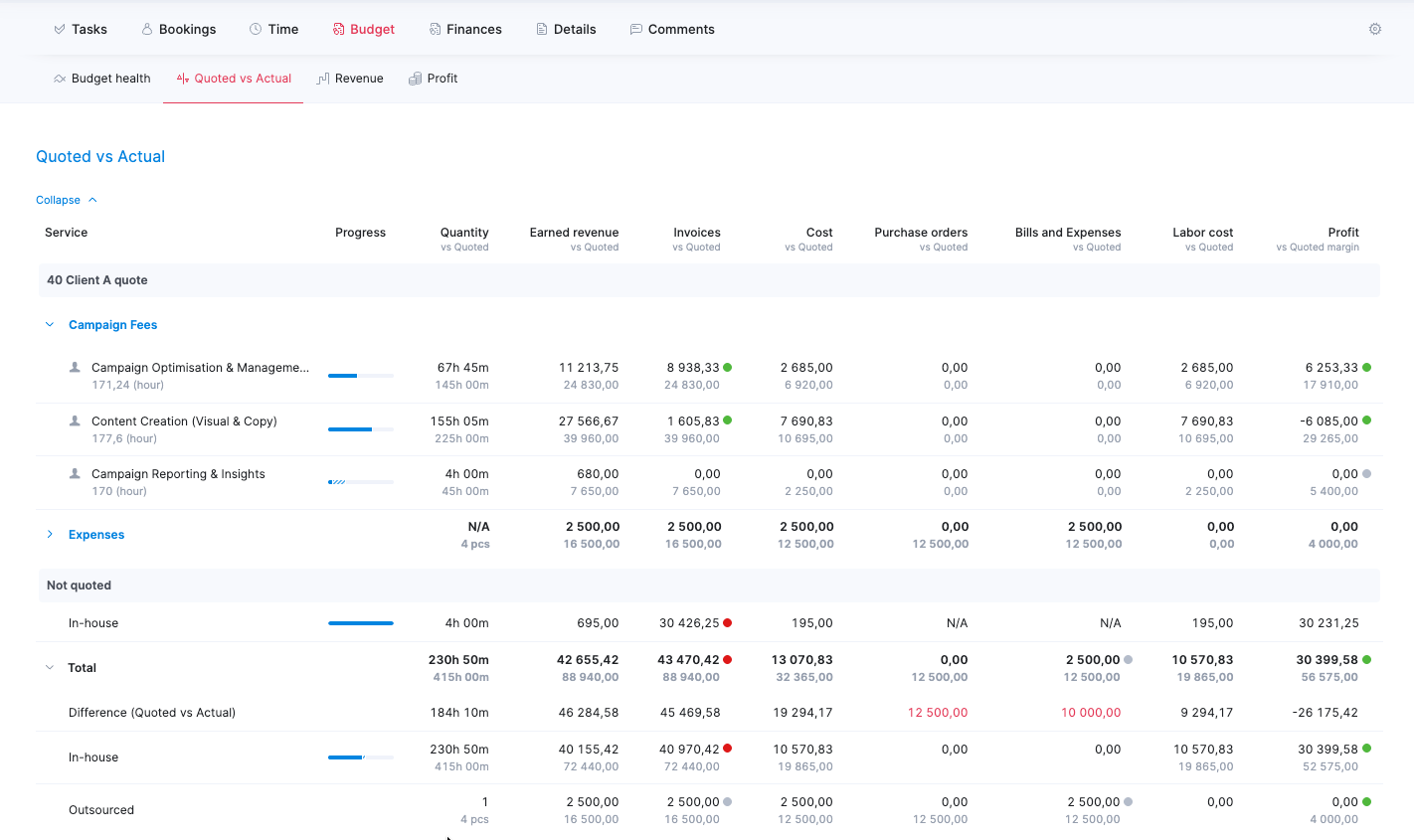
Scoro’s strongest distinction is continuity across the commercial lifecycle. Official product materials explicitly connect estimating, quoting, project delivery, time tracking, invoicing, and margin reporting. CRM and pipeline functions also sit closer to the delivery workflow than they do in most general-purpose PM tools.
For proposal-heavy consultancies or firms doing a meaningful amount of fixed-fee work, this can reduce the handoff between sales, delivery, and finance.
What reviewers repeatedly surfaced
We analyzed 25 publicly available Scoro review records, 19 of them tagged as highly relevant to consultants or professional-services teams.
Billing and invoicing were the most frequent themes. Reviewers described moving semi-manual quote and invoice processes into Scoro, creating tasks from quotes, and comparing quoted versus invoiced amounts alongside delivery activity.
Resource planning and reporting also appeared repeatedly. Several reviewers framed capacity and utilization as financial controls, not just scheduling tools. One operations-oriented example involved using resourcing visibility to reduce overbooking risk on fixed-fee work.
Reporting was useful, but not friction-free. Some users relied on Scoro data for management decisions; others described the effort required to configure reports or learn the system before those reports became useful.
The cost of that operational depth
Setup complexity showed up more often in the Scoro sample than in the Productive sample. Several reviewers described the system as powerful but initially overwhelming, particularly when configuring reporting and workflows across multiple functions.
Pricing also appeared as a trade-off for smaller or occasional users, and some reviewers mentioned integration or navigation friction.
When Scoro makes more sense than a delivery-first PM tool
Scoro is the clearer fit when the main question is:
“Can we carry a client from pipeline and quote through delivery and invoicing without breaking the workflow apart?”
If sales and quoting happen mostly outside the software and the real bottleneck is staffing and delivery profitability, Productive may be the cleaner fit. If the commercial workflow itself needs to be connected, Scoro has the stronger case.
What we found in 50 public user reviews
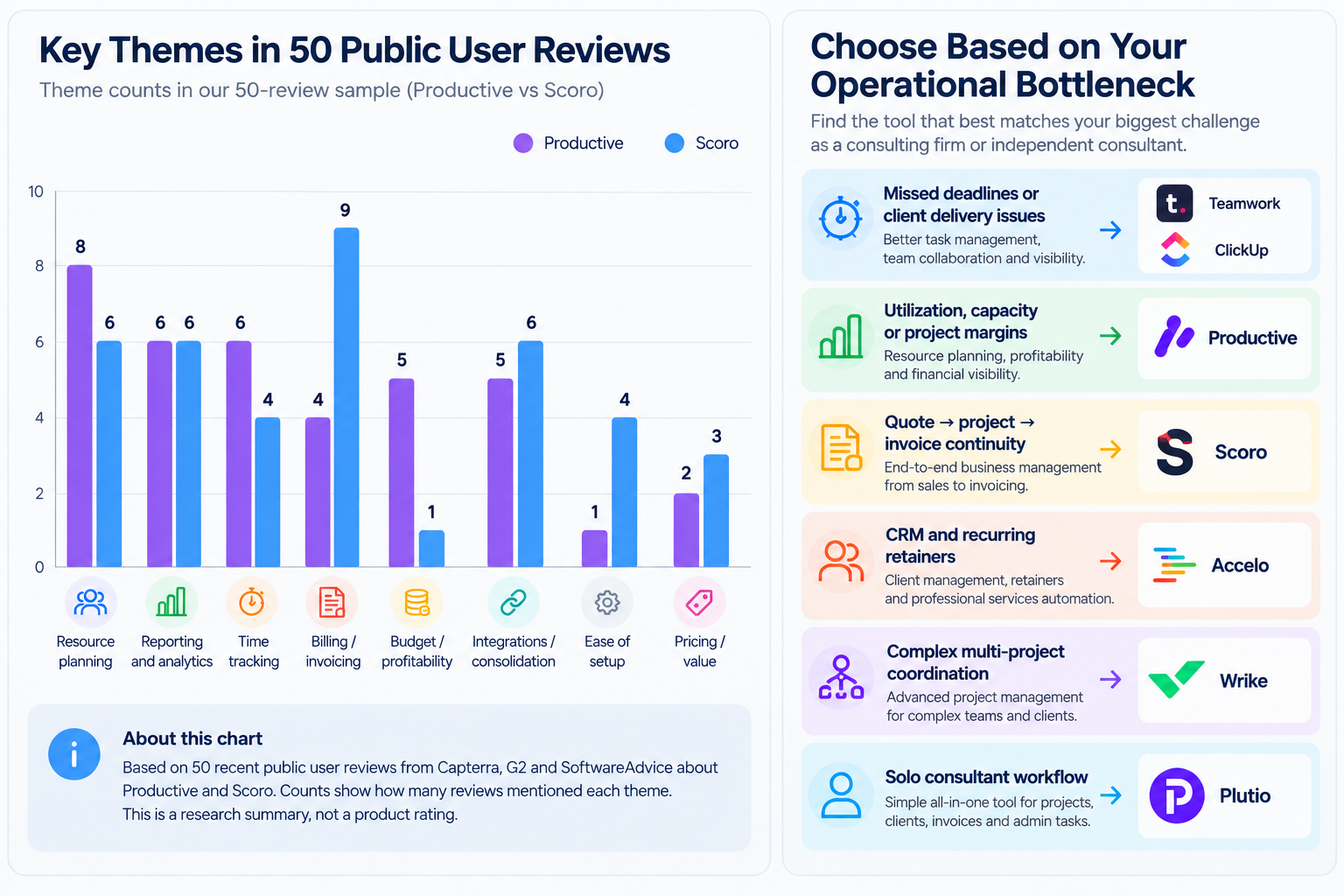
We reviewed 50 publicly available user-review records referencing Productive or Scoro (25 per product), tagged for consultant/professional-services relevance, sentiment, and recurring workflow themes. This is a curated public-review sample, not a survey, and it includes a mix of review types — non-incentivized, incentivized, and vendor-referred. It should be read as evidence of recurring patterns, not as a claim about how the full user base of either product feels.
Rough theme frequency across the sample (a single review can touch more than one theme, so counts don’t sum to 25):
| Theme | Productive (of 25) | Scoro (of 25) |
|---|---|---|
| Resource planning | 8 | 6 |
| Reporting | 6 | 6 |
| Time tracking | 6 | 4 |
| Billing / invoicing | 4 | 9 |
| Budget / profitability | 5 | 1 |
| Integrations / consolidation | 5 | 6 |
| Ease of setup | 1 | 4 |
| Pricing / value | 2 | 3 |
Read this as a directional signal, not a scorecard: Productive’s sample skews toward resourcing and profitability language, Scoro’s skews toward billing/invoicing and setup-friction language — consistent with the workflow-fit differences described above.
Other Tools Worth Considering
Productive and Scoro are the two deepest research-backed options in this guide, but they are not the only sensible choices. The six tools below solve narrower versions of the consulting workflow problem and can be a better fit when a firm does not need a full delivery-and-finance operating stack.
Teamwork — when client delivery matters more than commercial workflow
What it solves: Teamwork is strongest when a consultancy needs structured project delivery, billable time tracking, and client collaboration without building its process around CRM or quoting.
Billable time tracking is included in Teamwork Basics. Accelerate adds workload and capacity planning, retainers, and client invoices from logged time, while Optimize adds deeper resource scheduling, financial budgets, and profitability insights. Client Users can collaborate on up to five active projects without counting as paid subscription seats.
Where it fits: Client-service firms that care more about delivery visibility and collaboration than about running the entire quote-to-cash process inside the same platform.
Where it falls short versus Productive or Scoro: Teamwork covers less of the commercial lifecycle than Scoro and is less centered on delivery profitability and operating metrics than Productive.
Accelo — when retainers and PSA-style operations are the priority
What it solves: Accelo combines CRM, projects, retainers, time, invoicing, capacity forecasting, and profitability around professional-services work.
Its strongest case is not generic task management. It is the ability to manage recurring and project-based client work through a professional-services automation model.
Where it fits: Consultancies managing a meaningful mix of project work and recurring retainers, especially when CRM and client-account continuity matter.
Where it falls short versus Productive or Scoro: Accelo uses custom pricing, so cost is less transparent during initial comparison. Its workflow is also more PSA-oriented than a lightweight PM buyer may want.
ClickUp — when flexibility matters more than PSA depth
What it solves: ClickUp offers configurable project management without forcing a consultancy into a full professional-services operating model. Unlimited includes unlimited basic time tracking and resource management; Business adds broader workload management and reporting. Advanced time-tracking actions, including marking entries billable, have plan-based usage limits.
Where it fits: Smaller or less operationally complex consultancies that already handle invoicing and finance elsewhere and mainly need flexible project delivery.
Where it falls short versus Productive or Scoro: It is not centered on quote-to-cash, project profitability, or professional-services financial workflow.
Wrike — when coordination complexity becomes the bottleneck
What it solves: Wrike is more compelling when a consultancy has many concurrent projects, teams, approval paths, or reporting layers. Time tracking is available from Business. Its Pinnacle tier adds advanced resource and capacity planning, budgeting with bill and cost rates, billable hours, and advanced reporting.
Where it fits: Larger or more complex consulting operations where coordination and portfolio visibility matter more than integrated quoting and invoicing.
Where it falls short versus Productive or Scoro: Wrike is not primarily positioned around a consultant’s commercial lifecycle. Its strength is orchestration at scale rather than quote-to-cash continuity.
Plutio — when one person needs one client-work hub
What it solves: Plutio packages projects, proposals, contracts, invoices, time tracking, scheduling, and a client portal into a much lighter system. Its Core plan is explicitly positioned for solo work.
Where it fits: Independent consultants and very small practices that want fewer disconnected admin tools without needing team-level capacity planning.
Where it falls short versus Productive or Scoro: Resource planning and operational reporting are intentionally lighter because the product is solving a smaller-team problem.
Zoho Projects — when budget and core PM come first
What it solves: Zoho Projects covers tasks, timelines, time logs, and project budgets without trying to become a full PSA platform. Premium adds timesheets and project budgeting, while client users are available as paid add-ons on paid plans.
Billing and invoicing are generally handled through integrations with Zoho Books, Zoho Invoice, or Zoho Billing rather than through a native quote-to-cash workflow.
Where it fits: Cost-conscious teams that mainly need core project control and are comfortable keeping finance in another Zoho app.
Where it falls short versus Productive or Scoro: Resource, profitability, and commercial workflow depth is more limited unless additional Zoho products are brought into the stack.
Choose Based on Your Operational Bottleneck
The fastest way to narrow this list is to start with the failure mode that is already costing the consultancy time or margin.
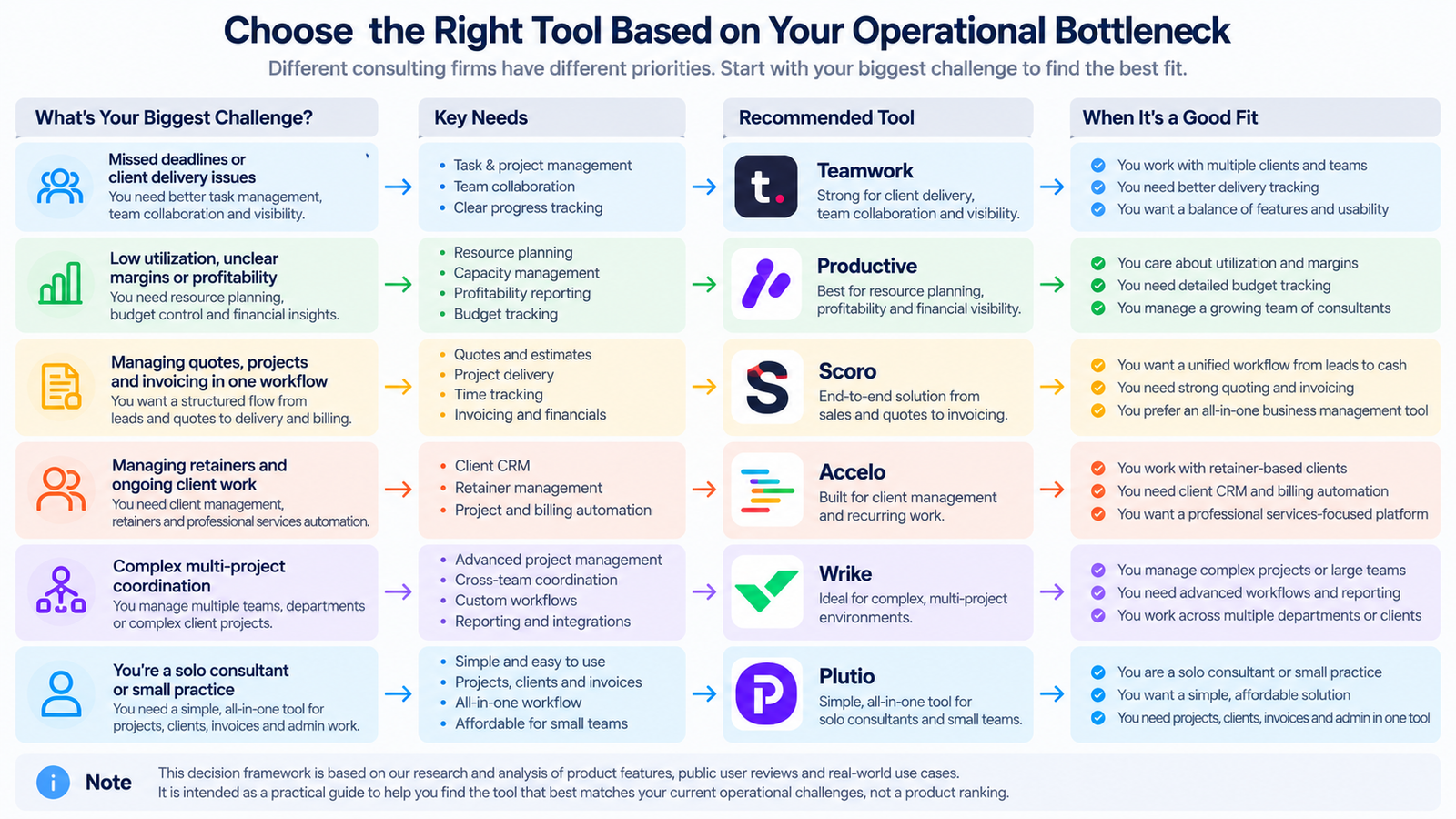
Client delivery is the bottleneck
If projects are slipping because tasks, deadlines, approvals, or client communication are fragmented, start with Teamwork or ClickUp. They solve the delivery layer without requiring the firm to redesign sales and finance around the same platform.
Utilization, staffing, or margin is the bottleneck
If the real question is who has capacity, whether work is staying inside budget, and which clients or projects are eroding margin, Productive is the more relevant starting point.
Quoting and invoicing are disconnected from delivery
If sales hands work to delivery through spreadsheets, quotes are disconnected from project budgets, or invoice preparation requires reconstructing what happened after the fact, Scoro deserves the closest look.
Retainers and recurring client work dominate the business
If the consultancy manages ongoing client relationships with recurring work and wants CRM, delivery, time, and retainer management tied together, Accelo is worth evaluating alongside the two main options.
Cross-team coordination is the bottleneck
If the difficulty comes from many teams, projects, approvals, and dependencies rather than billing or profitability, Wrike becomes more relevant.
Solo client administration is the bottleneck
If one consultant simply wants proposals, projects, time, invoices, and client communication in fewer places, Plutio is likely to be more proportionate than a full PSA-style platform.
The point is not to buy the software with the longest feature list. It is to remove the operational break that is already creating the most rework.
Methodology
The Productive and Scoro findings in this guide come from a structured sample of 50 publicly available user-review records: 25 for Productive and 25 for Scoro. Each record was deduplicated and tagged for consultant/professional-services relevance, sentiment, workflow type, and recurring themes.
Important limits:
- This is a curated public-review sample, not a survey, and it is not representative of either product’s full user base.
- The sample mixes non-incentivized, incentivized, and vendor-referred reviews.
- Review dates vary. Older reviews were used for durable workflow patterns, not as proof of current features.
- Theme counts describe this specific 50-record sample only; they are not market-wide percentages.
Current product facts — pricing, plans, feature availability, client access, and billing capabilities — were checked separately against official vendor materials.
Frequently Asked Questions
Is Productive or Scoro better for consultants?
Neither is universally better — they’re built around different parts of the workflow. Productive centers on delivery, staffing, time, and profitability once a project starts. Scoro centers on the full arc from lead and quote through delivery, invoicing, and reporting. The better fit depends on whether your bottleneck is delivery operations or commercial/quoting workflow.
Do I need a full PSA platform, or is a lighter tool enough?
If billing, resource planning, and profitability tracking are still manageable in a spreadsheet or a separate tool, a lighter option like ClickUp, Teamwork, or Zoho Projects may be enough for now. The PSA-style platforms (Productive, Scoro, Accelo) earn their setup overhead once those functions need to live in one connected system.
How reliable are the user-review patterns cited in this article?
They reflect recurring themes across a specific set of 50 publicly available reviews reviewed for this article, not a survey of all users. They’re useful for spotting consistent workflow strengths and trade-offs, but shouldn’t be read as statistically representative, and they don’t substitute for verifying current product features directly with each vendor.
What kind of consultancy is Productive or Scoro built for?
Productive is the clearer fit when the main problem is delivery operations: staffing, time, budgets, utilization, and profitability. Scoro is the clearer fit when the consultancy also wants pipeline, quoting, project delivery, and invoicing connected in one commercial workflow. Team size matters less than whether those workflows are complex enough to justify the setup overhead.
Should a solo consultant use one of these platforms?
Usually not the deeper PSA-style ones. Plutio is built specifically for solo or near-solo consultants; Productive, Scoro, and Accelo generally assume some level of team resourcing that a one-person practice doesn’t need yet.