
Most construction software comparisons begin with feature lists. That is the wrong starting point here: these six products are built for different jobs. One centres on field plans and tasks; another on BIM and controlled documents; another on job cost and project control in a financial environment. Choose before deciding which role must work reliably on live projects, and the shortlist may look fine in a spreadsheet but fail in the trailer.
This guide works in the opposite order. Start with likely fits, then move through six decisions: construction context, system of record, field workflow, governance depth, implementation capacity, and the financial/specialist-tool model. Products appear where they help answer a decision. The final section gives you a pilot you can run with your crews.
“Best” depends on operating context, workflow governance, field conditions, the implementation effort your team can absorb, and which system must hold financial and project-control data. The products covered are Procore, Buildertrend, Contractor Foreman, Autodesk Forma (formerly Autodesk Construction Cloud/ACC), Fieldwire, and CMiC.
How we used evidence. User observations in this guide come from public reviews we analyzed. They are self-selected and directional, not statistically representative; MartechChoice has not conducted hands-on testing or a proprietary survey. Pricing, plans, integrations, and feature availability can change, so current official documentation should govern product-specific buying decisions.
Start with the construction system you actually need
Before comparing brands, name the job the software must do without failing. Four roles recur, and most buyers need one to be the anchor:
- Field execution: getting current plans, tasks, issues, and photos to the people building.
- Document and model control: managing drawings, versions, and BIM-related coordination.
- Governed project administration: routing RFIs, submittals, and change orders with traceability.
- Financial and job-cost control: holding cost, billing, and forecast data that the business runs on.
Then ask whether you are replacing a stack or adding a specialist layer. A firm that already relies on an accounting system and drawing-review tool has a different problem from one starting with spreadsheets and text messages.
Public feedback often describes specialist tools remaining alongside the adopted platform. Treat “full suite” claims as something to examine, not an assumption that every other contractor tool can be retired.
Quick decision matrix: likely fits and trade-offs
This matrix is for orientation, not scoring or ranking. Rows are in no order of preference.
| Product | Likely fit / organisation-project context | Core system role | Field-operability emphasis | Document/BIM depth | Financial depth | Implementation signal | Pricing treatment |
|---|---|---|---|---|---|---|---|
| Procore | Larger/complex commercial coordination | Broad coordination suite | Field/office coordination | Document, RFI and submittal workflows depend on selected products | Cost/financial workflows depend on selected products | Broad setup/training required | Custom quote; annual fee based on selected products and Annual Construction Volume |
| Buildertrend | Residential/remodelling and smaller contractor | Client/project operations | Mixed; validate external adoption | Standard project/client documents | Budgeting/change-order context from public feedback | Configure/onboard clients and subs | Custom quote / tailored plan |
| Contractor Foreman | Small/mid-sized value-conscious contractor | All-in-one contractor operations | Office/field access | Project records/documents | Estimates, invoices, and job-cost context | Feature-density learning curve | Annual-plan pricing published from $49 to $332/month; 30-day trial; recheck current tier/feature scope |
| Autodesk Forma (formerly Autodesk Construction Cloud/ACC) | BIM/design-document intensive teams | Design-to-build data/model coordination | Current drawings/field access | Bundle-specific model/document emphasis | Cost Management is solution/bundle dependent | Autodesk/configuration/training capacity | Quote-based solution/bundle pricing |
| Fieldwire | Field-heavy GC, specialty trade, or site team | Field plans/tasks/issues | Test actual devices and connectivity | Plans, issues, photos, deficiencies; BIM viewer is plan-dependent | Budget is listed for Business Plus | Usually easier start; test workflow fit | Basic $0; Pro $39, Business $64, Business Plus $89 per user/month billed annually; features vary by tier |
| CMiC | Financial/job-cost/ERP-heavy contractor | Integrated construction ERP/project-control positioning in public feedback | Limited public mobile evidence | Project/control workflows in public feedback | Financial/job-cost emphasis in public feedback; confirm current official scope | High implementation/training demand in public feedback | Vendor confirmation required |
These are evidence-bounded starting fits, not universal rankings. Check the products, modules, user limits, integrations, and workflows included in the plan you would buy.
What to check before a product reaches your shortlist
- Procore: which selected products your project types need, and how annual ACV-based pricing changes with them.
- Buildertrend: whether it meets commercial or compliance requirements, and how subcontractors and clients actually adopt it.
- Contractor Foreman: how the feature density feels to a new user, which annual tier covers the workflow, and what accounting sync does in practice.
- Autodesk Forma: the current solution/bundle and module names, plus field experience on your connectivity.
- Fieldwire: which tier covers reporting, BIM, RFIs, submittals, change orders, and budget; also try markups on your devices.
- CMiC: current pricing, implementation scope, and evidence on field and mobile use.
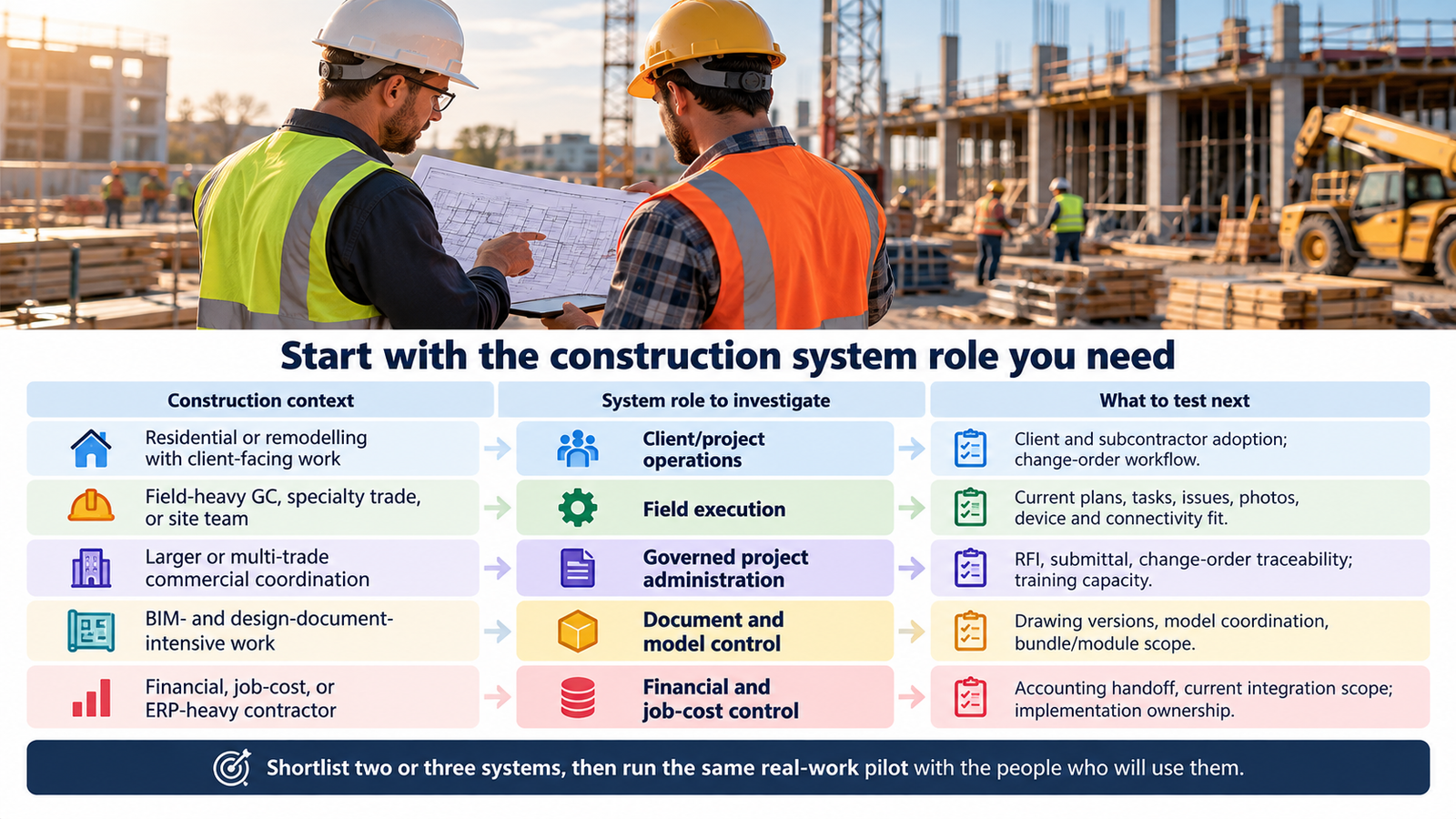
Gate 1: Match the platform to your construction context
Company size is a weak proxy for fit. A small firm can run document-heavy, multi-trade work that strains a lightweight tool, while a large firm may have a simple field-driven crew that would be slowed by a heavy suite. Separate two questions: how big are we, and how complex and governed are our projects?
| Your context | Systems to investigate | Trade-off to test |
|---|---|---|
| Residential or remodelling, client-facing | Buildertrend; Contractor Foreman as an all-in-one alternative | Whether client and subcontractor adoption holds up in your workflow |
| Small or mid-sized contractor wanting one hub | Contractor Foreman; Buildertrend | New-user complexity and reporting against breadth of function |
| Field-heavy GC, specialty trade, or site team | Fieldwire | Reporting, markup and device behavior; how much finance you must add elsewhere |
| Larger or multi-trade commercial coordination | Procore | Training burden and annual ACV/product pricing against breadth |
| BIM- and design-document-intensive work | Autodesk Forma (formerly ACC) | Onboarding effort, bundle scope, and connectivity or authentication friction |
| Financial, job-cost, or ERP-heavy contractor | CMiC | Implementation demand against the current officially documented financial scope |
Available feedback suggests the residential-versus-commercial line matters most for Buildertrend. Users describe client-facing scheduling and change-order strengths in residential and remodelling work, while commercial or compliance fit, external-user adoption, accounting integration, exports, and scale draw mixed feedback. For commercial work with strict documentation requirements, start there.
Procore’s feedback points toward complex commercial environments with many coordinating parties, but it is mixed on price, training, and the depth of scheduling and financial workflows. Context is only the first gate.
Autodesk Forma (formerly Autodesk Construction Cloud/ACC) is oriented toward BIM, models, and design-to-build coordination, particularly for teams already in the Autodesk ecosystem. Official Autodesk pricing describes ACC as part of Autodesk Forma and packages products by solution. Feedback is moderate rather than strong, with differing views on cost, onboarding, connectivity/authentication, and broad-GC fit. Check the current solution and module names before citing a capability.
Users describe Contractor Foreman as a broad, value-conscious operating hub for small and mid-sized contractors. They also raise the learning curve for new users, reliability, reporting and portfolio views, and mixed QuickBooks outcomes. Its breadth is both the appeal and the risk.
If your answers span several rows, that is normal. The system-of-record choice in the next gate will usually narrow the field more than context alone.
Gate 2: Decide what must be your system of record
Every project creates data in four places: field activity, controlled documents and models, formal administration, and money. Some products anchor one; a few reach into several. Decide which system owns each category and which can remain in specialist tools you already trust.
| System-of-record role | What it must own | Products where public feedback points |
|---|---|---|
| Field execution | Plans, tasks, issues, photos, punch/deficiency items | Fieldwire is the clearest field-first fit; Procore and Autodesk Forma also serve field access |
| Document and BIM | Drawings, versions, models, coordination | Autodesk Forma has the strongest document/BIM orientation in the evidence; Procore has document-workflow strengths |
| Governed project administration | RFIs, submittals, change orders, closeout | Procore is the most commonly cited hub; Buildertrend for client-facing change orders in residential work |
| Financial and job-cost control | Cost, billing, forecasting, accounting data | CMiC has the strongest public-feedback emphasis; Contractor Foreman and Procore have financial workflows of differing depth |
Feature scope is not uniform. Procore purchasers select products; Autodesk Forma packages products by solution; Fieldwire puts reports, integrations, BIM viewer, RFIs, submittals, change orders, and budget in different tiers. Read this as a system-role map, not proof that every workflow is available in every plan.
The feedback positions Procore as a coordination hub, Autodesk Forma around documents and BIM, Fieldwire as a field layer, and CMiC around financial control. It also describes continued use of specialist tools. Keeping accounting, drawing review, or scheduling elsewhere can be a deliberate stack choice rather than a product failure.
List the systems you use now, mark which you intend to keep, and have each vendor show the handoff. An integration listing establishes that a connection exists, not that it will behave reliably at your volume, under your permissions, or when something fails.
Gate 3: Test the field workflow before the office workflow
“Mobile app available” tells you little. A superintendent may need to open the latest plan, mark it up, attach a photo, assign an issue to a foreman, and close it after correction—on an older device and poor connection. A subcontractor should be able to see the same information without a training session.
Field-use feedback is mixed in consequential ways. Several construction users found access to plans, RFIs, and tasks genuinely helpful. Others preferred paper plans or reported field resistance, device-specific markup problems, and connectivity friction. That is not a contradiction to smooth over; it is why the pilot belongs on your devices with your crews.
Where each product’s evidence points:
Fieldwire is described as field-first, centred on plans, tasks, issues, and photos. Official pricing separates Basic viewing/task management from higher-tier reports, integrations, BIM viewer, and Business Plus project-management tools. Feedback also raises reporting customisation, markup and device behaviour, sync, and finance depth. Try the exact tier, devices, and connectivity you use rather than assuming a generic offline mode.
Procore and Autodesk Forma both have field and office access to plans and project records in the positioning evidence. Autodesk feedback flags connectivity and authentication as friction, so try logins and access on site rather than only in the office.
Contractor Foreman is positioned as a broader operations hub with office and field access. What helps an office can slow a foreman who needs three things quickly.
Buildertrend has mixed field evidence; the recurring question is adoption by subcontractors and clients.
CMiC has limited public mobile evidence. That is a gap in what we can say, not a finding about the product. Request a field demonstration and references.
Field pilot checklist
- Open the current plan set on the exact devices your crews carry.
- Check that a revision shows the current plan version.
- Add a markup and photo, then make sure another user sees both.
- Create an issue, assign it outside your company, and close it.
- Repeat with poor or no connectivity, then reconnect and check what synced. Have the vendor document which viewing, editing, task, photo, and synchronisation actions your device and plan support.
- Give a subcontractor access and watch them use it without help.
- Identify the plan, module, and permissions you would actually buy before judging the workflow.
Offline behaviour and sync should not be assumed product-wide. If it matters to crews, get the specific scope in writing.
Gate 4: Measure governance depth for documents, RFIs, submittals, and change orders
A tool that stores a file and a system that governs a contractual document workflow are different purchases. Governance depth covers version control, drawing and model coordination, RFI and submittal routing, change-order traceability, closeout, permissions, and audit trail. A plan-and-task tool can suit a crew that needs speed yet be wrong for a project where an owner will audit the paper trail.
Start by deciding which of these must run inside the software:
- Do RFIs and submittals need formal routing, or can they run by email and a log?
- Must change orders link to cost impact in the same system?
- Who needs different permissions, and can subs see only their own items?
- Do you need a closeout or turnover package from the system?
- Which workflows can stay in a specialist tool without creating risk?
Public feedback supports document and RFI strengths for Procore and BIM/document coordination strengths for Autodesk Forma. CMiC users describe project-control coverage alongside usability caveats. Fieldwire is a plans, issues, and photos layer; Buildertrend is relevant where client-facing change orders drive residential work; Contractor Foreman fits where project records and documents suit a smaller operation.
Specialist drawing review is a recurring dependency. Decide how much of that workflow should move and examine the round trip between tools.
“Supports RFIs” is not enough. Fieldwire’s official pricing places RFIs, submittal management, and Change Orders in Business Plus; Autodesk Forma lists an Automatic Submittal Log in designated solution bundles. During a demo, run an RFI from creation through closure with notifications and logs, then follow the exact change-order path for the plan you would buy. Review current documentation for compliance, auditability, closeout, and plan-specific scope rather than assuming comparable governance.
Gate 5: Budget for implementation capacity, not just subscriptions
Adoption and training recur across public feedback for all six products. The friction is not always the software: broad systems need someone to configure them, standardise use, and bring crews, subcontractors, and clients along.
| Product | Recurring implementation theme in public feedback |
|---|---|
| Procore | Breadth and the training it requires |
| Buildertrend | Getting external users, including clients and subs, to adopt it |
| Contractor Foreman | Feature density and the learning curve for new users |
| Autodesk Forma | Autodesk-specific learning and configuration |
| Fieldwire | Adoption across the actual device mix |
| CMiC | The internal implementation expertise required |
These are user-reported patterns, not measured implementation outcomes. We have no time-to-implement figures, so scrutinise any vendor estimate and request relevant references.
Implementation readiness questions
- Who owns configuration, and do they have the hours?
- How standardised are our processes today? Software rarely fixes inconsistent workflows.
- Which workflows must work on day one, and which can wait?
- Can we train crews, subs, and clients, or do we need the vendor to?
- What is the migration path from current documents and data?
- What performance and interface tolerance will the office accept?
Official sources show professional services and role-based training from Procore; delivery services and training videos from Autodesk Forma; training for custom contracts plus tutorials/webinars from Fieldwire; and setup, implementation, and training options from Contractor Foreman. Establish which service applies to your product, tier, geography, and workflow, and what it costs. Equivalent scope is not established for Buildertrend or CMiC. A lower subscription can cost more once internal time is counted, which leads to the final gate.
Gate 6: Choose the financial and specialist-tool model
Earlier decisions meet the financial model here. Some contractors need job costing, billing, forecasting, time, invoices, and change-order cost impact in the project system. Others prefer a coordination platform connected to accounting, estimating, drawing, and scheduling specialists. Both paths are defensible, but they lead to different shortlists.
CMiC is the clearest fit for the first model in the public feedback we analyzed. That feedback positions it around integrated construction financials, job cost, and project control, while also raising implementation and training burden, interface and performance, connectors, and thin field-mobile evidence. Treat that as public-feedback positioning, not a verified capability list; establish the current official financial, integration, training, and implementation scope before making it a requirement.
Procore, Buildertrend, and Contractor Foreman are qualified comparisons. Feedback on Procore’s financial and scheduling workflows is mixed. Buildertrend appears in budgeting and change-order discussions, with contested accounting integration and exports. Contractor Foreman is described around estimates, invoices, and job-cost context, with mixed QuickBooks outcomes; its official materials market job costing and document job-cost reporting. Autodesk Forma includes Cost Management in specified solution bundles, not necessarily every offering. Fieldwire lists Budget in Business Plus, rather than establishing it as a general financial system of record.
QuickBooks and other integration experiences are one area where the feedback conflicts. Some users report useful connections; others report friction. The available evidence does not explain why, which makes your chart of accounts a necessary test case.
Demonstrations to request
- Job-cost flow from a field event to the ledger.
- Cost-to-complete and forecast views.
- The cost and invoice effect of a change order.
- Data export in the formats you need.
- Failure recovery for an integration.
- Role permissions on financial data.
Documentation can show that an integration or service exists—for example, Contractor Foreman documents QuickBooks cost-code syncing, Autodesk Forma advertises ERP integrations, and Procore offers ERP launch services. It cannot establish bidirectional coverage, reliability, error recovery, or fit for your chart of accounts. Cover those details in the demo and contract.
Price the stack, not just the subscription: the platform, accounting or ERP connection, specialist tools you keep, and internal time to run them. Current published pricing ranges from product-specific custom quotes to published tier prices; CMiC still requires vendor confirmation. Advertised starting prices rarely reflect that total, and this guide makes no ROI claim. Check what the selected plan and modules include.
Build a shortlist and run a construction-workflow pilot
The gates should now have removed most candidates. Take the two or three that remain and pilot them against real work. Pick the system that passes your scenarios, not the one with the best demo.
Where the gates usually point
- Field execution is the anchor and finance stays elsewhere: start with Fieldwire, then assess whether you need more governance.
- Complex commercial coordination with many parties: start with Procore; examine training load, selected products, and annual ACV-based pricing.
- BIM and model-driven work in the Autodesk ecosystem: start with Autodesk Forma; examine onboarding, connectivity, and exact solution scope.
- Residential or remodelling with client-facing needs: start with Buildertrend; examine external adoption and accounting.
- Small or mid-sized firm wanting an all-in-one hub: start with Contractor Foreman; examine annual tier, usability, and reporting.
- Finance-led, ERP-heavy contractor: start with CMiC; examine current implementation, financial, integration, and field-access scope.
These are starting points, not verdicts. Run the gates before deciding.
Pilot scorecard (pass/fail prompts, no numeric scoring)
| Area | Pass/fail prompt |
|---|---|
| Onboarding | Can a new field user complete a task without help? |
| Latest-plan access | Does the field always see the current plan after a revision? |
| RFI and change order | Does an RFI route correctly and produce a traceable change order in the plan/module being evaluated? |
| Reports and exports | Can we get the reports and exports we need without workarounds? |
| Integration | Does the accounting or ERP handoff work on our data, and can we recover from failure? |
| Performance | Is speed acceptable on our devices and connections? |
| Subcontractor and client access | Can external users participate without a training burden? |
| Total cost | Have we priced the full stack, including internal time? |
Give each stakeholder a scenario: a superintendent or foreman for field use, a project manager for RFIs and change orders, an accountant or controller for the financial handoff, and the person who will own configuration. Use real recent projects so every candidate gets the same test. Public users reported pain around onboarding, latest-plan access, RFIs and change orders, reports and exports, integration, and performance; recreate those conditions deliberately.
Before designing the pilot around access, establish whether a trial or demo is available for the product, plan, geography, and eligibility you would buy. Fieldwire offers a free Basic plan and demo request; Contractor Foreman’s current annual-plan page lists a 30-day trial; Autodesk Forma pages offer sales contact and some solution pages advertise trials. Do not assume the same option for Procore, Buildertrend, or CMiC without current vendor confirmation.
FAQ
What should construction project management software include? It depends on the system role. Field execution points to plans, tasks, issues, and photos. Governed administration points to RFI, submittal, and change-order workflows with permissions and traceability. A financial anchor points to job-cost and accounting flows. Decide which role must be reliable, then check that the exact product, module, plan, and permissions cover it.
Do small contractors need an all-in-one platform or a specialist-tool stack? Neither is automatically right. Contractor Foreman can be attractive when you want one place for operations, but public feedback flags new-user complexity and mixed QuickBooks results. A lighter field tool plus existing accounting can work if projects are simple. Compare the full stack cost, including the time to run it.
What should a field team test before adopting construction software? Use the Gate 3 checklist: current-plan access on the devices your team uses, markups and photos, issue assignment and closure, poor-connectivity behaviour, and subcontractor access without help. Have the vendor document offline and sync scope for the specific device, product, plan, and workflow.
When do BIM or document-control requirements change the software choice? When model coordination or formal document versioning is central to the work, a plan-and-task tool may not be enough. Public feedback centres Autodesk Forma on BIM and document coordination, and Procore on document and RFI workflow. Product scope remains bundle- and product-dependent. Also decide whether specialist drawing-review tools stay in the stack.
What should be verified before relying on an accounting or ERP integration? Check the version and plan the integration covers, what data moves and in which direction, how errors surface and recover, and whether it accommodates your chart of accounts and job structure. A listing proves a connection, not a reliable workflow.
Next decision
Choose the system role first: field, documents and BIM, governed administration, or financial control. Use the gates to reduce the list to two or three, then pilot them on real work with the people who will use them.
If your needs extend beyond construction-specific workflows, our general project management software guide provides a broader comparison. General-purpose tools should not replace specialized construction capabilities when those are required.