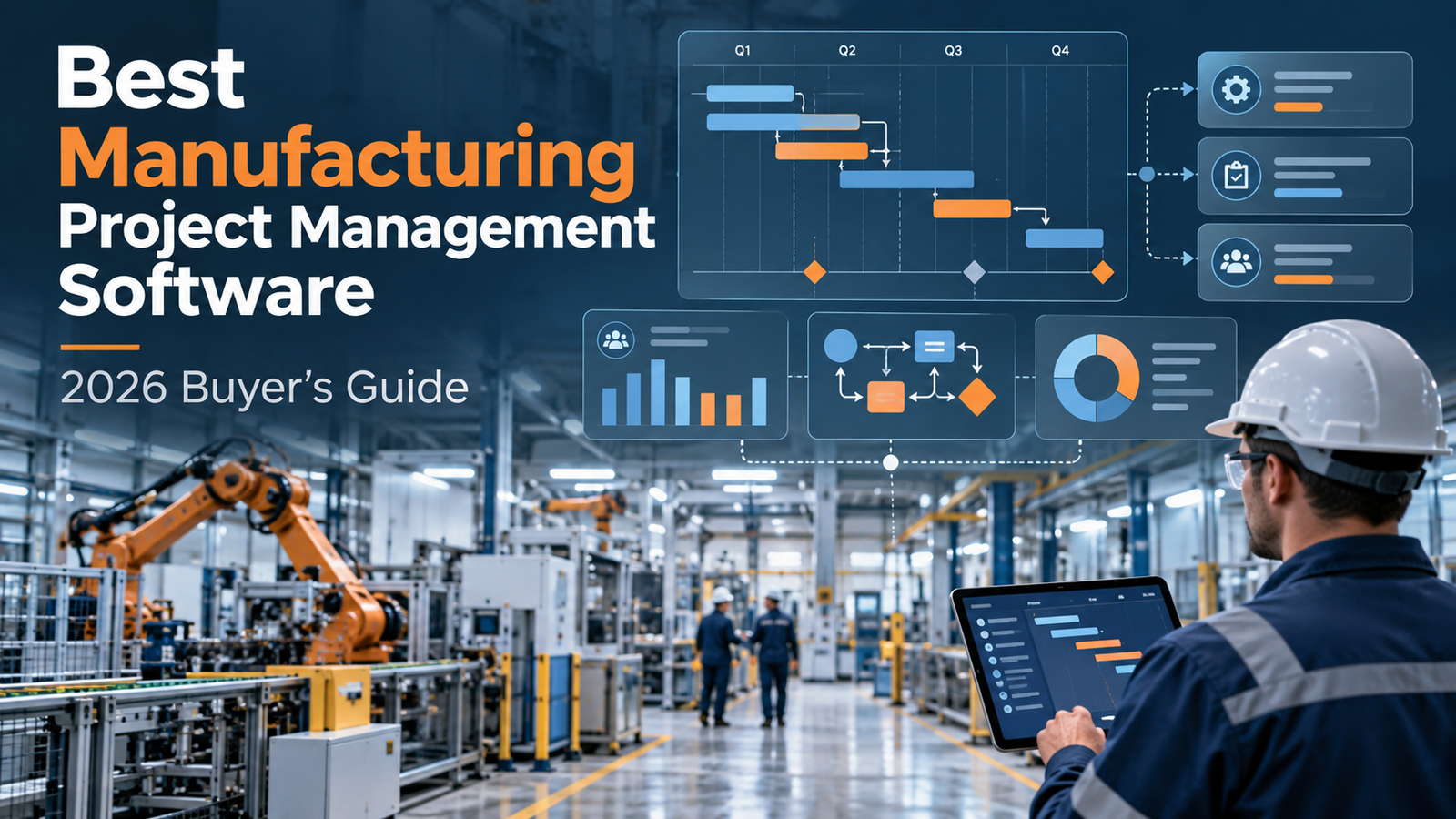
A manufacturing team can have a beautifully organized Gantt chart and still discover that three projects are waiting for the same engineer. The chart isn't necessarily wrong. It just isn't solving the real problem.
Consider an illustrative scenario, not a reported customer case: a custom equipment builder has four engineering releases due in one quarter, purchasing is chasing long-lead components, and the shop needs approved drawings before work can begin. The owner buys a task manager. Two months later, every task has a reassuring color, and the drawings are still late.
That's the distinction this guide is built around. Resource conflicts, departmental handoffs, and manufacturing orders are different problems; project management software for manufacturing spans several categories. Identify your bottleneck first, then build a shortlist.
How we evaluated these tools: This guide compares published capabilities, pricing, and vendor-reported customer experiences. MartechChoice did not conduct hands-on comparative tests. “Best for” labels indicate potential workflow fit, not tested rankings.
Quick Comparison: 7 Manufacturing Project Management Tools
Three workflows drive this shortlist. Resource and portfolio planning helps teams decide how shared engineering capacity is allocated across competing projects (Epicflow, Celoxis, Cora PPM). Cross-functional execution coordinates responsibilities, approvals, dependencies, and delivery between departments (ProjectManager, Wrike, Zoho Projects). Manufacturing job management follows orders and production-related work from quotation toward the shop floor (Hexagon WORKPLAN). These categories overlap, but choosing the wrong layer means paying for better visibility into a problem the tool cannot resolve.
| Software | Category | Best for | Key limitation | Indicative pricing |
|---|---|---|---|---|
| Epicflow | Resource/portfolio | Shared engineering capacity | Growth: 20–50 users; 50 projects; 250 tasks | Growth €22.50/person/month annually; €25 monthly; Enterprise quote |
| Celoxis | Resource/portfolio | Manufacturing PMOs | Capacity: Essentials+; costing: Professional+ | Core $10; Essentials $25; Professional $35; Business $45 |
| Cora PPM | Resource/portfolio | Complex engineering/CapEx | Enterprise implementation and governance | Contact sales |
| Hexagon WORKPLAN | Manufacturing jobs | Custom job-shop workflows | MES/job-management, not general task software | Contact sales |
| ProjectManager | Cross-functional | Manufacturing project execution | Advanced resources/portfolio: Business | Business $28 annual or $32 monthly |
| Wrike | Cross-functional | Departmental handoffs/approvals | Advanced capacity/budgeting: Pinnacle | Team $10; Business $25; Pinnacle quote |
| Zoho Projects | Cross-functional | Configurable small-team projects | Advanced portfolio/cross-project tools: higher tiers | Premium $4; Enterprise $9; Ultimate $14 |
Pricing snapshot: October 24, 2026. Unless otherwise specified, dollar prices are USD per user per month with annual billing; Celoxis prices are per standard user, Epicflow prices are in EUR, and quoted plans are not assigned invented prices. Prices, taxes, limits, and available features may change; check current vendor terms and the required tier. Epicflow's monthly €25 rate and ProjectManager's $32 monthly rate are monthly-billing exceptions.
The 7 Best Manufacturing Project Management Software Options
The first three platforms address resource allocation and portfolio oversight; their usefulness depends on how many projects compete for the same people and budgets.
1. Epicflow: Best for Multi-Project Resource Planning
Who should consider it: Engineer-to-order, product-development, and equipment-making teams running concurrent projects against a shared pool of engineers, designers, or other specialist resources.
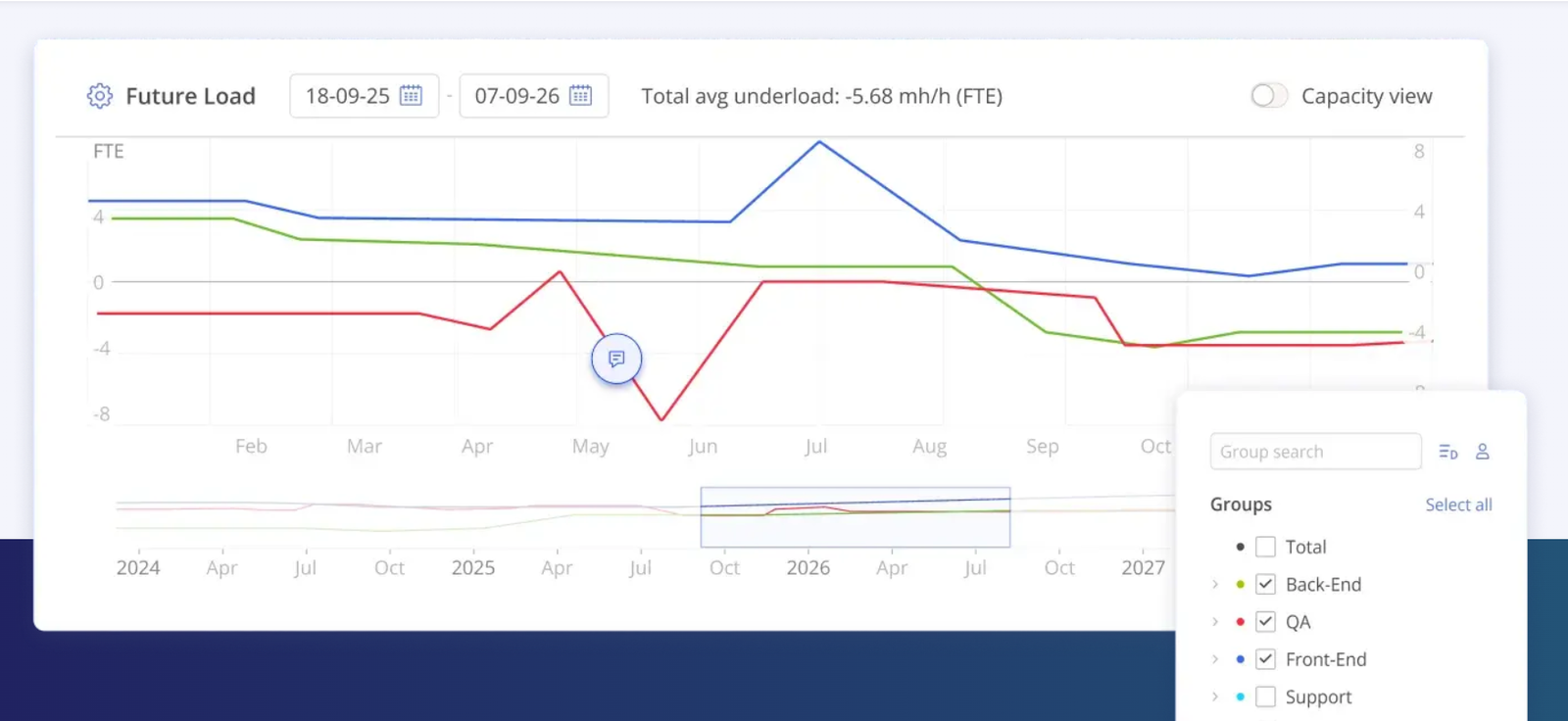
When every job is individually “on track” but the same few specialists appear on three critical paths, the problem is no longer basic task assignment. Epicflow's public feature matrix describes resource-capacity planning, workload management, bottleneck detection, group task prioritization, and due-date feasibility prediction. These functions are designed to help managers see resource pressure across projects instead of checking each schedule in isolation.
Prioritizing one urgent design change may push two other deliveries back. Resource forecasts can reveal trade-offs, but depend on estimates and timely updates; published functionality is not evidence of independently verified prediction accuracy.
Buying trade-off: Ask how schedules and availability data are imported and maintained. Growth is limited to 20–50 users, 50 projects, and 250 tasks; Enterprise adds broader portfolio capabilities. Confirm which prediction, AI, and scenario tools belong to the demonstrated tier.
Pricing source: Epicflow plans (annual and monthly billing distinguished in table).
Our assessment: Shortlist it for shared engineering-capacity constraints, not materials or machine-scheduling problems.
2. Celoxis: Best for Manufacturing PMOs
Who should consider it: Manufacturers managing enough projects that executives need a consistent view of priorities, resources, reporting, and financial exposure across departments.
Celoxis publishes advanced scheduling, Gantt charts, templates, dashboards, and portfolio visibility in its Core plan. Moving to Essentials adds resource workload and capacity planning, timesheets, and resource-conflict visibility. Professional adds expense and project-cost management, risk tracking, and intake controls. That tier structure is important: a manufacturer seeking financial and resource management together should not budget using only the headline Core price.
Vendor-reported manufacturing case: In a Celoxis customer story, US manufacturer Knape & Vogt describes siloed projects, weak portfolio visibility, and dispersed financial data. It illustrates the use case, not an independently verified outcome benchmark.
Buying trade-off: A portfolio tool works best when the organization agrees how projects are initiated, updated, prioritized, and measured. Ask which staff require full access, which need only timesheet or read-only roles, and which tier supplies the controls your PMO actually needs. Licensing composition can matter as much as the quoted per-user price.
Pricing source: Celoxis plans. Prices in table are per standard user/month, annually billed; Enterprise is custom quoted. Confirm full-access versus timesheet/read-only licensing.
Our assessment: Useful for established PMOs that need portfolio and cost visibility; excessive for teams without portfolio governance.
3. Cora PPM: Best for Complex Engineering and CapEx Projects
Who should consider it: Larger manufacturing organizations overseeing complex engineering programs, plant improvements, facility investment, regulated projects, or capital portfolios where approvals and oversight shape delivery.
Cora's official project-portfolio-management material positions Cora PPM for complex and regulated organizations, with project governance, program visibility, planning, risk, and management oversight. Such a system is most relevant when a manufacturing project must be defended and tracked across budget owners, engineering teams, procurement, and leadership—not simply when somebody wants a better calendar.
Buying trade-off: Evaluate migration, training, security, configuration ownership, and implementation scope before committing to enterprise governance. Product naming matters: as of October 2026, Cora has separately introduced antaivo, an autonomous-portfolio-intelligence platform. Do not assume antaivo functionality is included in an existing Cora PPM deployment or license; request the exact product, module, and commercial scope.
Pricing: No verified standard public per-user price; request a scoped quote. Sources: Cora PPM; antaivo.
Our assessment: Consider it for governance-heavy engineering or investment portfolios; do not confuse capability breadth with small-team suitability.
The first three tools help decide who works on what. The next addresses what happens when a quote becomes a manufacturing job.
4. Hexagon WORKPLAN: Best for Custom Manufacturing Job Management
Who should consider it: Custom, job-shop, and make-to-order manufacturers whose daily headaches begin with quotations and continue through purchasing, production scheduling, job progress, and shop-floor information.
Hexagon explicitly describes WORKPLAN as an MES job-management solution suited to job shops and made-to-order production. Its official product page lists quotation management, job tracking, document organization, purchasing and stock management, drag-and-drop planning, time capture, and quality-related functions. This makes WORKPLAN the category outlier in this guide. It belongs nearer the manufacturing-operations system than a general-purpose task manager.
Vendor-reported manufacturing case — Métal Industrie: Hexagon’s account describes a French sheet-metal manufacturer that adopted RADAN applications for laser-cutting and later used WORKPLAN to connect purchasing, quotations, and workshop information. The case reports 10% less cutting time, attributed to RADAN program optimization, not WORKPLAN. The useful lesson is integration across tools, not a stand-alone WORKPLAN productivity result.
Buying trade-off: Ask whether WORKPLAN is meant to replace, complement, or integrate with your current ERP/MES stack, and map which application remains responsible for financial records, stock, work orders, and shop-floor data. Also test the quotation-to-job workflow using a real sample job, not only polished demonstration data.
Pricing: Contact sales; no standard public price verified. Source: Hexagon WORKPLAN.
Our assessment: Relevant when quotation-to-job execution is the bottleneck; too operations-heavy for milestone-only collaboration.
Returning from shop-floor systems to project coordination, the final three tools focus on delivery and handoffs without replacing production operations software.
5. ProjectManager: Best for Manufacturing Project Execution
Who should consider it: Manufacturers with an existing production system who need a separate place to coordinate tooling projects, equipment installations, customer programs, product launches, or engineering milestones.
ProjectManager's Business edition provides Gantt, list, board and calendar views alongside dependency tracking, resource/workload planning, time tracking, cost and budget management, and portfolio dashboards. These are recognizable project-execution capabilities. An equipment installation can benefit from a shared schedule, accountable owners, and visible dependencies without moving the factory's bill of materials or machine control into the project tool.
Buying trade-off: The appropriate dividing line is integration and ownership of data. Ask how the tool will work with purchasing, ERP, quality, and production records. Its advanced resources, reporting, and portfolio features are part of the Business offering, so comparing only the cheaper Team plan may understate costs. Do not assume it provides native shop-floor execution, MRP, or full manufacturing job costing.
Pricing source: ProjectManager Business edition and plans; verify checkout terms.
Our assessment: A practical candidate for project execution when production planning is already handled elsewhere, and visibility across projects is what is missing.
6. Wrike: Best for Cross-Functional Collaboration
Who should consider it: Manufacturers where engineering, procurement, quality, and operations lose time to requests, approvals, handoffs, and status updates.
Wrike offers team collaboration and work-management capabilities. Its published Team plan includes interactive Gantt charts and dashboards; Business expands customizable workflows and other team processes. Those distinctions matter: a standardized engineering-change request may be useful, but somebody must define the intake fields, approval stages, access rules, and ownership before automation is worthwhile.
A customizable platform can coordinate who needs to act and when. It cannot, by virtue of a nicely configured approval workflow, perform material requirements planning or provide reliable machine-capacity calculations. Buyers should decide which manufacturing systems retain authority over those records and how project updates are synchronized.
Buying trade-off: Configuration effort, governance of templates, user adoption, and the cost of required tiers. Wrike lists advanced resource and capacity planning, budgeting, and BI in Pinnacle, a sales-quoted plan; those should not be attributed to entry-level Team subscriptions.
Pricing source: Wrike plans. Team and Business prices in the table are annual-billing rates; Pinnacle is quote-based. Wrike states this packaging applies to new purchases from January 21, 2026.
Our assessment: Shortlist it where the problem is cross-team handoffs. If the issue is shop-floor sequence planning, a collaboration platform is solving the wrong layer.
7. Zoho Projects: Best for Customizable Small-Team Workflows
Who should consider it: Smaller manufacturing engineering teams that want organized tasks, milestones, dependencies, work logs, and configurable routines without immediately buying an enterprise PPM platform.
Zoho Projects publishes project templates, configurable statuses, custom modules, time tracking, budgets, workflow actions, and collaboration functions. It can serve a team coordinating product changes, tooling work, and other bounded projects. But the exact depth of project dependencies and resource visibility depends on the plan; the lowest paid subscription is not equivalent to the entire product's feature set.
The official tier matrix separates project coordination from portfolio depth: Premium includes unlimited projects, project budgets, and workflow tools; Enterprise adds portfolio dashboards, critical path, baselines, and broader cross-project dependencies; Ultimate adds extended resource and reporting features.
Buying trade-off: A low seat price does not include the internal work of configuration, migration, training, or integration. Clarify whether your team requires project-level tracking or genuinely needs enterprise-wide resource coordination.
Pricing source: Zoho Projects plans. Table rates are annual-billing rates; taxes may apply.
Our assessment: A sensible first shortlist candidate for modest coordination needs. Reassess if resource conflicts across projects—not individual task updates—become the primary constraint.
Manufacturing Project Management vs. ERP, MRP, and MES
Much of the confusion in this market comes from asking four categories of software to do the same job.
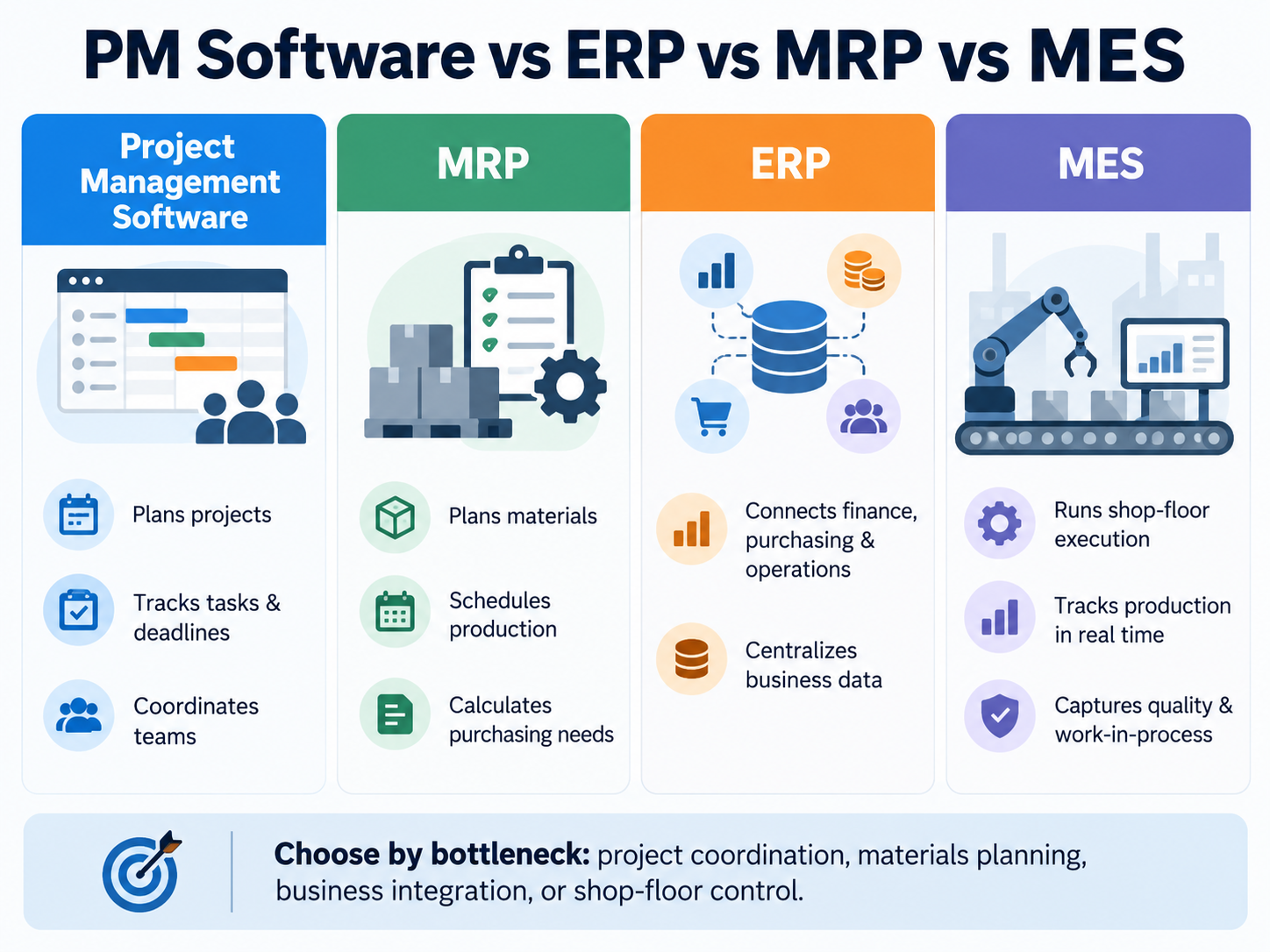
Project management software coordinates deliverables, owners, dates, dependencies, and resources across projects. MRP deals with the materials and production requirements needed to make goods. ERP connects wider business and operational records such as procurement, inventory, finance, and sometimes production. MES focuses on execution and visibility into manufacturing activity at or near the shop floor. These boundaries can overlap in integrated products, so vendors should show precisely what their system actually handles.
MRPeasy is a useful example of an MRP/manufacturing-management direction; Manufacturo is an example to examine in the manufacturing-execution category. Neither is a recommendation in this guide. Their role is to illustrate the limits of a project board.
A useful test is to identify where delays begin. If projects wait for engineering decisions and owners, investigate project or resource management. If they wait for stock, released jobs, or machine execution data, review production systems and their integration first.
How to Choose Software for Your Manufacturing Workflow
Start with the bottleneck, not the demo's longest feature list. A shortlist built around every possible feature often produces a demo that looks wonderful and a rollout that feels like a second job.
Use this bottleneck-to-shortlist map:
| Primary bottleneck | Software category | Initial candidates |
|---|---|---|
| Shared engineering capacity; conflicting projects | Resource / portfolio planning | Epicflow, Celoxis, Cora PPM |
| Approval delays; cross-team ownership | Cross-functional project execution | ProjectManager, Wrike, Zoho Projects |
| Quote-to-job handoffs; manufacturing operations | Job management / production systems | WORKPLAN; assess ERP/MRP/MES needs |
1. Match complexity and people. Consider make-to-order versus product-development workflows, the number of simultaneous projects, and which engineering, procurement, quality, or operations teams need access. Small teams may not need enterprise portfolio governance; multi-site portfolios need more than disconnected boards.
2. Map existing systems. List ERP, MRP, MES, CAD, PLM, and financial tools; identify which one owns each field. For integrations, determine whether data is read-only, synchronized, or periodically exported.
3. Inspect data readiness. Capacity and due-date tools depend on people supplying usable estimates, availability, and progress updates. An impressive predictive chart built from unreliable inputs is still unreliable—just with nicer colors.
4. Budget the full implementation. Include required-tier licenses, integrations, setup, training, administration, and upgrades. Require a written scope for quote-based products.
Bring the same short script to every vendor demonstration: “Show this project with our engineering roles, a late supplier, a drawing revision, and an approval delay. What happens to the schedule? Which system owns the resulting changes? Which features in this demo are included in the price?” If the vendor cannot show your workflow, you do not yet have a buying answer.
Frequently Asked Questions
What is manufacturing project management software?
It is software used to plan and coordinate project work in a manufacturing environment: tasks, milestones, dependencies, engineering resources, reporting, or—in some specialized products—manufacturing jobs. The label covers several overlapping categories, so the exact workflow matters more than the marketing name.
Is project management software the same as manufacturing ERP?
No. Project tools coordinate project delivery; ERP manages a wider range of business and operational processes. A manufacturer may use both, or choose a system that combines some functions. Confirm the actual system boundaries before purchasing.
Is general-purpose project management software for manufacturing enough?
Often, for engineering changes, installations, product launches, and collaboration. They are generally not substitutes for material planning or shop-floor execution.
When should a company consider specialist resource-planning software?
When several projects compete for the same scarce engineers or technical resources, causing uncertain commitments and recurring schedule conflicts. The company also needs sufficient data discipline to maintain dependable workload and progress records.
What should buyers verify during a demonstration?
Test a representative, nonconfidential scenario; confirm tier restrictions, integration ownership, and rollout requirements.
Conclusion
The decision rule is simple: identify the manufacturing workflow and operational bottleneck first; pick the software category second; compare vendors third. Shared engineering capacity calls for one kind of planning, cross-team delivery for another, and manufacturing orders may require a job-management, ERP, or MES solution.
Shortlist two or three products from the right category. Request demonstrations built around realistic work, the tools you already own, and the actual plan you would pay for. Choose the system that addresses the bottleneck rather than only making it more visible.