A small business shouldn’t need a project manager just to manage its project management software.
And yet here we are. Someone on the team discovers a tool on a Tuesday, builds a magnificent system of statuses, tags, and color codes by Wednesday, and by the following month half the team has quietly returned to sticky notes and “hey, quick question” texts.
If you run a team of roughly three to ten people and you’re hunting for the best task management software for small business, the question isn’t which tool has the most features. It’s which one keeps your team organized without becoming a second job. This guide covers Todoist, ClickUp, Trello, Asana, monday.com, and Zoho Projects, and focuses on the daily experience of a small team rather than the full machinery of project management. (For that bigger picture, see our guide to the best project management software.)
Quick Answer
Lightweight recurring work points toward the simpler tools. Work with handoffs and shared accountability points toward the more structured ones. Teams that enjoy configuring things can get a lot out of the flexible ones, as long as someone owns the setup. For recurring checklists and reminders, start with Todoist. For a visual handoff board, look at Trello. For more structured accountability, consider Asana. If you need configurable automation, compare ClickUp with monday.com Standard (rather than its Basic tier). Teams evaluating a broader project workflow on a smaller software budget should also consider Zoho Projects. These are scenario-based editorial recommendations, not outcomes of first-hand testing.
Affiliate Disclosure: This article may contain affiliate links. If you purchase through these links, we may earn a commission. Our recommendations are based on independent editorial research and are not determined by commissions.
Best Task Management Software at a Glance
| Product | Best-fit workflow | Main trade-off | Selected annual-billing plan |
|---|---|---|---|
| Todoist | Lightweight recurring tasks | Limited fit for complex multi-stage coordination | Business – $8/user/month |
| ClickUp | Configurable workflows and automation | Setup and upkeep require ownership | Unlimited – $7/user/month; AI may cost extra |
| Trello | Visual stage-by-stage task tracking | Dense boards need careful upkeep | Standard – $5/user/month |
| Asana | Team handoffs and responsibility tracking | More structure than simple to-dos require | Starter – $10.99/user/month |
| monday.com | Structured workflows with automation | Seat-bucket billing; automation begins on Standard | Standard – $12/seat/month; minimum 3 |
| Zoho Projects | Lower-cost tasks plus project tracking | More project-oriented than a pure checklist | Premium – $4/user/month |
These are selected plans for common small-team workflows, not equivalent feature bundles or a price ranking. Notable differences: Trello Standard favors boards/checklists; Asana Starter includes timelines and dashboards; monday.com Standard adds automations (subject to action limits); ClickUp Unlimited includes automation with plan limits. Prices exclude tax and extras.
How We Evaluated These Tools
What this is. A research-based comparison. MartechChoice did not personally test these products, and nothing here should be read as hands-on testing. Published feature and price descriptions are checked against linked official documentation; we have not independently benchmarked usability or performance.
Evidence we draw on. We use official plan and product documentation plus anonymized, user-supplied community material: one Todoist reflection, a written ClickUp workflow example with screenshots, and a ClickUp-to-Linear comparison video. The community materials have not been independently authenticated, so they are individual illustrations, not representative survey data.
What we looked at. Six questions guide every review:
- How easily can you create, assign, and date tasks, and see who owns what?
- How well does the tool handle recurring tasks, reminders, and everyday use?
- Can the team collaborate and see progress without a meeting?
- How much setup time, learning curve, and ongoing administration does it demand?
- Does automation save work, and what restrictions apply?
- What does it cost a 3-, 5-, and 10-person team?
What we don’t do. We assign no numerical scores, claim no measured productivity gains, and do not present research-based assessments as first-hand tests.
The Best Task Management Tools for Small Businesses
Todoist
Best for: Teams whose work is mostly a steady stream of individual tasks and recurring chores.
Todoist emphasizes quick task capture, due dates, priorities, reminders and recurring tasks. Its Business plan adds a shared team workspace, project folders, activity logs, templates and team roles. Those are practical foundations for a team that organizes repeatable work rather than running complex portfolios. Todoist plans.
In an anonymized user reflection supplied to MartechChoice, the writer describes organizing tasks by context-routine work, active work and things to revisit later-rather than assigning urgency labels to everything. They also use labels to separate actionable items from tasks waiting on others. That’s a workflow idea, not proof that Todoist uniquely reduces decision fatigue. It suggests one useful adoption test: can your team distinguish ready to do from waiting on someone without another status meeting?
Trade-offs. If your work depends on workload planning, multi-project dependencies or heavier reporting, compare specialized project platforms before committing.
Pricing. Business is $8/user/month billed annually ($96 per user/year), before tax. Official pricing.
Decision cue: If work repeatedly changes hands across several roles, compare Asana before settling on Todoist.
ClickUp
Best for: Teams that want to shape workflows and automation around how they already work, and have someone willing to own that shaping.
A flexible workspace can be brilliant-right up until someone has to maintain the ten clever rules nobody remembers creating. That’s the tension with any highly configurable tool, and it’s the question to ask about ClickUp. The flexibility is the appeal, and the maintenance is the cost.
To assess recurring work, test a repeated task or workflow rule in your own workspace and count the steps to maintain it. One community case shared with MartechChoice describes a content creator building a publishing board and setting a rule intended to create a follow-up review task after publication. The writer also describes configuring a ClickUp Super Agent, finding its entry point confusing, and watching AI usage costs. Screenshots show parts of the configuration; they do not independently establish a measured productivity gain. A separate community video compares ClickUp and Linear during a claimed migration. Its browser-network footage is not a controlled performance benchmark. Both sources are anecdotal and unverified, and neither is reproduced as an image or embedded video here.
Trade-offs. The Unlimited plan is $7/user/month billed annually ($10 monthly billing). ClickUp lists customization and integrations on this tier; AI capabilities and consumption-based usage must be checked separately at purchase. The Business tier, listed at $12/user/month billed annually, includes additional automation capacity. Official pricing.
Decision cue: Assign one team member to own the setup; if nobody can take that role, trial a simpler tool first.
Trello
Best for: Work that moves through visible stages, such as requested, in progress, waiting, done.
Boards, cards, assignees, due dates, checklists and automation support a visual handoff routine. Repeating tasks can be handled through automation, subject to the plan and its command limits. Trello Standard adds unlimited boards and advanced checklists. Those features are straightforward to explain, although real-life adoption depends on how the team maintains the board. Official plans.
Trade-offs. With a small queue, moving cards across a board is intuitive. At higher volume, cards are easier to lose in the crowd unless the team maintains the board. If your team needs timeline or sophisticated cross-project views, compare Trello’s higher tiers and structured alternatives.
Pricing. Standard is $5/user/month billed annually ($6 when billed monthly). Official pricing.
Decision cue: Choose Trello when the board is the workflow; investigate another tier or platform if dependencies span multiple projects.
Asana
Best for: Small teams where clear responsibility matters: who owns it, when it’s due, what’s blocked.
Asana Starter includes task coordination, timeline/Gantt views, reporting dashboards, forms and automations. Team members can assign work and monitor due dates; recurring tasks are also supported, with configuration to confirm for your workflow. That makes it a reasonable candidate for work crossing roles, such as a campaign passed between a marketer, designer and freelancer. Official pricing and feature list.
Trade-offs. Asana gives each handoff a clear home, a useful advantage for cross-role work. If the team only shares a weekly checklist, that structure may add steps without enough payoff. Confirm plan-specific features before buying.
Pricing. Starter is $10.99/user/month billed annually. Official pricing.
Decision cue: Asana is easiest to justify when the value of shared responsibility outweighs the additional structure.
monday.com
Best for: Teams that like seeing work as visual rows with owners, dates and statuses, plus basic workflow automation.
monday work management organizes work into boards with items, owners, statuses and dates. Standard adds automation actions. A spreadsheet-minded team may enjoy the layout, but the ease of onboarding remains something to test with actual staff-not a result measured here. Official work management plans.
Trade-offs. monday.com uses seat-bucket pricing starting at three seats. Standard is $12/seat/month billed annually and offers automations with plan-specific action limits; Basic is $9 but is not the comparison tier for the automation use case. A four-person team ordinarily buys five seats. Decide how much board setup the team is willing to maintain. Official pricing; seat billing explanation.
Decision cue: The team that only wants a shared weekly checklist may be buying an entire control room to switch on one light.
Zoho Projects
Best for: Small businesses already using other Zoho products, or considering a wider suite rather than a standalone task tool.
Zoho Projects Premium includes unlimited projects, customizable views and statuses, task blueprints, time logs, and workflow actions. For repeated work, assess whether task templates or automation fit your cadence; the application is more project-centric than a simple recurring-task list. It is more project-oriented than a basic recurring checklist and merits consideration when tasks connect to broader operations. The quality of any particular integration remains outside this desk-based comparison. Official pricing.
Trade-offs. Zoho Projects makes more sense when teams manage tasks inside projects, not just an inbox of small reminders. Outside the Zoho ecosystem, weigh those project features against the simplicity of a dedicated list. Its comparatively low entry price does not establish lower overall ownership cost.
Pricing. Premium is $4/user/month billed annually. Official pricing.
Decision cue: Start with Zoho Projects if its project workflows or existing ecosystem fit; otherwise compare the time needed to configure it with a lighter task app.
When Does a Simple Task Manager Beat a Full Project Management Platform?
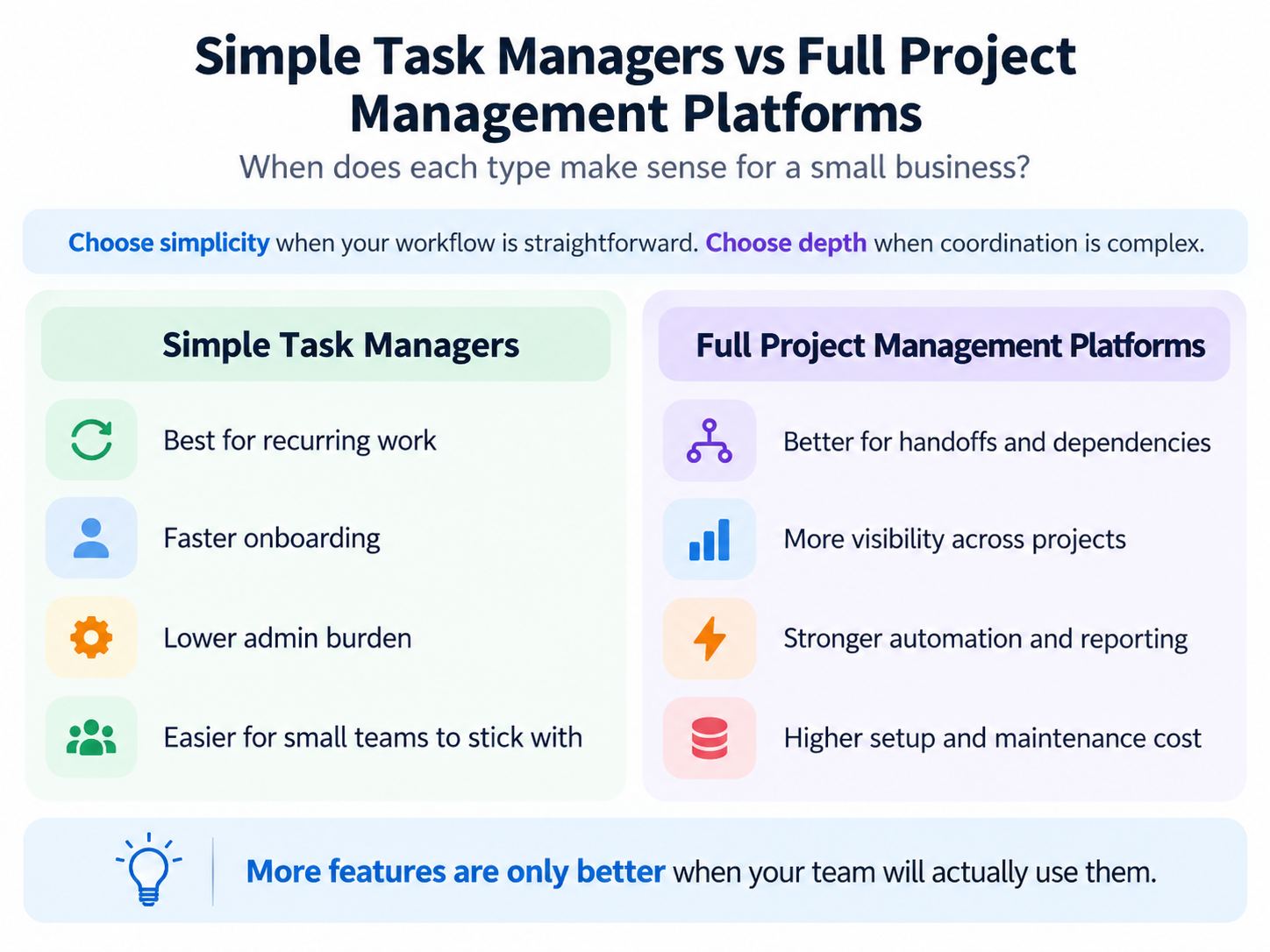
A task manager answers what needs doing, and by whom? A project management platform answers how do all these pieces fit together over time? Small businesses often need the first and get sold the second.
A simple task manager usually wins when:
- Work is recurring or made of independent tasks.
- Projects are short with few steps.
- Nobody wants training sessions or a dedicated administrator.
A fuller platform earns its complexity when:
- Tasks depend on other tasks.
- Work passes between several people.
- You need visibility across projects, not just within one.
Every extra capability can create setup and maintenance work: someone must configure it, teach it, and keep it tidy. In the supplied ClickUp case, a creator configured a rule connecting publication and post-publication review tasks. That’s a concrete type of workflow to test-not evidence that all teams save time. Build one automation around a genuinely repeated step before adding more.
For deeper project planning features, see our best project management software guide.
What Will Task Management Software Really Cost Your Team?
A low subscription price won’t rescue a tool your team stops opening after the first week.
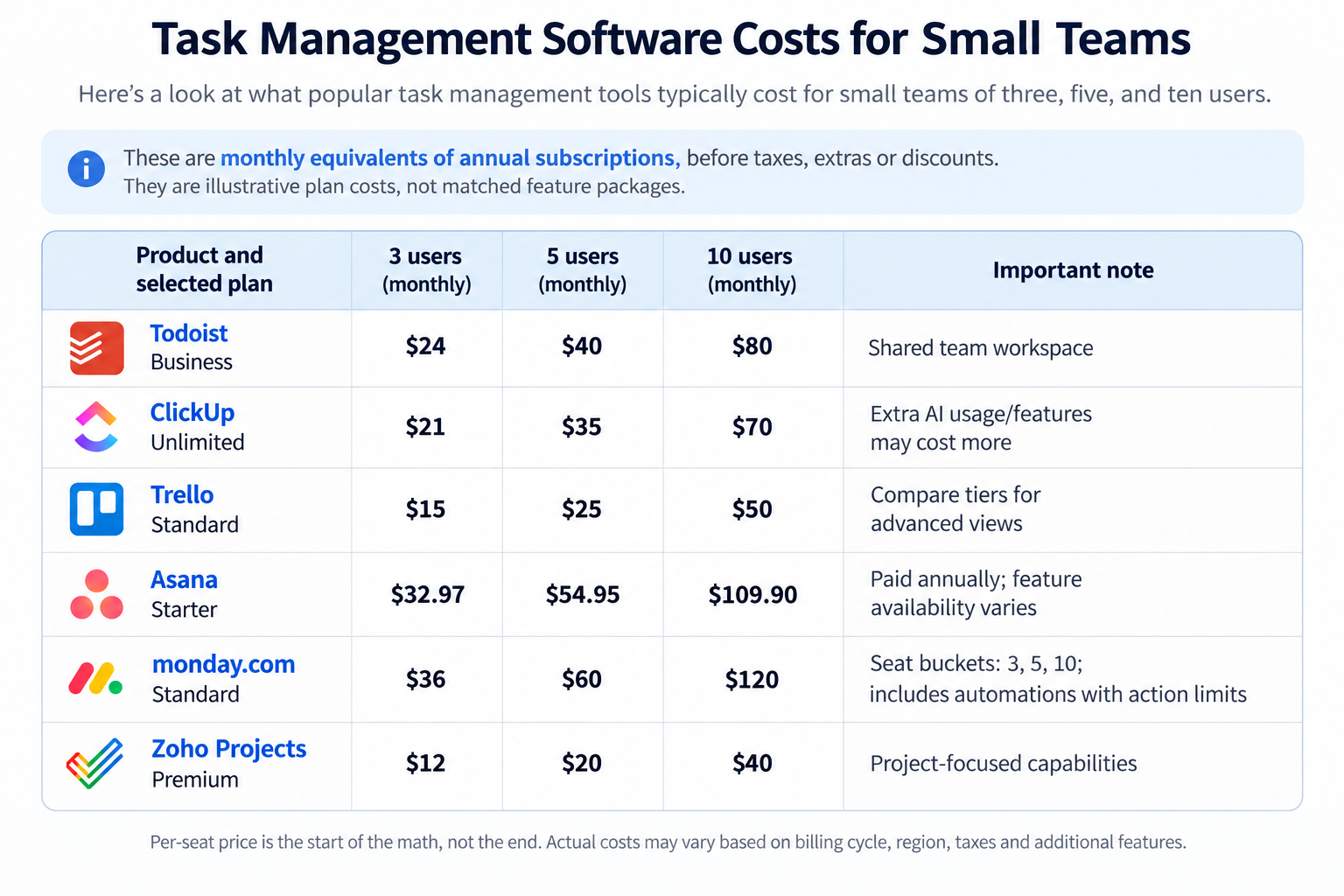
Per-seat price is the start of the math, not the end. The figures below are monthly equivalents of annual subscriptions, before taxes, extras or discounts. They are illustrative plan costs, not matched feature packages.
| Product and selected plan | 3 users | 5 users | 10 users | Important note |
|---|---|---|---|---|
| Todoist Business | $24 | $40 | $80 | Shared team workspace |
| ClickUp Unlimited | $21 | $35 | $70 | Extra AI usage/features may cost more |
| Trello Standard | $15 | $25 | $50 | Compare tiers for advanced views |
| Asana Starter | $32.97 | $54.95 | $109.90 | Paid annually; feature availability varies |
| monday.com Standard | $36 | $60 | $120 | Seat buckets: 3, 5, 10; includes automations with action limits |
| Zoho Projects Premium | $12 | $20 | $40 | Project-focused capabilities |
Billing example: monday.com Standard at $12 per seat per month means three paid seats cost $36/month equivalent, while a four-person team moves into a five-seat bucket at $60/month equivalent. The invoice is typically billed annually. monday.com seat rules.
What to check before you buy:
- Seat minimums, where a plan requires a set number of users.
- Monthly versus annual billing, and whether the lower price requires a yearly commitment.
- Automation and AI add-ons, which may be priced separately or limited by plan.
- Plan gating, meaning whether the feature you need is on the plan you’re pricing.
- Time cost. Setup, training, and cleanup hours don’t appear on an invoice but they’re real.
Do not interpret these prices as equivalent feature bundles. Decide which plan actually includes your must-have workflows before comparing costs.
How to Choose the Right Tool for Your Small Business
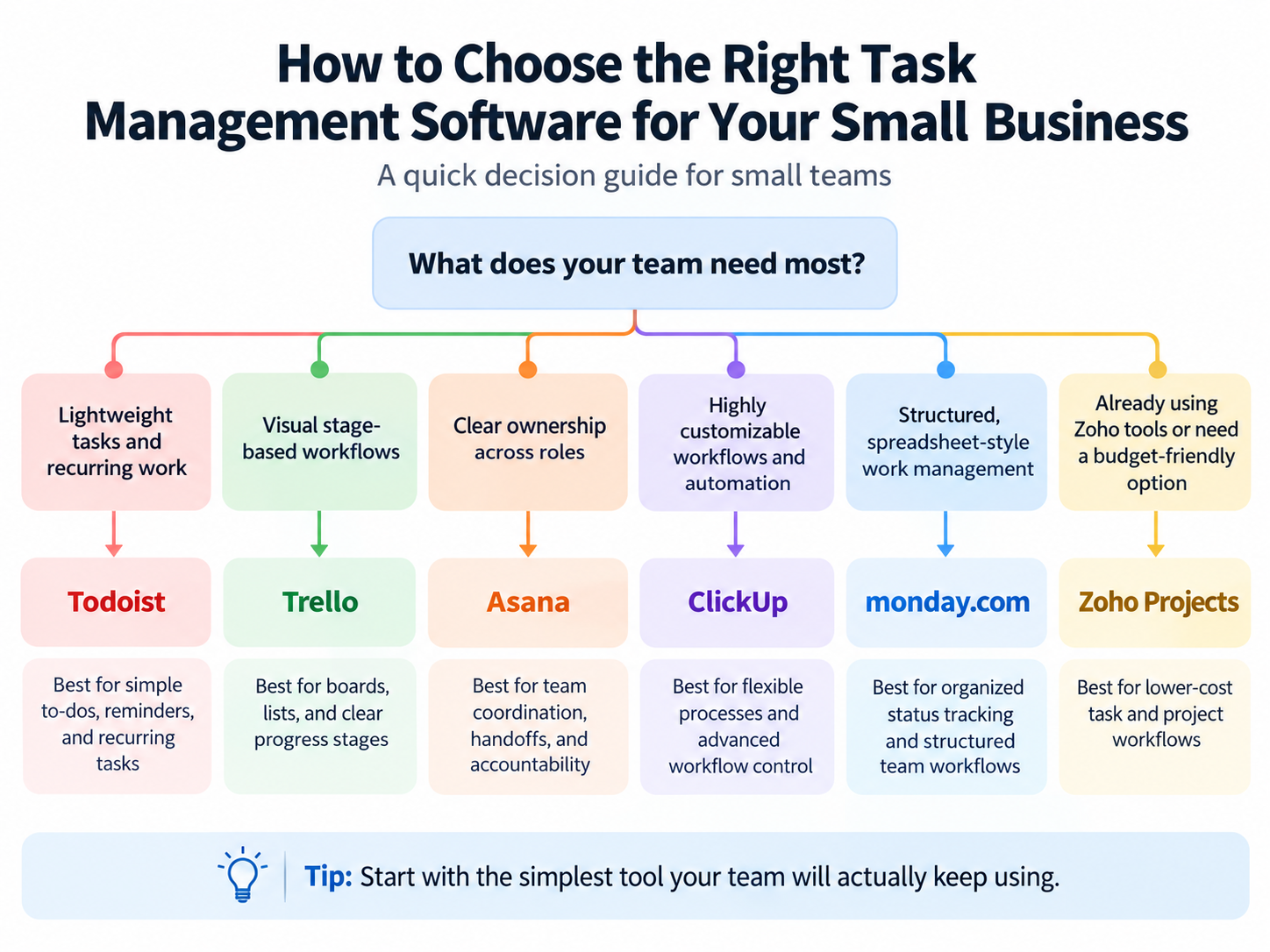
A feature checklist won’t tell you whether a busy teammate will update a task on Monday morning. Test that before you buy.
- Match the tool to how your team works. List-minded teams tend to stick with lists. Stage-minded teams tend to stick with boards.
- Name your non-negotiables. Recurring tasks? Assignees? A free tier? Decide before the demos start.
- Test onboarding with real work. Put in actual deadlines for a week and see whether people use it without being nagged.
- Estimate the upkeep. Ask who will maintain it and how many hours a month that realistically takes.
- Check the exit. Ask each vendor how exports work for your workspace and plan before importing critical business records.
Frequently Asked Questions
What is the best task management software for a small business?
Start with Todoist for lightweight recurring work, Trello for visual stages, or Asana for multi-person handoffs. ClickUp and monday.com suit businesses willing to configure more structured processes. These are scenario-based recommendations based on published features, not head-to-head hands-on tests.
Do small businesses need project management software?
Often a task manager is enough. Consider fuller project management when dependencies and cross-project visibility become daily problems.
Is there free task management software for small teams?
Yes. All six vendors advertise a free entry option, but team collaboration and limits differ: Todoist (Beginner and a free team starting point), ClickUp (Free Forever), Trello (free Workspace, collaborator limits), Asana (Personal), monday.com (Free, up to two seats), and Zoho Projects (Free, listed for up to five users on the current pricing page). Check the specific plan limits before choosing a free tier for a 3-10-person business.
How much does task management software cost per user?
The selected annually billed plans here range from $4/user/month (Zoho Projects Premium) to $12/seat/month (monday.com Standard). These are not the market-wide minimum or maximum prices. monday.com additionally uses seat buckets, and AI services can add charges.
Is Linear a good option for small businesses?
Linear is more naturally a candidate for software/product development teams than a general small-business task list. The community migration video is not enough to recommend a switch for most small-business teams.
Final Recommendations
No single tool wins for everyone, and this guide won’t pretend otherwise. Here is the scenario-based direction from published capabilities and the supplied user examples:
- You want the lowest friction: start with the simplest tool that covers your needs, likely Todoist or Trello.
- You need clear ownership across roles: look at Asana.
- You want to shape the tool around your process: consider ClickUp or monday.com, and assign someone to own the setup.
- You already run on Zoho: evaluate Zoho Projects first.
The most expensive task manager isn’t the one with the highest price. It’s the one your team abandons in week three, right before someone asks, “Wait, where did we write that down?”