A development team tracks its hard-cost budget in one spreadsheet, change orders in email, and permit deadlines on a shared calendar. The lender wants a draw package by Friday. The owner wants to know how three active projects compare. None of this is a task-list problem, and a generic to-do app will not solve it.
Real estate project management covers budgets, forecasts, approvals, vendors, contractors, documents, permits, and capital, often across several developments at once. Some teams need software built for development finance and cost control. Others run construction-heavy projects and need field-level tools. Many, especially smaller teams and those managing internal projects, are served well enough by a flexible general platform.
This guide sorts seven products by software type first, then by workflow. It covers project management for development, construction, and capital projects. It does not cover property management software for rent collection, tenant screening, or leasing.
Quick Picks
Need: Commercial real estate development
Pick: Northspyre
Software Type: Real-estate-specific
Need: Owner and developer workflows
Pick: Ingenious.Build
Software Type: Real estate development / construction
Need: Construction-heavy projects
Pick: Procore
Software Type: Construction-specific
Need: Highly customized workflows
Pick: Quickbase
Software Type: Flexible no-code / work management
Need: Flexible general PM
Pick: SmartSuite
Software Type: General work management
Need: Google Workspace teams
Pick: Kanbanchi
Software Type: General project management
Need: Budget-conscious general PM
Pick: Zoho Projects
Software Type: General project management
“Best for” labels describe fit for a use case, not an objective ranking.
Real Estate-Specific Software vs General Project Management Software
This is the main decision. Most other choices follow from it.
Real-Estate-Specific Platforms
These tools are built around development and capital projects. They address the financial layer of real estate work as well as the schedule.
Best suited for:
- Developers and owner’s representatives
- Capital-heavy projects
- Teams managing several developments at once
- Teams needing detailed budgeting and forecasting
- Teams needing portfolio-level reporting
Typical advantages:
- Workflows that reflect the development lifecycle
- Cost and capital visibility
- Portfolio reporting
- Financial oversight tied to project activity
Typical limitations:
- Higher cost
- More involved implementation
- Possibly more than a small team needs
- Pricing that is often sales-led
Some products in this space lean toward construction delivery rather than development finance. Procore remains construction-centric, but its owner-focused products extend into capital planning, portfolio visibility, and project financial controls. Ingenious.Build sits closer to the middle, covering owner-side finance and construction workflows in one platform.
General Project Management Software
General platforms handle scheduling, collaboration, and file sharing without assuming a particular industry.
Best suited for:
- Smaller teams
- Lighter project workflows
- Brokers and operations teams
- Marketing teams inside real estate firms
- Internal real estate projects
Typical advantages:
- Lower cost
- Faster onboarding
- Broad integrations
- Simpler interfaces
- Flexible workflows
Typical limitations:
- Limited real-estate-specific financial functionality
- Weaker capital management
- Weaker development forecasting
- Less specialized portfolio reporting
Flexible work management platforms such as Quickbase and SmartSuite sit between the two. They can be configured for real estate workflows, but the configuration is the team’s job. That gives you control, and it also gives you a build project.
A practical test: if a wrong number means a lender, investor, or budget problem, lean toward a specialized platform. If a missed deadline means an annoyed colleague, a general platform may be sufficient.
If a general-purpose platform fits your needs, our project management software comparison can help you evaluate options beyond real-estate-specific systems.
Which Type Should You Choose?
- Workflow: Development finance and forecasting → Software Category: Real-estate-specific → Pick: Northspyre
- Workflow: Owner-side development and construction workflows → Software Category: Real estate development / construction → Pick: Ingenious.Build
- Workflow: Construction delivery and field coordination → Software Category: Construction-specific → Pick: Procore
- Workflow: Highly customized internal workflows → Software Category: Flexible no-code → Pick: Quickbase
- Workflow: Flexible operational and project tracking → Software Category: General work management → Pick: SmartSuite
- Workflow: Google Workspace-centered small teams → Software Category: General project management → Pick: Kanbanchi
- Workflow: Low-cost general project management → Software Category: General project management → Pick: Zoho Projects
Best Real Estate Project Management Software
Northspyre: Real-Estate-Specific Development Platform
Software type: Real-estate-specific.
Northspyre is purpose-built for commercial real estate development, and that focus shapes the product. It centers on the money side of a project: budget management, forecasting, vendor management, draw requests, approvals, and document management, with accounting integrations that connect cost data to the financial system of record. It also includes AI-related functionality.
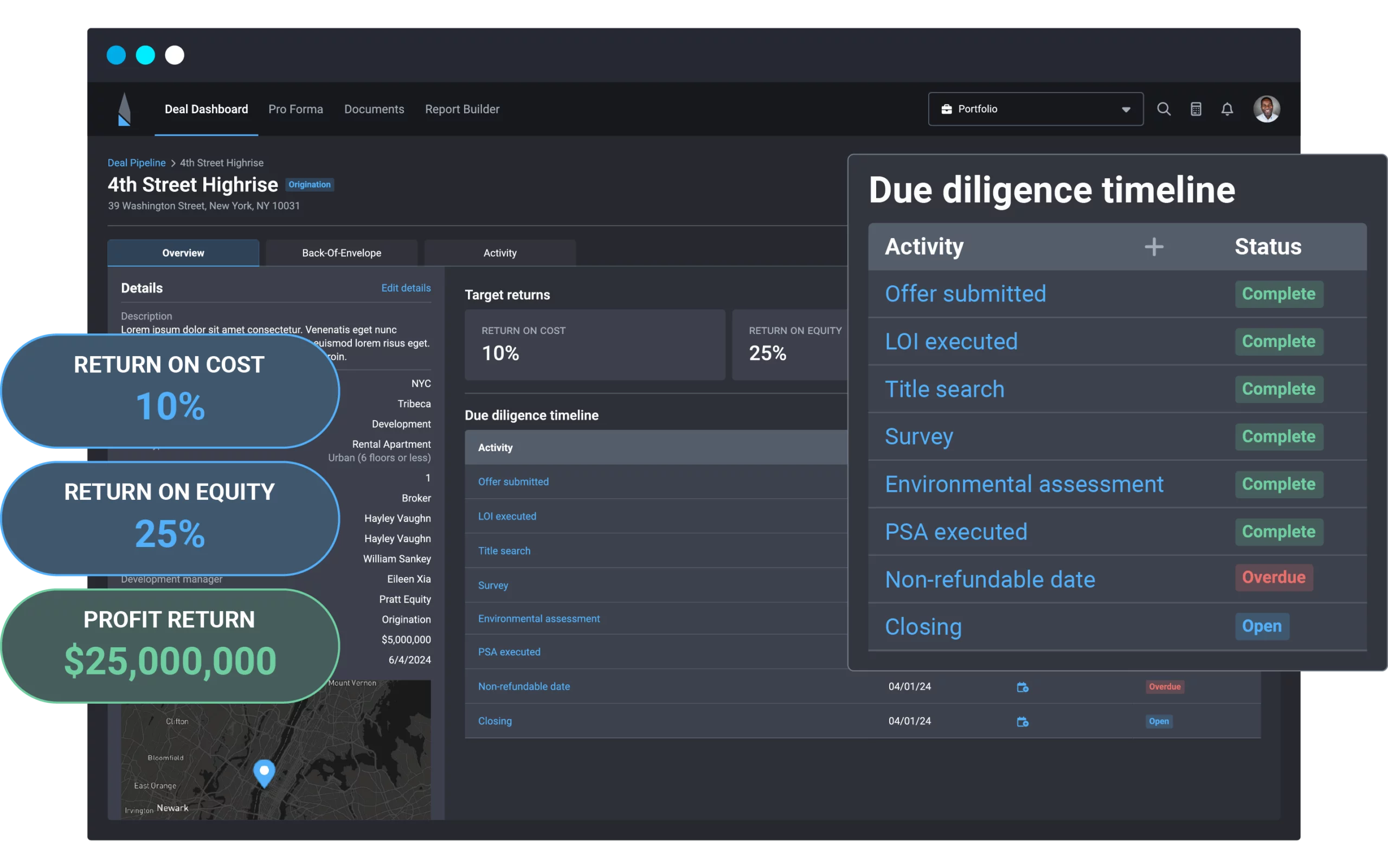
Reporting is a major reason to put it on a shortlist. Portfolio reporting and lender and investor reporting are built in, so a team managing several developments can produce consistent figures for outside stakeholders without assembling them by hand. Draw requests illustrate the workflow fit. Most general tools have no concept of them, while Northspyre treats them as a routine part of a development project.
The trade-off is scope and commitment. A platform specialized around development finance is likely more than a small team or a purely internal project needs, and implementation takes effort. Pricing is sales-led, so a quote requires contacting the company. Annual contracts are commonly used, which makes this a bigger decision than signing up for a monthly tool.
For work dominated by field coordination or simple task tracking, a construction platform or general tool is better aligned.
Ingenious.Build: Owner-Side Finance and Construction in One Platform
Software type: Real estate development / construction platform.
Ingenious.Build is worth comparing against both Northspyre and Procore, because it covers ground associated with each. On the financial side, it supports budgets, commitments, forecasting, change orders, invoices, approvals, and capital planning, with portfolio views and dashboards that roll project data up for leadership. On the construction side, it handles RFIs, submittals, schedules, and document management. ERP integrations connect it to accounting systems.
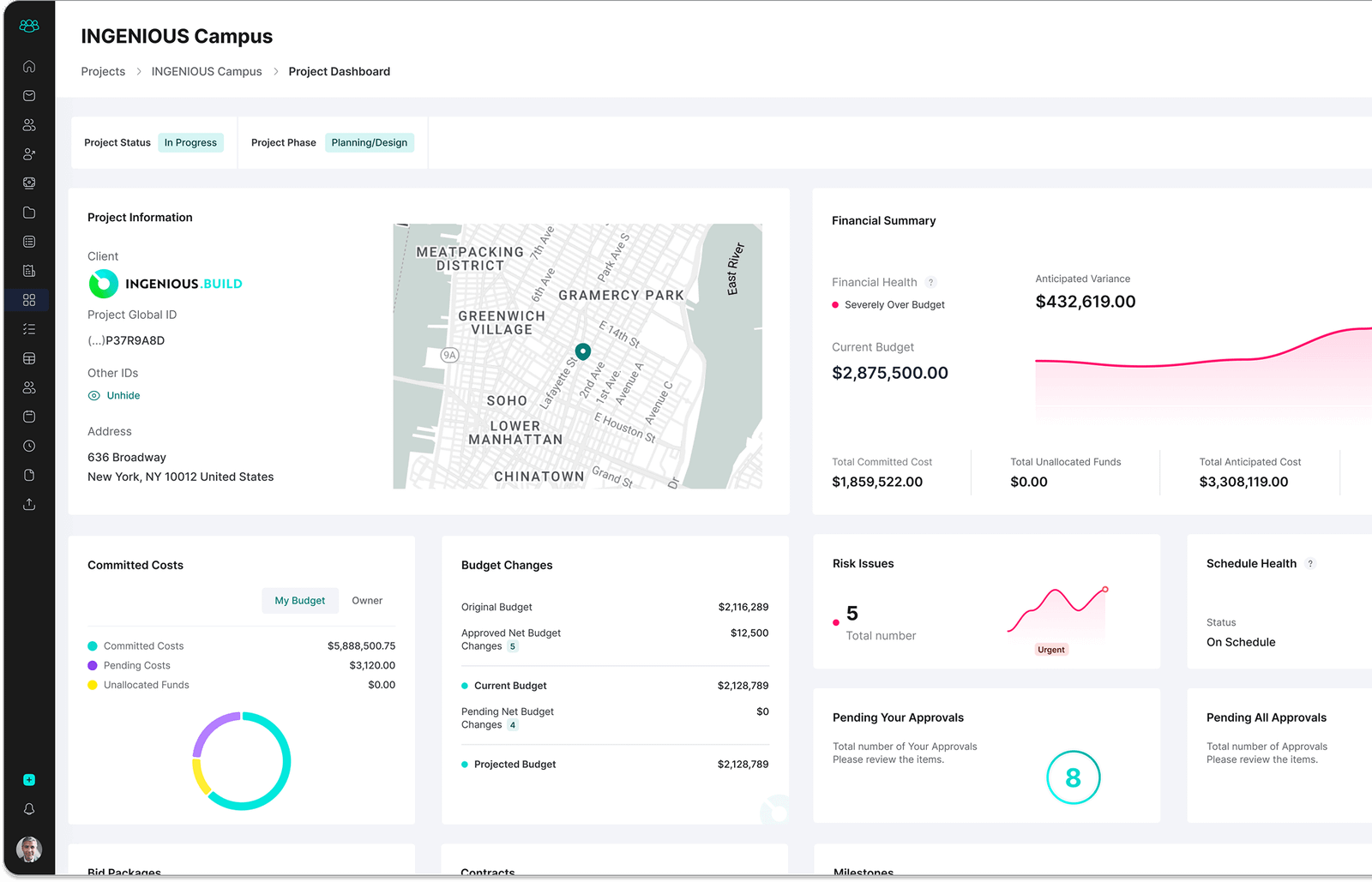
The audience is broad: owners, developers, owner’s representatives, general contractors, architects, engineers, and specialty trades. For an owner-side team, that means the parties on the other side of the project can work in the same system rather than in a separate contractor tool.
Pricing is a distinguishing feature. It is transparent and per-seat, with a pricing calculator, which is unusual in a category where quotes are the norm. Projects are unlimited, and external collaborators can be added without standard paid-seat requirements. For owners who bring in many outside parties, that changes the cost math.
It remains a specialized platform rather than a general work management tool, so mostly internal, non-construction work fits a flexible platform more naturally. Organizations with a deeply embedded construction system for field operations should also weigh the cost of switching.
Procore: Construction Management With Owner-Focused Products
Software type: Construction-specific.
Many real estate teams are construction-heavy, which is why Procore belongs here. It is a construction-centric platform that supports owners as well as contractors, with field workflows, project financials, cost controls, contracts, invoices, and change orders covering the build itself. It also supports accounting and ERP integrations.
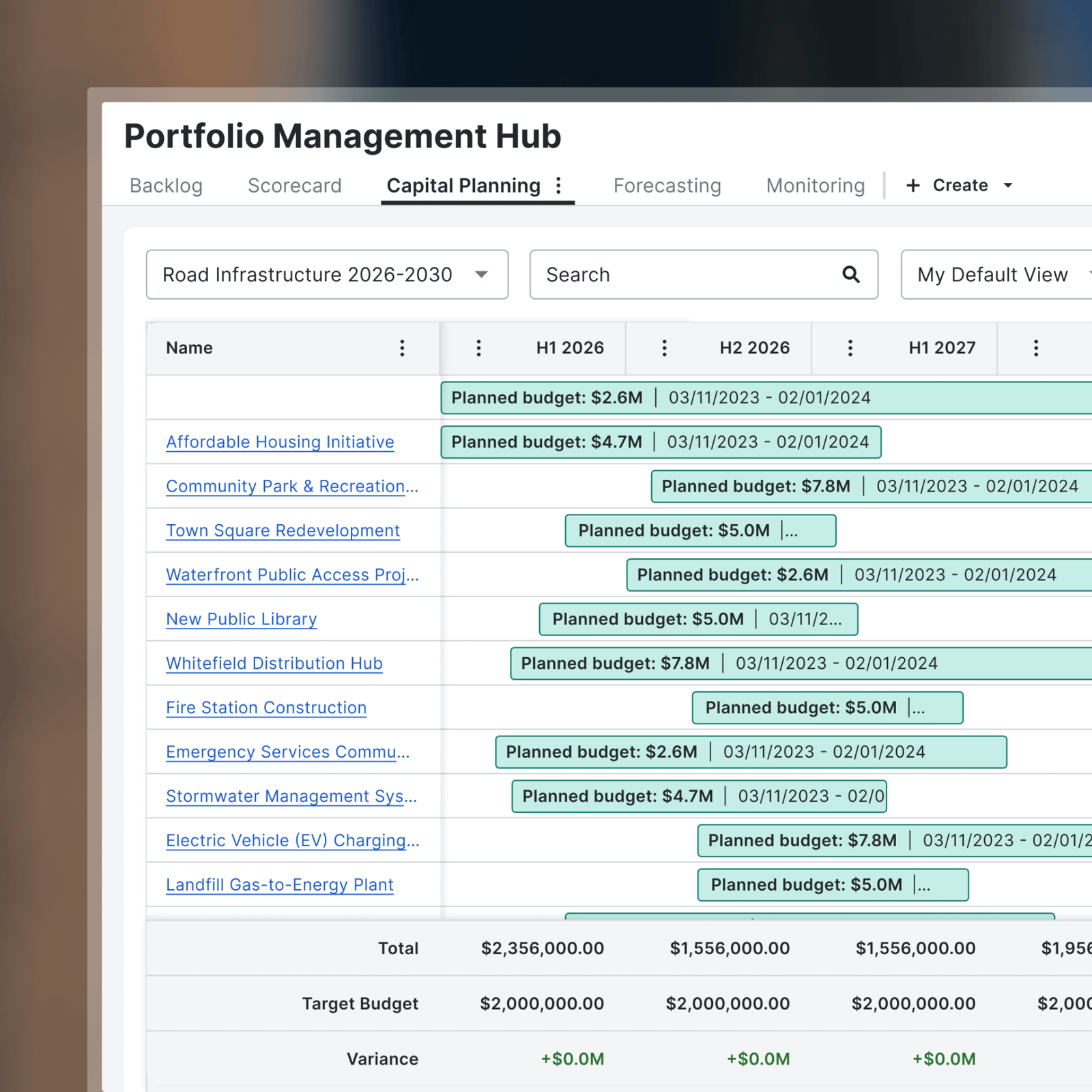
A common assumption is that a construction platform stops at the job site. Procore remains construction-centric, but its owner-focused products extend into capital planning, portfolio visibility, and project financial controls. Owners running large construction programs can use it for more than field coordination.
It is still not a pure real estate development finance platform. Its center of gravity is delivering the build. If the main challenge is development budgeting, forecasting, and investor or lender reporting, compare it directly with Northspyre and Ingenious.Build.
Owner pricing can scale with annual construction volume. That may suit organizations with a steady, significant program, and it is harder to justify for occasional or small projects. Confirm current details with Procore.
Quickbase: When the Workflow Doesn’t Match Any Template
Software type: Flexible no-code / work management platform.
Quickbase is not real-estate-specific, and its appeal comes from that. It is a no-code workflow platform where a team builds its own applications. A real estate organization with an unusual capital-request process, a custom approval chain, or reporting that no off-the-shelf tool matches can model those processes directly.
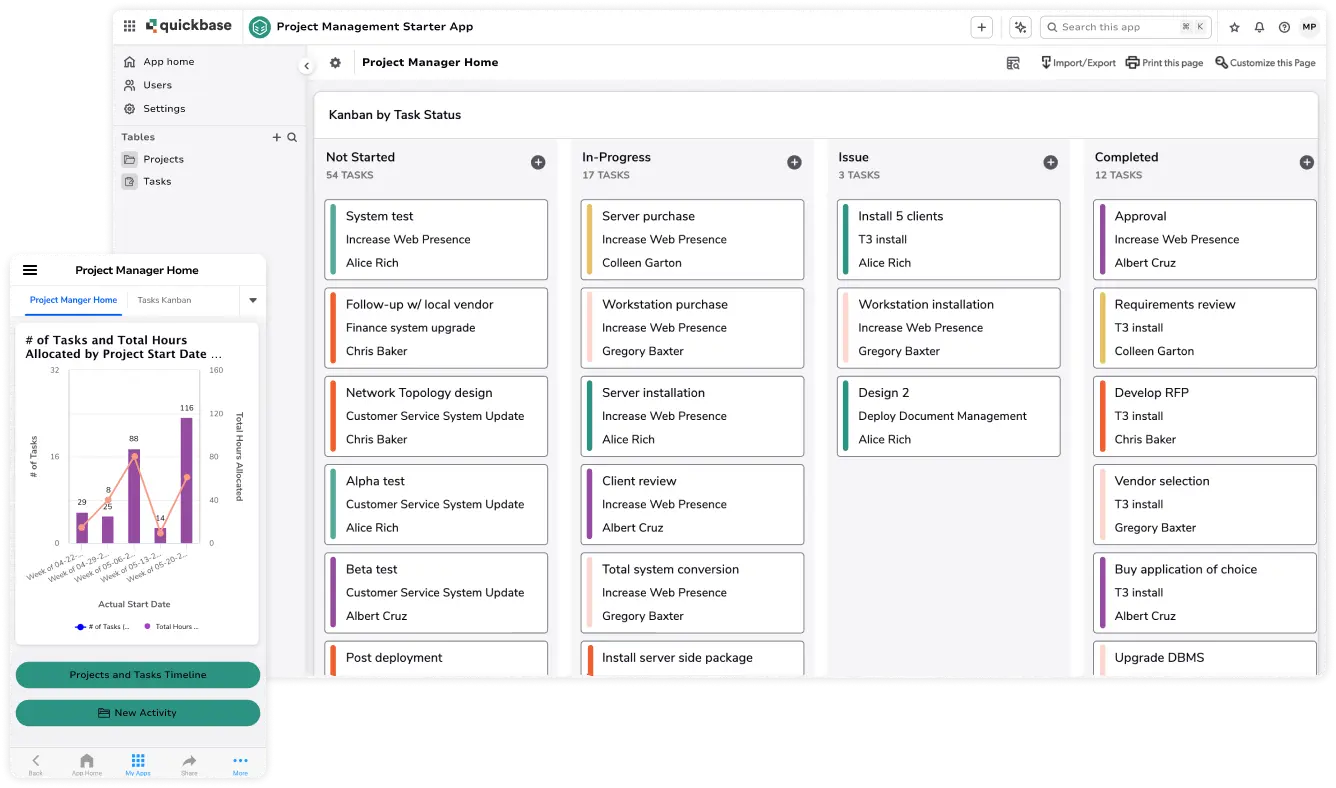
The platform supports dashboards, reports, workflow automation, and integrations. Gantt functionality is available at the Business level.
The cost of that flexibility is effort. Nothing arrives pre-built for development finance, so budgeting logic, vendor tracking, and portfolio roll-ups are designed and maintained by the team. That suits organizations with internal builders or an implementation partner, and it is a poor match for anyone expecting to switch it on and go.
Pricing is per user. The Team plan starts at $35 per user per month when billed annually, and the Business plan starts at $55 per user per month when billed annually. A platform minimum applies, so the effective starting cost for a small team is higher than the per-user figure suggests. A 30-day free trial gives a team time to judge whether a custom build is realistic before committing.
SmartSuite: Flexible Structure for Varied Real Estate Work
Software type: General work management.
SmartSuite fits the stage where a basic task tool has become too thin but a development platform would be excessive. It is a general work management platform, not real-estate-specific software, and it handles varied work well: renovation trackers, capital improvement lists, vendor records, and internal projects that share a workspace.
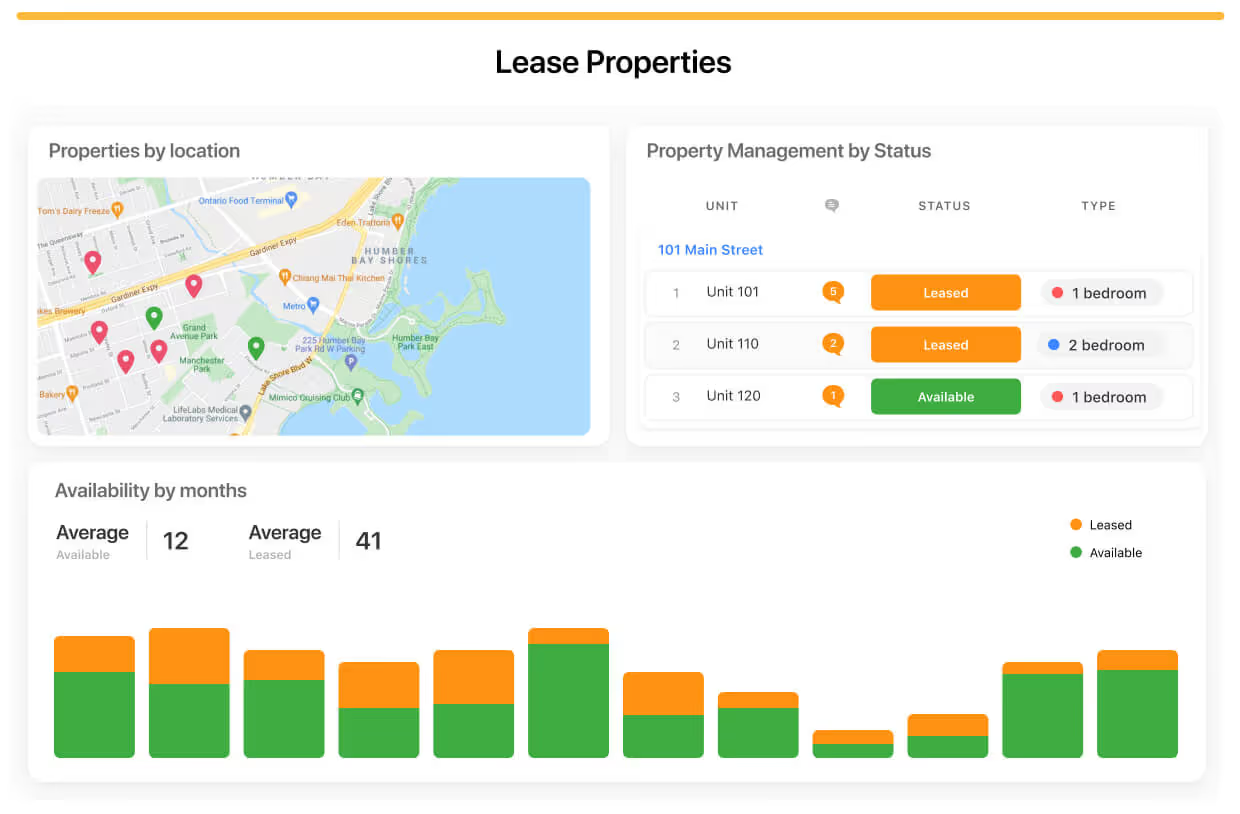
The feature set is broad for the price. It includes dashboards, automations, and custom workflows, along with Gantt and timeline views, resource allocation, and time tracking. Permissions and API access are supported, which helps when several people or external parties need controlled access.
Development finance is outside its scope. Forecasting, capital management, and lender or investor reporting would have to be built inside the platform or handled in separate tools.
Pricing is per seat. The Team plan is $15 per seat per month billed annually, or $20 billed monthly. The Professional plan is $32 per seat per month billed annually, or $36 monthly. A 14-day free trial is available, and Enterprise pricing is custom. There is no permanent free plan.
Kanbanchi: Project Tracking Inside Google Workspace
Software type: General project management.
Kanbanchi fits a narrow but common situation: a small real estate or brokerage operations team that already works in Google Workspace and wants project tracking close to it. It is designed for Google Workspace and Microsoft 365 environments and integrates with Google Drive and Google Calendar, so files and dates are not duplicated in a separate system.
The feature set goes beyond a basic board. Gantt charts, task dependencies, and time tracking are available, and workload views are available depending on the plan. That covers renovation schedules, listing marketing campaigns, and internal initiatives with a few moving parts.
It is not designed for real estate finance. Capital management, development forecasting, and portfolio-level financial reporting are outside its scope, and dedicated vendor or contractor management is not a confirmed strength. Complex development or construction projects may become limiting quickly.
Kanbanchi uses tiered paid pricing. Check the current pricing page for plan details, since features such as workload views vary by plan. Outside Google Workspace or Microsoft 365 environments, much of its advantage disappears.
Zoho Projects: A Low-Cost Starting Point
Software type: General project management.
Zoho Projects is a general project management platform, not a real estate product. Its practical draw for cost-conscious teams is a free plan alongside a fuller feature set on paid tiers.
The free plan supports up to 3 users and 1 project, with 5 GB of storage. That is enough to evaluate the platform or run one small internal project, and it will not cover a team managing several projects at once. Beyond the free plan, Gantt functionality, project budgets, and timesheets are supported. Billing functionality can integrate with Zoho Invoice or Zoho Books, which helps when time is billed or project costs are tracked against a budget. Confirm current paid-tier pricing on Zoho’s pricing page.
Project budget support is a real advantage over many basic task tools, but it is not development finance. Capital management, forecasting, and specialized portfolio reporting are outside what the product is built for, and vendor and contractor workflows will likely need workarounds. Teams already using other Zoho products may find the integration path easier.
Zoho Projects is a reasonable fit for renovation tracking and internal initiatives. It is a poor fit for RFI and submittal workflows or development forecasting.
Comparison Table
| Software | Best For | Software Type | Budget / Cost | Vendor / Contractor | Documents | Portfolio View | Pricing |
|---|---|---|---|---|---|---|---|
| Northspyre | Commercial real estate development | Real-estate-specific | Strong | Available | Available | Available | Sales-led |
| Ingenious.Build | Owner and developer workflows | Development / construction | Strong | Available | Available | Available | Per-seat, calculator |
| Procore | Construction-heavy projects | Construction-specific | Available | Available | Available | Available through owner products | Varies; scales with volume |
| Quickbase | Highly customized workflows | Flexible no-code | Configurable | Configurable | Configurable | Configurable | Per-user; platform minimum |
| SmartSuite | Flexible general PM | General work management | Not industry-specific | Configurable | Configurable | Configurable | Per-seat; 14-day trial |
| Kanbanchi | Google Workspace teams | General project management | Not industry-specific | Not confirmed | Google Drive integration | Not confirmed | Tiered paid plans |
| Zoho Projects | Budget-conscious general PM | General project management | Project budgets | Not confirmed | Varies by plan | Not confirmed | Free plan; paid tiers |
Choose Software Based on Your Real Estate Workflow
Real Estate Development
Development is driven by money moving through phases: acquisition, entitlement, design, construction, and stabilization. Teams need development budgets, capital planning, forecasting, approvals, and reporting for lenders and investors, often across several developments.
A real-estate-specific platform such as Northspyre, or an owner-focused platform such as Ingenious.Build, is the natural starting point. The reason is control over cost and reporting, not task management. If you cannot quickly answer “where does this budget stand against forecast,” a general tool is unlikely to close the gap without significant customization.
Construction-Heavy Projects
When the work is a build, the challenge shifts to coordination: contractors, subcontractors, schedules, RFIs, documents, cost tracking, change management, and milestones. Field-level detail matters more than portfolio finance.
Procore is designed primarily for this workflow, and Ingenious.Build also covers RFIs, submittals, schedules, and change orders from the owner’s side. A general tool can handle schedules but usually lacks construction-specific document and change workflows.
Portfolio and Multi-Project Management
Portfolio work needs cross-project reporting, status visibility, resource allocation, financial oversight, and executive dashboards. The question is whether the tool can roll up consistent data across projects.
Northspyre, Ingenious.Build, and Procore’s owner-focused products all address portfolio visibility directly. Flexible platforms like Quickbase and SmartSuite can build portfolio dashboards, but keeping data structure consistent across projects becomes the team’s responsibility. Simpler general tools tend to show project status well and financial oversight poorly.
Property Operations
This is not the same as property management software. Rent collection, tenant screening, and leasing belong to property management platforms and are outside this article.
The overlap is project work inside operations: renovations, maintenance projects, vendor coordination, capital improvements, and recurring internal workflows. A general or flexible platform may be sufficient for these. A recurring inspection cycle or a unit-renovation checklist is a workflow problem, not a development-finance problem. Zoho Projects or SmartSuite may fit.
Smaller Real Estate Teams
Small teams mainly need deadlines, shared documents, lightweight budgeting, and simple reporting. Industry-specific platforms add implementation effort and cost that may not pay off at that scale.
A general platform is often more appropriate here; project management tools for freelancers offer another starting point. Kanbanchi suits Google Workspace or Microsoft 365 teams, and Zoho Projects suits cost-conscious ones. The signal to move up is not team size alone. It is when budget tracking, vendor coordination, or reporting starts to require repeated workarounds.
Features That Matter Most in Real Estate Project Management Software
Budget and cost control. The essential capability is comparing budget, committed cost, and actual spend at the project level. General tools track tasks and sometimes simple budgets. Specialized tools track cost structure. Ask how changes and commitments are handled, since that is where spreadsheets usually break.
Forecasting. Development teams need to project final cost and timing, not only record what has been spent. This is a defining difference between real estate platforms and general ones.
Vendor and contractor management. Look for records of contractors and vendors, their documents and insurance, and their invoices and commitments. Coordination through comments alone is not enough on larger projects.
Documents and approvals. Permits, drawings, contracts, and change orders need version control and an approval trail. Check who approves what and whether the history is preserved.
Scheduling and milestones. Real estate schedules depend on external events such as permits, inspections, and financing milestones. The tool needs to show these dependencies clearly, particularly on construction work.
Portfolio visibility. Seeing status and financials across projects in one view is what separates project software from portfolio software. Test it with real data from several projects.
Reporting. Ask which reports exist for lenders, investors, and leadership, and whether they can be produced without rebuilding them each time.
Accounting and finance integrations. Cost data usually originates in accounting systems. Confirm which systems integrate and how data flows, including whether the connection works with your specific ERP or accounting platform.
Permission controls. External contractors, consultants, and lenders should see only what they need. Check role-based access and how external users are licensed, since that can change the cost of a per-seat platform.
Custom workflows. Approval chains differ between organizations. Flexible platforms allow custom workflows, while specialized platforms offer more structure and less freedom. Decide which trade-off fits your team.
How We Evaluated Real Estate Project Management Software
We compared each platform using publicly available product information and criteria specific to real estate work:
- Relevance to real estate workflows: how closely the product maps to development, construction, or internal real estate projects
- Real estate or construction specialization: whether the product is purpose-built or general
- Budget and cost management: the depth of cost tracking and forecasting
- Portfolio and project visibility: cross-project status and reporting
- Vendor and contractor workflows: management of external parties
- Document management: control, approvals, and organization of project records
- Workflow flexibility: how easily processes can be adapted
- Pricing transparency: whether pricing is public or sales-led
- Suitability by team size and use case: fit for small teams versus larger development organizations
- Integration capabilities: connections to accounting and other systems
This comparison is based on published product information and has not been verified through hands-on testing or customer interviews. Products change frequently, so confirm current features and pricing with each vendor before deciding.
FAQ
What is real estate project management software?
It is software used to plan and control real estate projects such as developments, construction, capital improvements, and internal initiatives. Beyond tasks and schedules, it typically covers budgets, vendors, documents, approvals, and reporting. The category ranges from real-estate-specific platforms to general tools used for real estate work.
What is the difference between real estate project management software and property management software?
Project management software handles work with a start and end, such as building, renovating, or developing. Property management software handles the ongoing operation of leased properties: rent collection, tenant screening, leasing, and resident communication. The two overlap in maintenance and renovation work, but they solve different problems.
Can real estate teams use general project management software?
Yes, particularly for smaller teams and internal projects. General tools become limiting when a team needs detailed cost control, development forecasting, capital management, or specialized portfolio reporting.
What features should real estate developers look for?
Prioritize budget and cost control, forecasting, vendor and contractor management, document approvals, portfolio reporting, and accounting integrations. Confirm each with the vendor using your own project data rather than a generic demo.
Is real estate project management software the same as construction management software?
Not exactly. Construction management software focuses on delivering a build: RFIs, submittals, drawings, field coordination, and change management. Real estate project management software often takes a wider view that includes development finance, capital planning, and portfolio oversight. Some products span both. Ingenious.Build covers owner-side finance and construction workflows, and Procore’s owner-focused products extend from construction into capital planning and portfolio visibility.
Conclusion
Start with the type of software, then choose the product.
If your work is development and capital planning, with budgets, forecasts, and reporting to lenders or investors, look at an industry-specific platform such as Northspyre or Ingenious.Build. If your work is mostly construction delivery, with subcontractors, RFIs, and field coordination, Procore’s construction focus is a stronger fit, and its owner-focused products may cover more of the financial side than many teams expect. If you need a tool shaped to your own process, a flexible platform like Quickbase or SmartSuite can be built to fit, at the cost of design and maintenance effort. If your needs are lighter, a general tool like Kanbanchi or Zoho Projects may be sufficient at a lower cost.
Before committing, list the three reports or decisions your team struggles with most today. The category that makes those easiest is likely the right one.