ClickUp built its reputation on doing almost everything: tasks, docs, chat, goals, whiteboards, time tracking. For teams that actually use most of that, it’s hard to beat. But that same breadth is exactly why other teams start looking elsewhere. A marketing team that only wants a Kanban board and a calendar can end up buried in custom fields, ClickApps, and settings menus they never asked for.
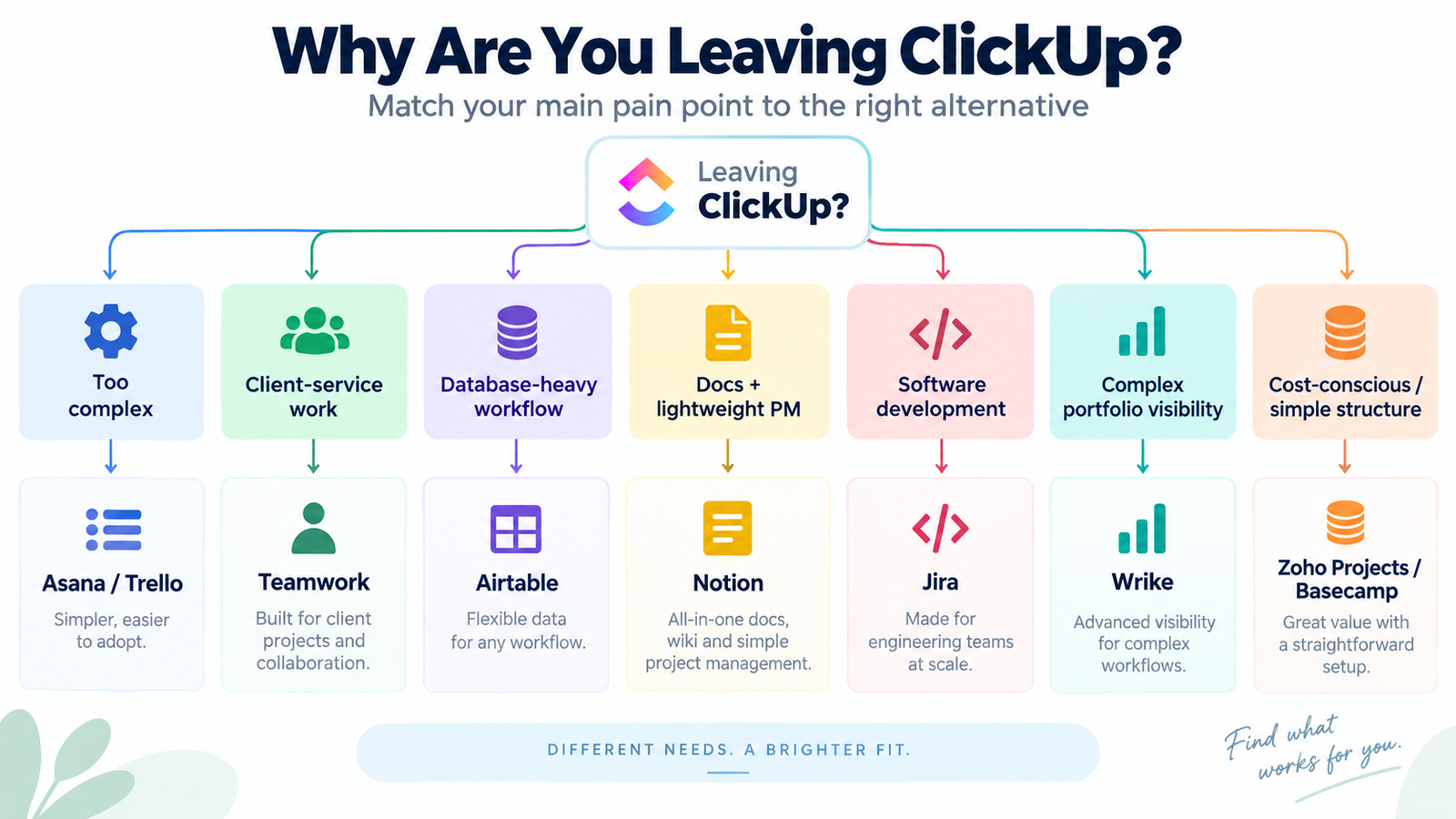
There’s no single “best ClickUp alternative.” The right one depends entirely on why you’re leaving. Maybe onboarding took too long. Maybe your agency bills clients by the hour and ClickUp’s project structure fights that workflow. Maybe you just need a database, not a task manager. This guide works backward from those reasons, matches each one to a specific alternative, and is honest about what you’d give up by switching.
Quick Comparison: Best ClickUp Alternatives
Swipe horizontally to view all columns
| Tool | Best For | Main Advantage Over ClickUp | Main Trade-off | Starting Price |
|---|---|---|---|---|
| Asana | Structured task management | Clearer hierarchy, faster onboarding | Less customizable, pricier per seat | Free (2 users); $10.99/user/mo |
| monday.com | Visual, flexible workflows | Friendlier visual builder | Automations/guests gated behind higher tiers | Free (2 seats); $9/seat/mo (3-seat min) |
| Teamwork.com | Client services & agencies | Built-in billing, budgets, retainers | Less useful for non-client internal work | Free (5 users); $9.99/user/mo |
| Airtable | Database-driven workflows | Real relational data, flexible records | Weaker at pure task/project tracking | Free; $20/seat/mo |
| Notion | Docs + lightweight PM | Strong wiki and knowledge-management focus | Lighter portfolio reporting and resource-management depth | Free; $10/member/mo |
| Trello | Simple Kanban only | Simple board-based workflow with a low-cost paid tier | No native docs; lighter reporting and portfolio controls | Free (10 boards); $5/user/mo |
| Wrike | Complex project visibility | Strong dashboards, portfolio reporting | Business tier starts at 5 users and targets larger teams | Free; Business $25/user/mo |
| Jira | Software development teams | Purpose-built for agile/Scrum | Steep learning curve for non-technical teams | Free (10 users); ~$7.91/user/mo |
| Zoho Projects | Value-conscious teams | Close fit for teams already in the Zoho ecosystem | Smaller third-party app marketplace | See current pricing |
| Basecamp | Flat, no-per-user pricing | Fixed monthly price regardless of headcount from the Studio tier up | No native Gantt charts, limited customization | Free (1 project, 5 users); Studio $59/mo (unlimited users) |
Pricing shown is list price, billed annually where a discount applies. Confirm current rates on each vendor’s pricing page before budgeting, since SaaS pricing changes often.
Why Teams Look for ClickUp Alternatives
ClickUp Can Feel Overwhelming
ClickUp’s pitch is that it replaces several other apps at once, which means the interface has to accommodate a lot: multiple view types, nested spaces and folders, dozens of ClickApps, and a custom field system deep enough to model almost any workflow. That flexibility is genuinely valuable for ops-heavy teams. For a five-person content team that just wants a task list, it’s a lot of surface area to learn before anyone ships work.
Some users report that new hires take longer to get productive in ClickUp than in a simpler tool, particularly when a workspace has accumulated years of custom statuses and fields from past admins. Teams that prefer a narrower, more opinionated tool may find that limitation frustrating rather than empowering.
Performance and Reliability Concerns
Heavier apps generally ask more of your browser, and ClickUp is no exception, especially in workspaces with large numbers of tasks, dashboards, and automations running at once. Users discussing ClickUp in community forums and review sites have raised concerns about load times on data-heavy views and occasional sync delays during peak usage. These aren’t universal experiences and often depend on workspace size, browser, and how many integrations are active, so treat this as something to test with your own data rather than a fixed verdict on the product.
Pricing May Not Fit Every Team
ClickUp’s per-seat structure looks inexpensive at the entry level, but the real number for many teams sits at the Business plan ($12/user/month annually), since the free and Unlimited tiers cap dashboards, advanced automations, and other features teams tend to need once they’re past the pilot stage.
AI features are billed through a separate track from the core plans — Brain AI and Everything AI list at $9 and $28 per user/month respectively — though ClickUp has also been rolling out newer plan configurations, so exact AI packaging and pricing can vary by workspace and rollout stage.
It’s worth checking your own workspace’s upgrade page rather than assuming a single fixed AI price applies everywhere. None of this makes ClickUp expensive by category standards, but a workspace that grew organically over a few years, with unused paid seats and multiple add-ons, can end up costing more than the plan page suggests.
It’s worth confirming your current ClickUp bill against what you’d actually use before comparing it to another tool’s list price.
Some Teams Need a More Specialized Tool
ClickUp is a generalist. That’s the whole point of it. But a generalist tool is rarely the sharpest option for a narrow job.
Software teams usually get more out of an issue tracker built around sprints and code integrations. Agencies billing clients by the hour get more out of a tool with budgets and retainers built in from day one. Teams whose real workflow is a database with relationships between records — clients, projects, invoices — often find that a project management tool, however customizable, is fighting the shape of their data.
In those cases, “more specialized” beats “more features.”
The Best ClickUp Alternatives for 2026
Asana — Best for Structured Task and Project Management
Asana is one of the most commonly considered general-purpose alternatives to ClickUp, and the reason usually comes down to clarity. Tasks, subtasks, and projects follow a more rigid, predictable hierarchy, and the interface doesn’t ask you to configure much before it becomes usable.
Teams coming from a ClickUp workspace with dozens of custom fields often describe the move to Asana as a relief rather than a downgrade, simply because there’s less to decide.
Where it gives ground: Asana’s advanced features — including Goals, Workload, and native time tracking — sit on the Advanced plan at $24.99/user/month annually, noticeably above ClickUp’s comparable Business tier.
Asana also doesn’t offer the same depth of view customization or ClickApp-style extensibility. You’re trading configuration power for a cleaner starting point.
Best for: Teams that want task management to be obvious on day one, especially marketing, ops, and cross-functional teams that don’t need deep customization.
monday.com — Best for Visual, Flexible Workflows
monday.com’s board-and-column interface is built to be edited by non-technical users, and it provides visual automation builders for common workflows such as status changes, notifications, and due-date reminders.
monday.com places strong emphasis on visual boards and dashboard-based reporting, which matters for teams that report progress to stakeholders who aren’t in the tool day to day.
The catch is the tier structure. Automations and integrations are locked out of the entry-level Basic plan at $9/seat/month with a three-seat minimum, and you generally need Standard at $12/seat/month or Pro at $19/seat/month to get the features that make monday.com worth choosing over a cheaper board tool.
A small team that only budgets for Basic will find it thinner than expected.
Best for: Visually oriented teams that want an easy-to-build interface and are prepared to land on the Standard or Pro tier rather than the entry plan.
Teamwork.com — Best for Client-Service Teams and Agencies
Teamwork.com is built around the assumption that your projects belong to clients, and that assumption shows up everywhere: time tracking tied to billable rates, project budgets and profitability reporting, retainer tracking, invoicing, and client-oriented roles and workflows.
For an agency, that’s the difference between bolting client-service features onto a general PM tool and using a platform designed around that workflow from the start.
The trade-off is that Teamwork.com is less useful once you step outside client-facing work. Internal-only teams such as product, engineering, or HR typically get less value from the client and budgeting features they’re paying for, and ClickUp’s broader feature set covers more of that internal-tool territory in one workspace.
Best for: Agencies and professional-services teams tracking billable time, project profitability, and client deliverables in one place.
Airtable — Best for Database-Driven Workflows
If your “project management” problem is really a data-modeling problem — linked records, multiple views of the same underlying data, and structured fields that behave like a lightweight database — Airtable is a different category of tool than ClickUp, even though the marketing sometimes overlaps.
Relational data, such as a client linked to multiple projects linked to multiple invoices, is native to how Airtable works. In ClickUp, you’d approximate that with custom fields and relationships that weren’t really designed for the same purpose.
What you lose is task-management convenience. Airtable doesn’t have ClickUp’s native time tracking, sprint tools, or task-focused dashboards, and building a genuinely task-centric workflow in Airtable takes more setup than it would in a purpose-built PM tool.
Pricing also jumps quickly. Team is $20/seat/month, while Business is $45/seat/month and includes more advanced admin controls and automation capacity.
Best for: Teams whose core work is structured data — content calendars, inventory, CRM-style tracking — rather than sequential task lists.
Notion — Best for Docs Plus Lightweight Project Management
Notion’s strength is documentation and knowledge management, not project tracking, and it’s honest about that trade-off.
Wikis, meeting notes, specs, and databases that double as light task boards all live comfortably in one connected workspace, and teams that use ClickUp mainly for docs and a simple task list often find Notion covers the same ground with a much shorter learning curve.
Where Notion is clearly thinner than ClickUp is in complex project oversight. Notion can handle timelines, dependencies — including automatic date shifting when a blocking task moves — and lightweight project planning through its database views, but its portfolio reporting, resource-management depth, and dedicated project-management controls are lighter than platforms built primarily for complex project delivery.
A team running multi-month, multi-team programs with heavy resource planning will likely hit that ceiling faster than a team using Notion mainly for docs with lightweight task tracking layered on top.
Best for: Teams whose main need is a shared knowledge base with lightweight task tracking layered on top, not deep project management.
Trello — Best for Simple Kanban Workflows
Trello is the answer for teams that find ClickUp’s feature set actively distracting. Boards, lists, and cards are the entire mental model, and the Standard plan at $5/user/month is one of the lower-cost paid tiers in this category.
For a small team running a straightforward content pipeline or support queue, that simplicity is the feature.
The honest limitation is that Trello stays simple because it doesn’t try to do as much. There’s no native document editor, and while Premium adds Calendar, Timeline, Table, Dashboard, and Map views, reporting and portfolio-management depth remain limited compared with more full-featured PM platforms.
Anything resembling resource management or advanced time tracking still requires third-party Power-Ups. If your workflow outgrows a single board with a few automations, you’ll likely outgrow Trello too.
Best for: Small teams running one clear, linear workflow who actively want fewer features, not more.
Wrike — Best for Complex Project Visibility
Wrike places strong emphasis on cross-project reporting, resource planning, and portfolio visibility.
Dashboards, workload balancing, cross-project dependencies, and budget tracking are all built for teams managing several projects at once and needing a real-time view of where each one stands.
Wrike’s current Business plan starts at $25 per user per month and is designed for teams of at least five users, while higher-end plans such as Pinnacle use custom pricing.
That packaging makes Wrike more natural for mid-size and larger teams than for very small teams evaluating project-management software mainly on price.
Best for: Mid-size to large teams managing multiple concurrent projects that need strong cross-project visibility and reporting.
Jira — Best for Software Development Teams
Jira isn’t a general ClickUp replacement, and positioning it as one would be misleading.
It is designed around Scrum and Kanban software-development workflows, including sprint planning, backlog management, story points, and integrations with GitHub, GitLab, and Bitbucket.
For engineering teams that need structured sprint and issue-tracking workflows, Jira may align more closely with their day-to-day development process than a general-purpose project-management platform.
That specialization is the same reason it’s a poor fit outside engineering. Non-technical teams tend to find Jira’s terminology and workflow unfamiliar, and using it for marketing or ops work usually means fighting the tool rather than benefiting from it.
Best for: Software development and engineering teams running agile workflows, not general project management across the business.
Zoho Projects — Best for Value-Conscious Teams
Zoho Projects covers the core of project management — Gantt charts, task dependencies, time tracking, and issue/bug tracking — and is worth considering for cost-conscious teams.
Confirm the exact current rate on Zoho’s official pricing page before budgeting, since published figures can shift between billing cycles and regions.
Teams already using other Zoho products such as CRM, Books, or Desk also get tighter integration than they would connecting a separate PM tool into that ecosystem.
Zoho Projects has a smaller third-party app marketplace than some larger project-management platforms, so teams that rely heavily on integrations should confirm that their required apps are supported before committing.
Its appeal is primarily value and ecosystem fit rather than feature-for-feature parity with ClickUp.
Best for: Small and midsize businesses prioritizing cost, especially those already inside the Zoho ecosystem.
Basecamp — Best for Predictable, Flat-Fee Pricing
Basecamp is the wildcard on this list because its pricing model, not its feature set, is what makes it a genuine ClickUp alternative for certain teams.
Rather than billing per seat, Basecamp prices by active-project count and storage. Freelancer at $25/month caps out at 20 users, while Studio at $59/month, Pro at $99/month, and the Unlimited plan at $299/month all include unlimited users at no extra cost.
That removes the seat math every other tool on this list requires, and it can undercut per-seat pricing substantially once a team passes a fairly modest headcount.
The interface stays deliberately simple across every tier: message boards, to-dos, schedules, card tables, and docs, with fewer dashboard and customization options to configure than ClickUp.
What you’re trading away is flexibility. Basecamp does not emphasize Gantt-style planning, custom fields, advanced automation, or reporting dashboards to the same degree as more configurable project-management platforms.
Teams that need to slice project data in different ways will find Basecamp’s structure fixed rather than adaptable, and the tiers cap you by active project count rather than by feature depth.
Best for: Teams that want predictable, flat, no-per-user pricing and are comfortable with a fixed, simple project structure rather than deep customization.
Which ClickUp Alternative Should You Choose?
If ClickUp Feels Too Complicated
Consider Asana if you still need structured project management, or Trello if your workflow is mainly Kanban-based. Both reduce configuration compared with a heavily customized ClickUp workspace.
If you are still comparing different approaches, our project management software guide covers broader options for different teams and workflows.
If You Manage Client Work
Teamwork.com is built specifically around billable time, client budgets, and retainers — the parts of agency work that ClickUp handles as an afterthought rather than a core feature.
If You Need Structured Task Management Without ClickUp’s Depth
Asana is a strong option here for teams that want clear hierarchy, dependable views, and less setup overhead.
If You Need Database Flexibility
Airtable, if your work is really structured, relational data rather than sequential tasks.
If You Only Need Simple Task Management
Trello for the simplest possible workflow, or Basecamp if you also want flat-fee pricing and built-in team communication.
If You Are a Software Development Team
Jira is a strong fit for software development teams running structured Scrum or Kanban workflows, with features designed specifically around software delivery.
If Pricing Is Your Main Concern
Zoho Projects is worth checking for cost-conscious teams, particularly organizations already using the Zoho ecosystem.
Basecamp is worth modeling too. Once you need more than a handful of active projects, its Studio tier already includes unlimited users at a fixed $59/month, so the breakeven point against per-seat tools can arrive earlier than teams expect.
When You Should Not Switch From ClickUp
Leaving ClickUp isn’t automatically the right move, even if something about it is bothering you. A few situations where staying usually makes more sense:
- Your team has spent months building automations, custom fields, and dashboards that are deeply embedded in daily work. Rebuilding that in a new tool has a real cost, in time and in the errors that come with migration.
- Your integrations — Slack, Google Drive, HubSpot, and similar — are already configured and working. Reconnecting all of that elsewhere isn’t instant.
- The actual problem is configuration, not the product. A ClickUp workspace with years of accumulated custom statuses, unused spaces, and conflicting automations can feel just as overwhelming as any other overgrown tool. A cleanup project may solve more than a migration would.
- Your team already knows the tool well. The learning curve you’d pay again in a new platform is a real cost, not a hypothetical one.
Switching tools should solve a specific, meaningful workflow problem. It shouldn’t happen just because another platform looked cleaner in a fifteen-minute demo.
How We Selected These ClickUp Alternatives
This list wasn’t built from a formal lab test or a survey of users — we want to be upfront about that.
It was built by reviewing each product’s official documentation and pricing pages, comparing feature sets and target use cases against ClickUp’s, and cross-referencing publicly available user feedback for the subjective points — ease of use, complexity, and performance — discussed above.
Where pricing or features are mentioned, they reflect what each vendor’s official pricing page showed at the time of research.
SaaS pricing changes often, so confirm current numbers before you buy.
ClickUp Alternatives FAQ
What is the best ClickUp alternative?
It depends on why you’re leaving.
Asana is a strong general-purpose option for teams that want simpler structure. Teamwork.com is well aligned with agencies and client work, while Jira is built around software-development workflows.
There isn’t one universal winner across every use case.
Is Asana better than ClickUp?
Not universally.
It’s simpler and faster to onboard, but less customizable and, at the Advanced tier, more expensive per seat.
Teams that value clarity over configurability tend to prefer Asana; teams that want deep customization tend to stay with ClickUp.
Is monday.com better than ClickUp?
For visually oriented teams that prefer board-based workflows and dashboard reporting, monday.com may be a better fit.
Teams that rely heavily on ClickUp’s broader feature set or automation depth should compare the relevant paid tiers before switching.
What is a simpler alternative to ClickUp?
Trello is one of the simplest options here for teams that mainly need Kanban boards.
Basecamp adds more built-in team communication and project structure while remaining comparatively straightforward.
Is there a free alternative to ClickUp?
Most tools on this list have a free tier — Asana, monday.com, Airtable, Notion, Trello, Wrike, Jira, Zoho Projects, and Basecamp all do — though each caps users, storage, or features differently.
Asana’s free Personal plan, for example, now caps at 2 users.
Check the current free-plan limits directly on each vendor’s pricing page before assuming it covers your team’s needs.
What should I consider before switching from ClickUp?
Consider migration effort, including moving tasks, docs, and history; rebuilding integrations; retraining your team; and whether the new tool’s pricing at your actual seat count and usage level is really cheaper once you’re past the entry tier.
Choosing Your Shortlist
There’s no single tool on this list that beats ClickUp for everyone.
If complexity is the problem, Asana or Trello solve it. If client billing is the problem, Teamwork.com solves it. If you’re managing software sprints, Jira should be high on the shortlist.
And if your team has already invested heavily in ClickUp’s automations and integrations, staying and cleaning up the workspace may beat switching altogether.
The practical next step isn’t picking one tool from this list — it’s shortlisting two or three based on your specific reason for looking, and testing them against your real workflow before committing a whole team to a migration.
For teams comparing project management options across specific use cases, see our guide to the best creative project management software: