Updated September 2026. Pricing and plan packaging change frequently, so confirm current rates and feature availability on each vendor’s official pricing page before purchasing.
Marketing teams rarely struggle because they lack another task list. The harder problems are coordinating overlapping campaigns, keeping creative reviews from stalling, handling requests from other departments, and giving stakeholders a clear view of what is on track and what is not.
That is where marketing project management software earns its place. The best tools combine campaign planning, content calendars, intake forms, approvals, workload visibility, automation, and reporting so teams spend less time chasing updates across email and Slack.
For this guide, we compared the tools against nine practical criteria: marketing workflow fit, collaboration, creative review and approval, campaign visibility, automation, reporting, ease of use, pricing and value, and integration depth.
Our Top Marketing Project Management Software Picks
If you only have 30 seconds, start here:
- monday.com — Best overall for marketing teams
- Asana — Best for cross-functional campaigns
- ClickUp — Best value for feature-rich workflows
- Wrike — Best for creative review and approvals
- Teamwork — Best for marketing agencies
- Smartsheet — Best for campaign planning and reporting
- Airtable — Best for content operations
- Notion — Best for lean marketing teams
- Adobe Workfront — Best for enterprise marketing operations
- CoSchedule — Best for marketing calendars
Why You Can Trust MartechChoice
We built this guide by reviewing vendor documentation, pricing pages, product help centers, and the workflows each platform is designed to support. We compared the products against common marketing use cases such as campaign planning, creative approvals, content calendars, intake management, workload visibility, and reporting.
We are not claiming that every platform below went through a multi-week hands-on test. Where a detail can change quickly — especially pricing, AI packaging, trials, and plan limits — it should be rechecked against the vendor’s current official documentation before publication or purchase.
Our recommendations are based on product fit and buyer needs, not on which vendor offers the highest affiliate commission.
Quick Comparison Table
| Tool | Best For | Starting Price | Free Plan / Trial | Key Marketing Strength |
|---|---|---|---|---|
| monday.com | Marketing teams overall | From $9/seat/month | Free plan up to 2 seats + trial | Flexible campaign boards, calendars, and dashboards |
| Asana | Cross-functional campaigns | From $10.99/user/month | Free Personal plan up to 2 users | Dependencies, timelines, and cross-team visibility |
| ClickUp | Feature-rich workflows on a budget | From $7/user/month | Free Forever plan | Customization, dashboards, docs, and automation |
| Wrike | Creative review and approvals | From $10/user/month | Free plan + 14-day trial | Proofing, approvals, and structured creative intake |
| Teamwork | Marketing agencies | From $9.99/user/month | Free plan up to 5 users / 5 projects + trial | Client work, time tracking, budgets, and profitability |
| Smartsheet | Campaign planning and reporting | From $9/member/month | Free trial available | Structured planning, dashboards, and portfolio reporting |
| Airtable | Content operations | From $20/user/month | Free plan | Flexible databases, editorial workflows, and linked records |
| Notion | Lean marketing teams | From $10/member/month | Free plan | Docs, databases, and lightweight planning |
| Adobe Workfront | Enterprise marketing operations | Custom pricing | Contact sales | Governance, resource management, and Adobe integration |
| CoSchedule | Marketing calendars | From $29/month | Free calendar option + 14-day trial | Calendar-first content and social coordination |
Prices above reflect publicly listed annual-billing rates available during our September 2026 review. Vendors can change pricing, packaging, minimum seats, and included AI usage at any time.
Best Marketing Project Management Software Reviews
1. monday.com — Best Overall for Marketing Teams
Best For: Marketing teams that want one flexible workspace for campaign planning, calendars, reporting, and repeatable workflows.
Why We Picked It
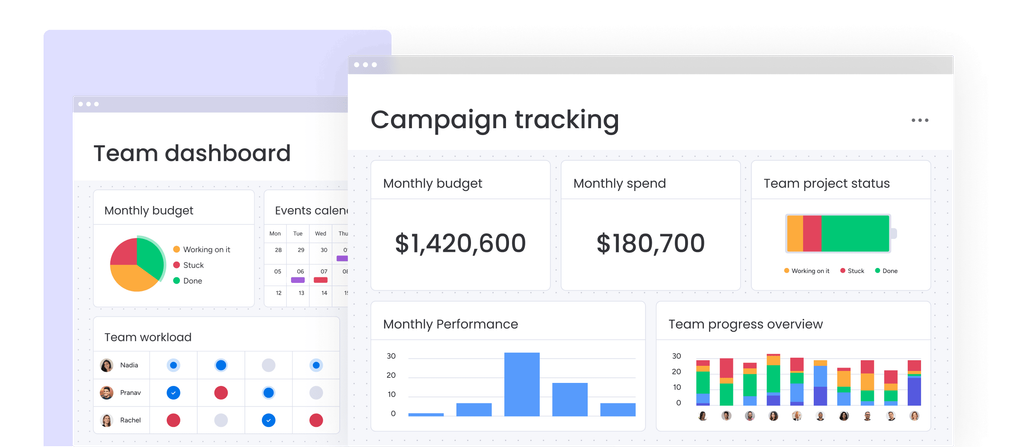
monday.com is one of the easiest tools on this list to adapt to different marketing workflows without forcing every team into the same project structure. A content team can work from a calendar, a campaign manager can use a timeline or Gantt view, and leadership can monitor progress through dashboards built from the same underlying work.
Its main advantage is flexibility without requiring a highly technical administrator. That makes it a strong general-purpose choice for teams that need better visibility across campaigns but do not require the heavier governance of an enterprise platform such as Adobe Workfront.
Wrike is still the stronger choice when detailed creative proofing is the main bottleneck, while Teamwork makes more sense for agencies that need billing and profitability built into the project workflow.
Key Marketing Features
- Campaign and content-planning boards with multiple views
- Forms for campaign or creative intake
- Dashboards for cross-campaign visibility
- Workload and resource views on higher plans
- No-code automations for repetitive workflow steps
- Integrations with common collaboration and business tools
- AI-assisted workflow capabilities on eligible paid plans
Marketing Use Case
A campaign request enters through a form, creates a standardized campaign record, assigns tasks to strategy and creative owners, moves through production and approval stages, and feeds status data into a dashboard that a marketing lead reviews each week.
Integrations
Useful integrations include Slack, Microsoft Teams, Google Workspace, Salesforce, and other tools available through monday.com’s integration ecosystem. Integration and automation allowances vary by plan.
Pricing
monday.com offers a free plan for up to two seats. For work management, annual-billing list prices currently start at approximately:
- Basic: $9 per seat/month
- Standard: $12 per seat/month
- Pro: $19 per seat/month
- Enterprise: Custom pricing
Paid plans require a minimum of three seats. Standard and above add substantially more automation, integrations, and AI-enabled workflow capabilities than the entry tiers.
Pros
- Easy to adapt to different campaign structures without rebuilding the system from scratch
- Multiple views let marketers, project leads, and executives work from the same data in different ways
- Strong automation potential for recurring campaign processes
- Broad template and integration ecosystem
Cons
- Three-seat minimum raises the real entry cost for very small teams
- Automation, integration, dashboard, and AI allowances vary significantly by plan
- Creative proofing is not as specialized as Wrike’s review workflow
Who Should Choose It
monday.com fits teams that want campaigns, calendars, requests, and reporting in one adaptable workspace without taking on enterprise-level complexity.
2. Asana — Best for Cross-Functional Campaigns
Best For: Marketing teams whose campaigns regularly depend on product, sales, legal, leadership, or other departments.
Why We Picked It
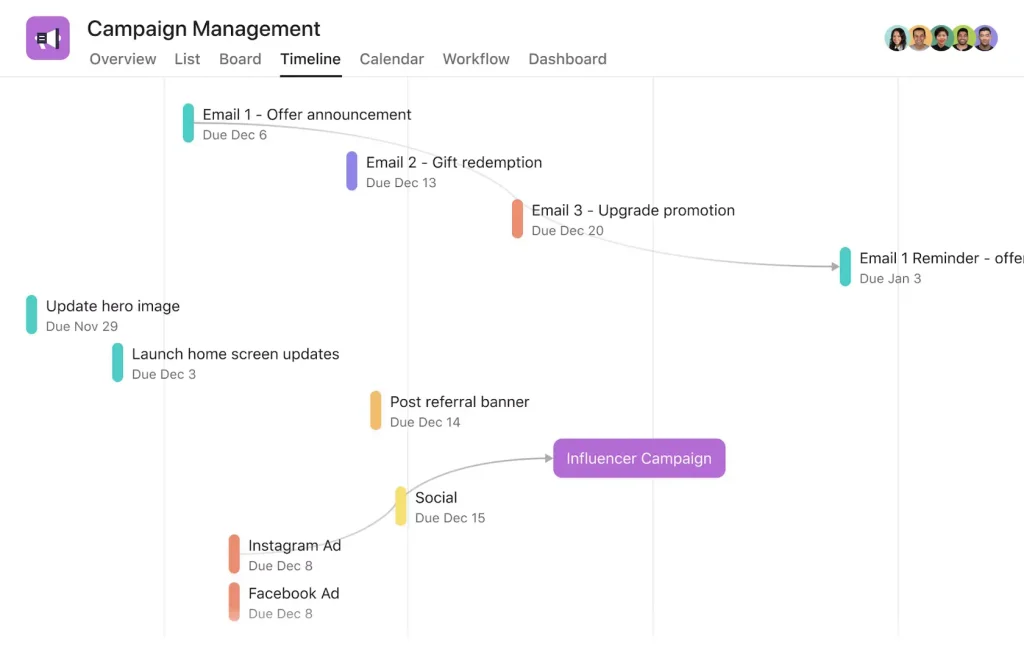
Asana is particularly useful when campaign success depends on sequencing work across teams. Its Timeline and Gantt views, task dependencies, portfolios, goals, and workload features make it easier to see how one delayed dependency affects the rest of a launch.
That matters for marketing teams working on product launches, events, brand campaigns, or other projects where deliverables arrive from several departments. Compared with monday.com, Asana tends to feel more structured around task relationships and cross-project coordination.
The tradeoff is that some of Asana’s strongest portfolio, workload, proofing, and approval features sit above the Starter tier.
Key Marketing Features
- Timeline and Gantt views
- Task dependencies
- Forms for campaign and creative requests
- Reporting dashboards
- Workflow automation
- Portfolios and Goals on higher plans
- Workload management on higher plans
- Approvals and proofing on Advanced
Marketing Use Case
A product-launch campaign contains dependent work across product, legal, design, content, and sales enablement. If the product specification slips, the dependency chain makes the downstream impact visible before the public launch date is missed.
Integrations
Asana supports more than 100 integrations on its free tier, including common tools such as Slack and Google Drive. Higher tiers add support for platforms such as Salesforce and business-intelligence tools.
Pricing
Current annual-billing pricing includes:
- Personal: $0, for up to 2 users
- Starter: $10.99 per user/month
- Advanced: $24.99 per user/month
- Enterprise tiers: Custom pricing
Starter includes Timeline/Gantt, dashboards, forms, custom fields, unlimited automations, and AI Studio Basic. Advanced adds portfolios, Goals, Workload, approvals, and proofing.
Pros
- Strong dependency tracking for campaigns with many moving parts
- Good cross-project visibility on higher tiers
- Forms and unlimited automations are available from Starter
- Advanced adds meaningful marketing capabilities such as approvals and proofing
Cons
- Free plan is limited to two users
- Several high-value management features require Advanced
- Creative review is useful but less specialized than Wrike’s proofing workflow
Who Should Choose It
Asana is a strong fit when marketing work crosses departmental boundaries and one team’s delay can affect the entire campaign schedule.
3. ClickUp — Best Value for Feature-Rich Workflows
Best For: Marketing teams that want a broad feature set, strong customization, and comparatively low entry pricing.
Why We Picked It
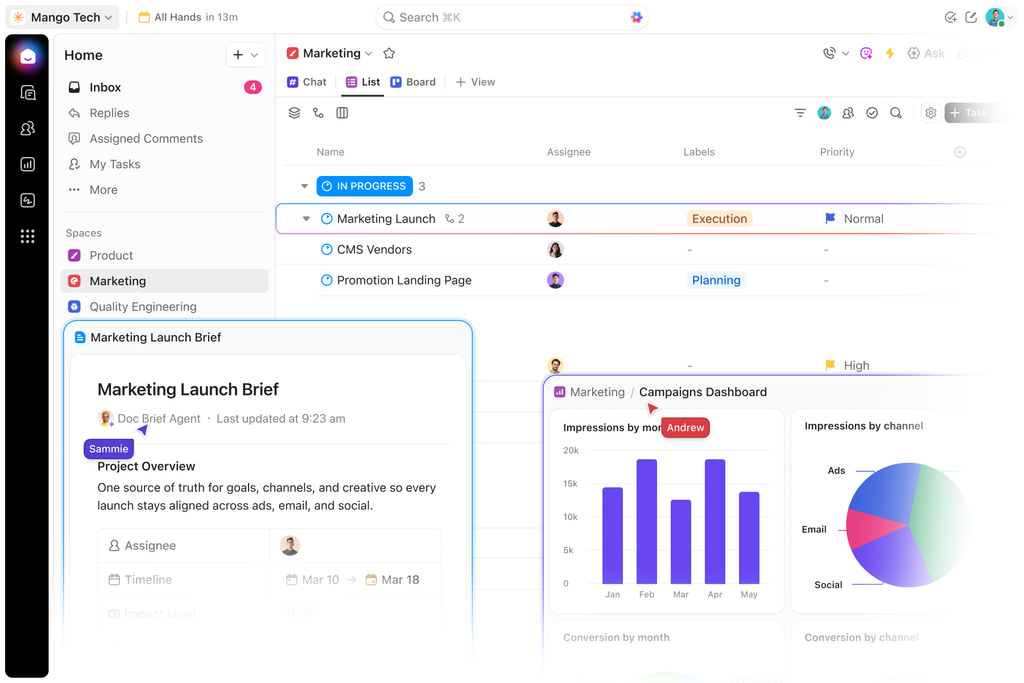
ClickUp combines task management, docs, whiteboards, dashboards, automation, goals, time tracking, and multiple project views in one platform. For teams trying to reduce the number of separate tools they use, that breadth can be attractive.
Its pricing is also aggressive relative to many competitors. The Unlimited plan includes Gantt charts, integrations, time tracking, resource management, and other capabilities at a lower listed annual price than many comparable paid tiers.
The flexibility comes with setup overhead. ClickUp gives teams many ways to structure work, which is useful once the system is configured but can slow onboarding if nobody owns the workspace design.
Key Marketing Features
- List, Board, Calendar, Gantt, and other project views
- ClickUp Docs for briefs and campaign documentation
- Dashboards
- Whiteboards
- Automation
- Forms
- Goals and portfolio management
- Proofing on supported paid tiers
- AI-compatible workflows and AI usage depending on plan
Marketing Use Case
A content team stores campaign strategy in Docs, turns deliverables into tasks, views publishing deadlines on a calendar, triggers notifications when copy is approved, and tracks campaign workload through dashboards.
Integrations
The Unlimited plan includes broad integration support, including tools such as Slack, HubSpot, and Google Drive.
Pricing
Current annual-billing pricing includes:
- Free Forever: $0
- Unlimited: $7 per user/month
- Business: $12 per user/month
- Enterprise: Custom pricing
Free Forever supports unlimited members but has meaningful usage and storage limits. AI availability and usage limits depend on the plan and current ClickUp packaging, so AI should be evaluated separately from the base subscription price.
Pros
- Strong feature depth for the price
- Docs, whiteboards, tasks, dashboards, and chat can live in one workspace
- Unlimited plan includes many features that competitors reserve for more expensive tiers
- Business adds more advanced automation, proofing, and reporting capacity
Cons
- Configuration depth creates a steeper onboarding curve
- Teams can overbuild the workspace if they do not establish conventions early
- The interface can feel dense for marketers who only need a simple campaign calendar
Who Should Choose It
ClickUp makes the most sense for teams that want broad functionality at a relatively low price and are willing to spend time setting up a clean workspace.
4. Wrike — Best for Creative Review and Approvals
Best For: Marketing and creative teams that spend too much time moving assets through review, feedback, and approval.
Why We Picked It
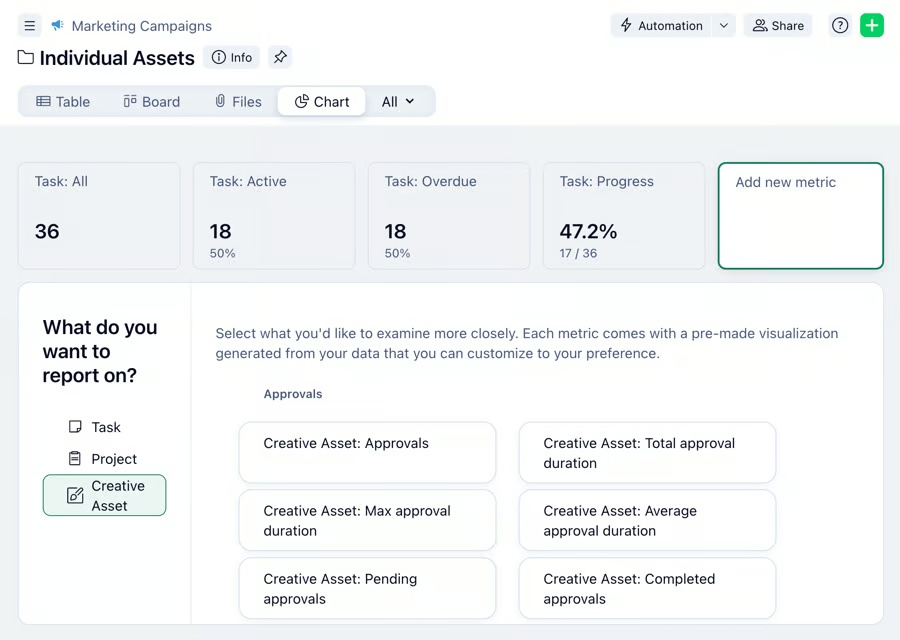
Wrike stands out because creative review is treated as part of the project workflow rather than as an afterthought. Its proofing capabilities support contextual feedback, version review, and approval workflows, which helps teams reduce the cycle of downloading files, commenting in email, and uploading revised versions.
For creative-heavy marketing teams, that can matter more than having the most flexible task board. Request forms can also standardize intake before work reaches designers or copywriters.
Wrike is therefore a strong fit for teams whose main bottleneck is not task creation but getting the right stakeholders to review and approve work on time.
Key Marketing Features
- Online proofing and contextual feedback
- Approval workflows
- Request forms
- Gantt charts and dependencies
- Dashboards
- Resource and capacity management on higher tiers
- Adobe Creative Cloud integration
- AI-assisted work and automation capabilities depending on plan
Marketing Use Case
A designer uploads a campaign asset, stakeholders add feedback directly against the creative, revised versions remain tied to the same work item, and the asset moves forward only after the required approval stage is complete.
Integrations
Wrike supports integrations with common workplace tools and offers Adobe Creative Cloud connectivity that is especially relevant for creative teams. Advanced integration capabilities vary by package.
Pricing
Wrike’s current new-purchase pricing starts at:
- Free: $0
- Team: $10 per user/month, billed annually, for 2–15 users
- Business: $25 per user/month, billed annually, for 5–200 users
- Pinnacle: Custom
- Apex: Custom
Wrike offers a 14-day free trial. Because Wrike updated its packaging in 2026, teams should check the current plan comparison before assuming a specific proofing, AI, resource, or integration capability is included in the tier they are considering.
Pros
- Strong creative review and approval workflow
- Structured intake reduces incomplete or ad hoc requests
- Adobe Creative Cloud integration is relevant for design-heavy teams
- Scales well beyond basic task tracking
Cons
- More advanced workflow and resource capabilities require higher plans
- More complex than a calendar-first tool
- Teams that do little creative review may not benefit enough from its specialization
Who Should Choose It
Wrike is most compelling when creative review and approval delays cause more friction than basic task tracking.
5. Teamwork — Best for Marketing Agencies
Best For: Agencies that need to connect project delivery with clients, time, budgets, retainers, and profitability.
Why We Picked It
Teamwork is designed around client work rather than purely internal project management. That distinction matters for agencies.
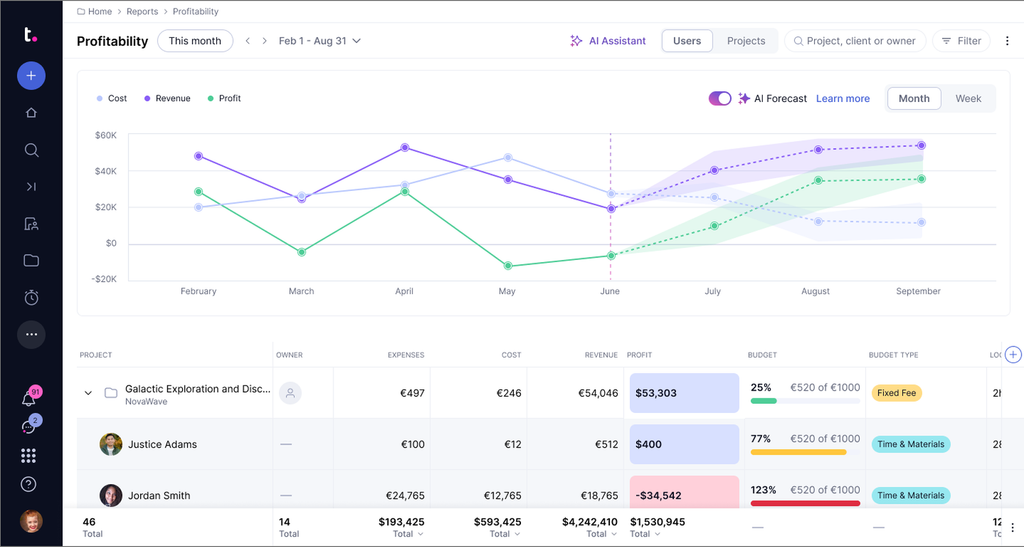
A marketing agency often needs to know not only whether a campaign is on schedule, but also how much billable time the team has used, whether a retainer is being consumed too quickly, whether the project remains profitable, and what the client can see.
Teamwork brings those operational concerns closer to the project workflow than general-purpose tools such as monday.com or Asana.
Key Marketing Features
- Time tracking
- Client and project organization
- Budgets and financial controls on higher tiers
- Workload and capacity management
- Retainer management
- Forms and automations
- Client-facing collaboration
- Proofing capabilities
- TeamworkAI features on paid plans
Marketing Use Case
An agency builds a client campaign, assigns strategy and creative work, tracks time against the engagement, gives the client controlled access to relevant work, and reviews resource and profitability information before the project closes.
Integrations
Teamwork’s integrations vary by plan. Higher tiers include connections relevant to services businesses, including HubSpot and QuickBooks, with additional CRM and finance integrations available at more advanced levels.
Pricing
Current annual-billing pricing includes:
- Free: $0, up to 5 users and 5 projects
- Basics: $9.99 per user/month
- Accelerate: $24.99 per user/month
- Optimize: Contact sales
- Enterprise: Contact sales
Basics and Accelerate offer 14-day trials. Accelerate adds capabilities such as work-request forms, 20,000 automations, workload/capacity planning, retainers, and invoicing. Teamwork is also rolling out usage-based AI credits in September 2026, so AI allowances should be checked before purchase.
Pros
- Client-services workflow is built into the product
- Time, retainers, budgets, and profitability can be managed alongside delivery
- Client collaboration is more natural than in many internal-first PM tools
- Free tier is useful for evaluating the core workflow
Cons
- Best agency features sit above the free tier
- In-house marketing teams may not need its client-services features
- Advanced financial and resource capabilities increase cost
Who Should Choose It
Teamwork is best suited to marketing and creative agencies that need project delivery tied directly to client work, time, budgets, and profitability.
6. Smartsheet — Best for Campaign Planning and Reporting
Best For: Marketing operations teams that prefer structured planning and need reliable dashboards and portfolio-level reporting.
Why We Picked It
Smartsheet feels familiar to teams that already plan campaigns in spreadsheets, but adds workflow automation, dashboards, Gantt and calendar views, forms, reporting, and collaboration around that structured data.
That makes it especially useful for marketing operations teams managing many campaigns or programs and reporting status to leadership. It is less naturally creative than Wrike, but stronger when the work is structured around repeatable plans, reporting, and portfolio visibility.
Smartsheet has also expanded its AI capabilities, so it should no longer be thought of as simply a collaborative spreadsheet.
Key Marketing Features
- Grid, Gantt, board, calendar, and timeline-style planning views depending on plan
- Forms and reports
- Dashboards
- Workflow automation
- Workload tracking on Business
- Proofing and creative collaboration capabilities
- AI-assisted analysis and productivity features
- Portfolio and program management options for larger deployments
Marketing Use Case
A marketing operations lead manages several campaign plans in standardized sheets, uses forms to collect requests, automates status updates, and rolls campaign health into dashboards for leadership.
Integrations
Smartsheet supports integrations with major workplace and enterprise systems, including Google Workspace, Microsoft tools, Slack, Salesforce, Jira, and Adobe-related creative workflows depending on plan and configuration.
Pricing
Current annual-billing pricing includes:
- Pro: $9 per member/month, for 1–10 members
- Business: $19 per member/month, for 3+ members
- Enterprise: Custom
Smartsheet currently promotes a free trial. Pro includes 250 automations per month, while Business includes unlimited automations and workload tracking. AI functionality is now part of Smartsheet’s current platform positioning.
Pros
- Familiar structure for teams moving from spreadsheet-based campaign planning
- Strong reporting and dashboard capabilities
- Useful automation even at the Pro tier
- Good fit for standardized, repeatable marketing operations
Cons
- Less natural for creative proofing than Wrike
- Spreadsheet-like structure is not ideal for every marketing team
- Some portfolio and enterprise capabilities require higher-level packages
Who Should Choose It
Smartsheet suits marketing organizations that prioritize structured planning, repeatability, and executive reporting over a lightweight creative workspace.
7. Airtable — Best for Content Operations
Best For: Content-heavy marketing teams that need to manage assets, metadata, channels, campaigns, and editorial workflows in one connected system.
Why We Picked It
Airtable starts from a database model rather than a conventional task list. That makes it useful for content operations because a content program often has to track more than status and due dates.
A single content item may have an author, format, funnel stage, campaign, channel, publish date, target keyword, asset links, and distribution status. Airtable’s linked records and multiple views make those relationships easier to model than a flat task board.
It is a strong fit when marketing teams think in terms of content systems and structured records rather than only projects and tasks.
Key Marketing Features
- Linked records
- Grid, Kanban, Calendar, and Gallery views
- Forms
- Automations
- Interfaces for simplified stakeholder views
- Content and campaign databases
- AI-assisted fields and agent-style capabilities depending on plan
- Integrations and automation connections
Marketing Use Case
A content team connects blog posts, social assets, campaigns, and distribution channels in one base. Editors work from an editorial calendar, stakeholders use a simplified interface, and automations notify owners when an item moves into review.
Integrations
Airtable supports integrations and connection options with tools such as Slack, Google Workspace, Zapier, and other services through native integrations, automation actions, APIs, and partner platforms.
Pricing
Airtable offers a free plan for lightweight use. Current annual-billing paid pricing includes approximately:
- Team: $20 per user/month
- Business: $45 per user/month
- Enterprise Scale: Custom
Paid plans charge for users with edit permissions, while read-only collaborators, form submissions, and shared links are treated differently under Airtable’s billing model. Airtable became part of Bending Spoons in September 2026, so teams planning a long-term deployment should recheck pricing and packaging close to purchase.
Pros
- Excellent for managing content metadata and connected records
- Multiple views let different teams work from the same source of truth
- Read-only access and forms can reduce unnecessary paid editor seats
- Flexible enough to support editorial calendars, campaign databases, and asset tracking
Cons
- Editor-based pricing can become expensive as more people need write access
- Less structured for classic task dependencies and approval workflows than dedicated PM systems
- Requires thoughtful database design to stay clean as the system grows
Who Should Choose It
Airtable works especially well when content, campaigns, assets, and metadata need to be connected rather than managed as isolated tasks.
8. Notion — Best for Lean Marketing Teams
Best For: Small marketing teams that want documentation and lightweight project planning in the same workspace.
Why We Picked It
Notion combines pages, wikis, databases, calendars, and project-style views in a flexible workspace. That is useful for small teams that want campaign briefs, messaging documents, meeting notes, content calendars, and task tracking in one place.
It is important, however, not to undersell Notion’s current project capabilities. Notion databases support subtasks and dependencies, and teams can visualize work in timeline-style views. The real limitation is not the absence of these features; it is that Notion remains lighter in areas such as formal proofing, sophisticated resource planning, and structured enterprise approval workflows.
Key Marketing Features
- Docs and wikis
- Databases with custom properties
- Calendar, board, table, and timeline-style views
- Subtasks and dependencies
- Forms
- Database automations
- Comments and collaboration
- Notion AI, with full AI capabilities concentrated in higher paid tiers
Marketing Use Case
A small marketing team stores campaign strategy, brand guidance, meeting notes, and an editorial database in one workspace. Content items move through a simple workflow while briefs remain linked to the work rather than being scattered across separate documents.
Integrations
Notion supports connections with tools including Slack and Google Drive, with integration depth depending on plan and use case.
Pricing
Current annual-billing pricing includes:
- Free: $0
- Plus: $10 per member/month
- Business: $20 per member/month
- Enterprise: Contact sales
Free and Plus include trial access to some AI capabilities, while Business is positioned as the tier with broader AI functionality for teams.
Pros
- Combines documentation and lightweight project planning well
- Databases support subtasks, dependencies, and multiple views
- Attractive pricing for small teams
- Useful for teams already keeping briefs and knowledge in Notion
Cons
- Resource and workload management is lighter than dedicated project-management platforms
- Formal proofing and approval workflows are limited compared with Wrike or Workfront
- Highly flexible workspaces can become inconsistent without clear governance as the team scales
Who Should Choose It
Notion is a practical fit for teams that value documentation and flexible planning more than formal resource management or advanced creative approval workflows.
9. Adobe Workfront — Best for Enterprise Marketing Operations
Best For: Large marketing organizations that need governance, standardized intake, resource planning, approvals, and portfolio-level control.
Why We Picked It
Adobe Workfront operates in a different part of the market from lightweight tools such as Notion or ClickUp. It is designed for organizations coordinating high volumes of work across teams, programs, stakeholders, and approval processes.
For enterprises already using Adobe Creative Cloud or Adobe Experience Cloud, Workfront’s ecosystem fit is particularly relevant. It also offers formal demand management, resource management, review and approval workflows, and enterprise governance capabilities.
That enterprise depth also makes Workfront more complex to buy, configure, and administer than the self-serve tools on this list.
Key Marketing Features
- Work management
- Demand management
- Structured intake and custom forms
- Review and approval workflows
- Resource and capacity management
- Portfolio and program-level management
- Adobe ecosystem integration
- AI capabilities across current packages
- Workfront Fusion as an add-on for low-code integrations and automation
Marketing Use Case
A global marketing organization standardizes campaign requests, routes them through governed intake, plans capacity across teams, coordinates creative approvals with Adobe workflows, and gives leadership a portfolio-level view of work across regions or business units.
Integrations
Workfront integrates closely with Adobe products and can connect to broader business systems. Workfront Fusion is sold as an add-on for low-code connections across applications.
Pricing
Adobe does not publish self-serve prices for Workfront. Current packages are:
- Select
- Prime
- Ultimate
All require contacting Adobe for pricing. Prime adds more advanced work-management and security capabilities, while Ultimate extends automation and data-management capabilities further. Add-ons such as Workfront Planning and Workfront Fusion may be priced separately.
Pros
- Built for enterprise governance and high-volume marketing operations
- Strong resource, approval, and portfolio-management capabilities
- Particularly relevant for organizations already invested in Adobe
- More structured than general-purpose work-management tools
Cons
- No transparent self-serve pricing
- More demanding implementation and administration
- Excessive for most small and midsize marketing teams
Who Should Choose It
Adobe Workfront is designed for organizations that need enterprise governance, resource planning, and standardized marketing operations at a scale where lighter tools become difficult to control.
10. CoSchedule — Best for Marketing Calendars
Best For: Teams whose main problem is coordinating content and social activity on a shared marketing calendar.
Why We Picked It
CoSchedule approaches the problem from a marketing-calendar perspective rather than starting with a general project-management system. That makes it appealing to teams that mainly need to answer a simple operational question: what is publishing, when, and across which channels?
Its current product lineup also makes an important distinction between social-management plans and the broader Suite offering. Teams looking for full content and team management should therefore evaluate the Suite rather than assuming the entry-level social plans include every project-management capability.
Key Marketing Features
- Drag-and-drop marketing calendar
- Social scheduling and publishing
- Social automation
- Campaign-building tools
- Approval features on Professional
- Client calendars and agency publishing tools
- Content and campaign planning in Suite
- AI-assisted social writing, campaign building, insights, and brand-voice functionality depending on plan
Marketing Use Case
A small marketing team plans social and content activity on a shared calendar, schedules distribution, routes social messages through approval, and uses campaign planning to keep related content grouped around the same initiative.
Integrations
CoSchedule supports a range of marketing and publishing integrations. Exact availability depends on the product tier, so teams should confirm the integrations they need before selecting a plan.
Pricing
Current annual-billing pricing is:
- Starter: $29/month, includes 1 user seat
- Professional: $49/month, includes 2 user seats
- Suite: Custom pricing, starting around $69/month
- Free calendar option: Available with limited usage
Starter and Professional offer 14-day trials. Professional adds social-message approvals and agency-oriented publishing features, while Suite expands into broader content, campaign, team, permission, and workspace management.
Pros
- Calendar-first design matches how many content and social teams plan work
- Purpose-built social and marketing features reduce the need to adapt a generic PM tool
- Professional includes approval and agency-oriented functionality
- Suite adds broader content and campaign planning
Cons
- Entry plans are primarily social-management products, not full project-management suites
- Advanced content and team-management capabilities move into the custom-priced Suite
- Less suitable than Asana, monday.com, or Workfront for complex dependency and resource planning
Who Should Choose It
CoSchedule is a strong fit when the main coordination problem is managing content and social activity on a shared marketing calendar rather than running complex cross-functional projects.
How We Chose the Best Marketing Project Management Software
We compared each platform against the work marketing teams actually have to manage rather than treating every project-management feature as equally important.
Marketing Workflow Fit
We looked at whether a tool naturally supports campaigns, content production, creative requests, approvals, and recurring marketing workflows.
Collaboration
Marketing rarely operates alone. We considered how well each platform supports collaboration across marketing, design, sales, product, leadership, clients, or external partners.
Creative Review and Approval
For creative-heavy teams, we looked for contextual feedback, version management, approval stages, and a workflow that reduces feedback scattered across email or messaging apps.
Campaign Visibility
We considered calendars, timelines, dashboards, portfolios, and other views that help teams understand campaign status without manually collecting updates.
Automation
We looked at whether a tool can remove repetitive coordination work such as assignments, notifications, status changes, and recurring processes.
Reporting
We considered whether teams can report on campaign progress, workload, project health, capacity, or financial performance without rebuilding the data elsewhere.
Ease of Use
A feature only creates value if the team actually adopts it. We therefore considered setup complexity, learning curve, and the amount of administration a platform requires.
Pricing and Value
We compared starting prices, seat requirements, feature gating, trial availability, free plans, and whether the tier a marketing team realistically needs is substantially more expensive than the advertised entry price.
Integrations
We considered connections to communication, CRM, storage, creative, automation, and other systems marketing teams commonly use.
What Is Marketing Project Management Software?
Marketing project management software helps teams plan, coordinate, execute, and monitor marketing work such as campaigns, content production, creative requests, launches, and recurring promotional activity.
The category overlaps with general project-management software, but marketing teams often place more weight on a specific set of workflows: content calendars, creative intake, review and approval, campaign visibility, stakeholder collaboration, and reporting across several simultaneous initiatives.
A general task-management platform can often be configured to support these workflows. The difference is how much setup and workaround the team needs. If a team still relies on a spreadsheet for the editorial calendar, email for creative feedback, and Slack messages for campaign requests after buying project-management software, the system has not solved the coordination problem.
Marketing project management software becomes more valuable as the number of campaigns, stakeholders, channels, or approval steps increases.
Key Features to Look For
Campaign Planning
The platform should let you organize work around a campaign or initiative rather than forcing every deliverable to live as an unrelated task.
Content Calendars
A useful content calendar should be connected to real project data so dates, owners, status, and campaign context stay synchronized.
Creative Briefs and Request Forms
Structured intake prevents work from starting with incomplete information and reduces ad hoc requests sent through chat or email.
Proofing and Approvals
Creative-heavy teams should look for contextual feedback, version review, and visible approval status. Not every marketing team needs advanced proofing, but those that do should treat it as a primary buying criterion.
Workflow Automation
Automation should reduce repetitive coordination such as assigning work, changing statuses, sending reminders, and triggering the next step in a workflow.
Resource and Workload Management
Teams managing several campaigns at once need to see capacity before someone becomes the bottleneck.
Dashboards and Reporting
Leadership should be able to understand campaign status without asking every project owner for a manual update.
Client Collaboration
Agencies need controlled external access, approval workflows, time tracking, and often budget or profitability data.
Integrations
The best platform is not useful if it becomes an isolated system. Check the tools your team actually depends on — CRM, communication, storage, creative, analytics, automation, and publishing — before buying.
How to Choose the Right Marketing Project Management Tool
Small Marketing Teams
Prioritize speed of setup, low total cost, and enough structure to stop work from falling through the cracks. Notion, ClickUp, or an entry-level monday.com setup can work well depending on how much project structure the team needs.
Marketing Agencies
Prioritize client access, time tracking, budgets, retainers, capacity, and profitability. Teamwork is the clearest agency-focused option in this list. Wrike becomes more attractive when creative review is the bigger bottleneck.
Creative Teams
Prioritize proofing, feedback, approval status, and version control. Wrike is the strongest specialist here, while Adobe Workfront becomes relevant at enterprise scale.
Content Teams
Prioritize editorial calendars, flexible metadata, reusable workflows, and relationships between campaigns and assets. Airtable is strong for database-driven content operations, while CoSchedule is better for teams that think primarily in calendars and publishing schedules.
Enterprise Marketing Teams
Prioritize governance, standardized intake, portfolio visibility, resource management, security, and the ability to scale repeatable processes across multiple teams. Adobe Workfront and higher-tier Smartsheet deployments are built for this level of complexity.
Marketing Project Management Software Pricing
Pricing in this category varies too much for a single “average price” to be useful.
A small team can start with a free plan or a product costing roughly $7–$20 per user each month when billed annually. At the other end of the market, enterprise products such as Adobe Workfront use negotiated pricing and may involve implementation, add-ons, and administrative overhead beyond the subscription itself.
Before comparing headline prices, check five things:
- Seat minimums: A $9-per-seat product can cost more than expected if the vendor requires three or more paid seats.
- Feature gating: Proofing, portfolios, workload management, advanced automations, and AI may require a higher tier.
- AI usage: Several vendors now package AI through credits, usage limits, or higher-plan entitlements.
- Annual billing: The lowest advertised price is often tied to an annual commitment.
- External collaborators: Some products charge differently for guests, viewers, contributors, or editors.
The most relevant price is not the cheapest plan. It is the cheapest plan that actually includes the workflow your team needs.
Frequently Asked Questions
What is the best project management software for marketing teams?
There is no single best option for every team. monday.com is the most balanced general-purpose choice in this guide. Asana is stronger for campaigns with cross-department dependencies, Wrike for creative approvals, Teamwork for agencies, Airtable for content operations, and Adobe Workfront for enterprise marketing operations.
What software do marketing agencies use for project management?
Agencies can use general-purpose platforms, but Teamwork stands out because client work, time tracking, budgets, retainers, capacity, and profitability are closer to the core product. Wrike is a strong alternative when creative proofing and approval are more important than financial project management.
What is the difference between marketing project management software and regular project management software?
The underlying technology may be similar, but marketing teams typically need stronger support for campaigns, creative intake, content calendars, approvals, stakeholder feedback, and cross-campaign reporting. The best marketing setup is the one that handles those workflows without forcing the team to rebuild them manually in spreadsheets and email.
If you do not need marketing-specific workflows, our general project management software comparison covers broader options for different teams.
Is monday.com or Asana better for marketing?
monday.com is usually the better fit for teams that value flexible boards, calendars, and customizable workflows. Asana is especially strong when marketing work depends on other departments and task dependencies matter. The better choice depends on whether flexibility or structured cross-team coordination is the bigger need.
What features should marketing project management software have?
Most teams should look for campaign planning, calendar or timeline views, structured intake, automation, dashboards, collaboration, and workload visibility. Creative teams should give extra weight to proofing and approvals, while agencies should prioritize client access, time, budgets, and profitability.
Do small marketing teams need project management software?
Not always. A very small team running one or two simple initiatives may be fine with shared documents and a basic calendar. Dedicated software becomes more valuable when several campaigns overlap, requests arrive from multiple stakeholders, deadlines depend on other people, or too much time is spent asking for status updates.
Final Recommendation
Best Overall: monday.com
The strongest all-around option for marketing teams that want flexible campaign planning without moving into enterprise-level complexity.
Best for Cross-Functional Campaigns: Asana
A strong fit when marketing depends on other departments and task relationships matter.
Best Value for Feature Depth: ClickUp
Best for teams willing to invest more setup time in exchange for broad functionality at a relatively low price.
Best for Creative Approvals: Wrike
The strongest choice here when review, proofing, and approval are the main workflow bottlenecks.
Best for Agencies: Teamwork
Built around client services, with time, financial, and resource-management features that general-purpose tools do not emphasize.
Best for Campaign Planning and Reporting: Smartsheet
A good fit for structured marketing operations and leadership reporting.
Best for Content Operations: Airtable
Best when content, campaign metadata, assets, and channels need to live in a connected database.
Best for Lean Teams: Notion
A practical choice for teams that want briefs, documentation, content planning, and lightweight projects in one workspace.
Best for Enterprise: Adobe Workfront
Built for governance, resources, approvals, and marketing operations at large scale.
Best for Marketing Calendars: CoSchedule
A focused choice for teams whose biggest coordination challenge is content and social scheduling.
The longest feature list is rarely the best buying criterion. Start with the bottleneck that costs your team the most time — creative approval, campaign coordination, client profitability, content operations, or enterprise governance — and use that problem to narrow the shortlist.
If your team is focused primarily on creative production and approval workflows rather than full marketing operations, see our guide to the best creative project management software.