
A freelancer can have five client projects moving at once while the actual work lives in completely different places: tasks in one app, feedback in email, time records in another, contracts in a folder, and invoices somewhere else again.
That fragmentation is often the real problem. Freelancers do not only manage projects. They manage clients, deadlines, billable time, approvals, paperwork, and getting paid.
The best project management software for freelancers therefore depends on where your workflow is breaking down. Some people need stronger project planning. Others need contracts and invoicing in the same system. Hourly consultants may care more about accurate time tracking than a sophisticated task board.
The eight tools below cover those different situations rather than treating every freelancer as if they have the same workflow.
Quick Picks: Which Tool Fits Your Workflow?
Moxie at a glance
Best for: Freelancers who want projects, clients, contracts, invoicing, scheduling, and time tracking in one system.
Moxie is built specifically around running a freelance business rather than adapting a team project platform to solo work. The main trade-off is that you may pay for more business-management features than you need if all you want is a task board.
Bonsai at a glance
Best for: Freelancers who want project work closely connected to proposals, contracts, billing, and client administration.
Bonsai now has real project-management capabilities as well as its better-known business tools. Its strongest fit is still the freelancer who wants the project and commercial sides of a client engagement connected.
Toggl Track at a glance
Best for: Consultants, developers, writers, and other freelancers whose revenue depends heavily on accurately recorded hours.
Toggl Track includes basic planning features, but its strongest reason to choose it is still time tracking, billable rates, and reporting rather than full client-business management.
Dubsado at a glance
Best for: Service businesses with a repeatable intake, proposal, scheduling, contract, and follow-up process.
Dubsado is strongest before and around the project itself: onboarding, forms, scheduling, client communication, automation, and invoicing. It is less compelling when complex task planning is the main problem.
Zoho Projects at a glance
Best for: Freelancers who mainly need tasks, milestones, timelines, timesheets, and structured project execution.
Zoho Projects is closer to a conventional PM platform than a freelancer business suite. That is useful when you already have separate tools for contracts and accounting.
Plutio at a glance
Best for: Freelancers who want a client-facing workspace that combines project delivery with proposals, contracts, invoicing, and time tracking.
Plutio offers an unusually broad feature set on its entry plan. The trade-off is that a broad system takes more setup than a lightweight task manager.
monday.com at a glance
Best for: Freelancers who expect to add contractors, assistants, or employees and want a flexible system they can keep as the business grows.
monday.com is highly configurable and scales well, but that flexibility can feel excessive for a simple solo workflow. Paid plans also use seat-based pricing, which matters when only one person needs the software.
Indy at a glance
Best for: Solo freelancers who want projects, tasks, time tracking, proposals, contracts, and invoicing without a heavy setup process.
Indy is easier to approach than many larger business suites. Its simpler structure also means it is less suitable for complex project dependencies or larger collaborative teams.
What Freelancers Actually Need From Project Management Software
Most project management software is designed around teams: assigning work, balancing workloads, reporting to managers, and coordinating departments. A freelancer has a different operating problem.
Keep multiple clients separate
The first question is whether the software gives each client a clear home. Tasks, files, notes, deadlines, messages, and billing details should not blur together across projects.
This matters even more when several clients have overlapping deadlines. A good system should let you see both the individual client context and your overall workload.
See what is due without maintaining the system all day
Freelancers rarely need the most complicated PM setup available. They need a view they can trust.
That may mean a weekly task list, a calendar, a board, or a timeline. Dependencies and Gantt charts become useful when projects have multiple stages, but they are unnecessary overhead for simpler client work.
Track billable time accurately
Hourly freelancers need reliable time records for invoices. Fixed-fee freelancers can also benefit because tracked time shows whether a project was actually profitable.
The important distinction is whether time tracking is just a timer or whether those hours connect to clients, projects, rates, reports, and invoices.
Give clients enough visibility without exposing everything
A client portal, guest view, or shared project space can reduce status-update emails. It can also centralize files, approvals, and comments.
But client collaboration only helps if it is simple enough for the client to use. A feature-heavy portal that nobody logs into does not solve the problem.
Connect proposals, contracts, and invoicing when useful
For many freelancers, project management starts before the first task is created. A lead becomes a proposal, the proposal becomes a signed contract, the work begins, and the project eventually becomes an invoice.
All-in-one freelancer platforms try to keep that chain connected. Traditional PM tools usually focus on delivery and leave the commercial workflow to other software.
Neither model is automatically better. The right choice depends on whether you want fewer systems or deeper specialist tools.
Keep the setup proportional to a one-person business
A freelancer does not have an operations team maintaining the software. If every new client requires twenty minutes of configuration, the system can become another administrative burden.
Templates, sensible defaults, reusable workflows, and easy recurring tasks are often more useful than dozens of customization options.
Price the tool like a solo business
Seat-based software can look inexpensive until minimum seat counts and higher-tier features are considered. Freelancer-focused tools may charge more for one account but include contracts, invoicing, portals, or other software you would otherwise buy separately.
Compare the total workflow cost rather than only the headline monthly price.
Leave room to grow
A freelancer who expects to stay solo can optimize for simplicity. Someone planning to use subcontractors or build an agency should pay more attention to permissions, collaborators, shared boards, workload visibility, and client access.
That difference is why the same tool will not be right for every freelancer.
The Best Project Management Software for Freelancers
Moxie — Best All-in-One Freelancer Workflow
Moxie makes the most sense when you want the client relationship and the project itself in one place.
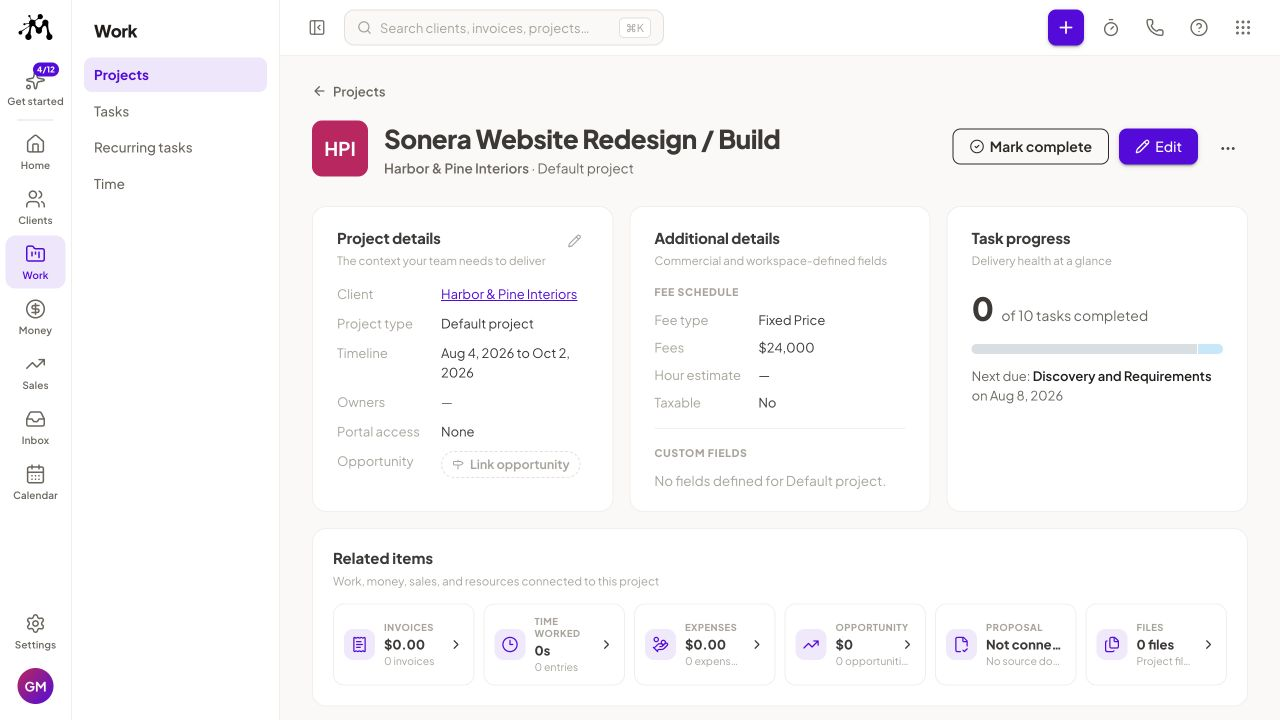
Its Starter plan includes client management, project management, invoices and payment tools, proposals and contracts, time tracking, scheduling, a calendar, forms, and other business-management features. Moxie lists Starter at $12 per month when paid monthly or $10 per month on annual billing. The Pro tier adds features such as a white-labeled client portal, workflow automation, and broader integrations.
That combination is useful when the friction is not one isolated problem. If you are currently moving information between a CRM, task app, timer, contract tool, and invoice system, Moxie can replace several handoffs.
The downside is the same breadth. A freelancer who already has accounting, invoicing, and contract tools they like may not gain much from moving everything into one platform. And if the work itself has complex dependencies, resource planning, or advanced reporting, a dedicated PM platform can go deeper.
Moxie is a strong starting point for solo service providers who want one operating system for the business rather than a collection of separate apps.
Bonsai — Best for Contracts and Invoicing
Bonsai is no longer just a contracts-and-invoices tool with a few tasks attached. Its current Basic plan includes time tracking, task management, unlimited projects, CRM, and unlimited clients. Higher tiers add the commercial workflow that many freelancers associate with Bonsai: proposals, contracts, invoices, payments, forms, scheduling, and a client portal.
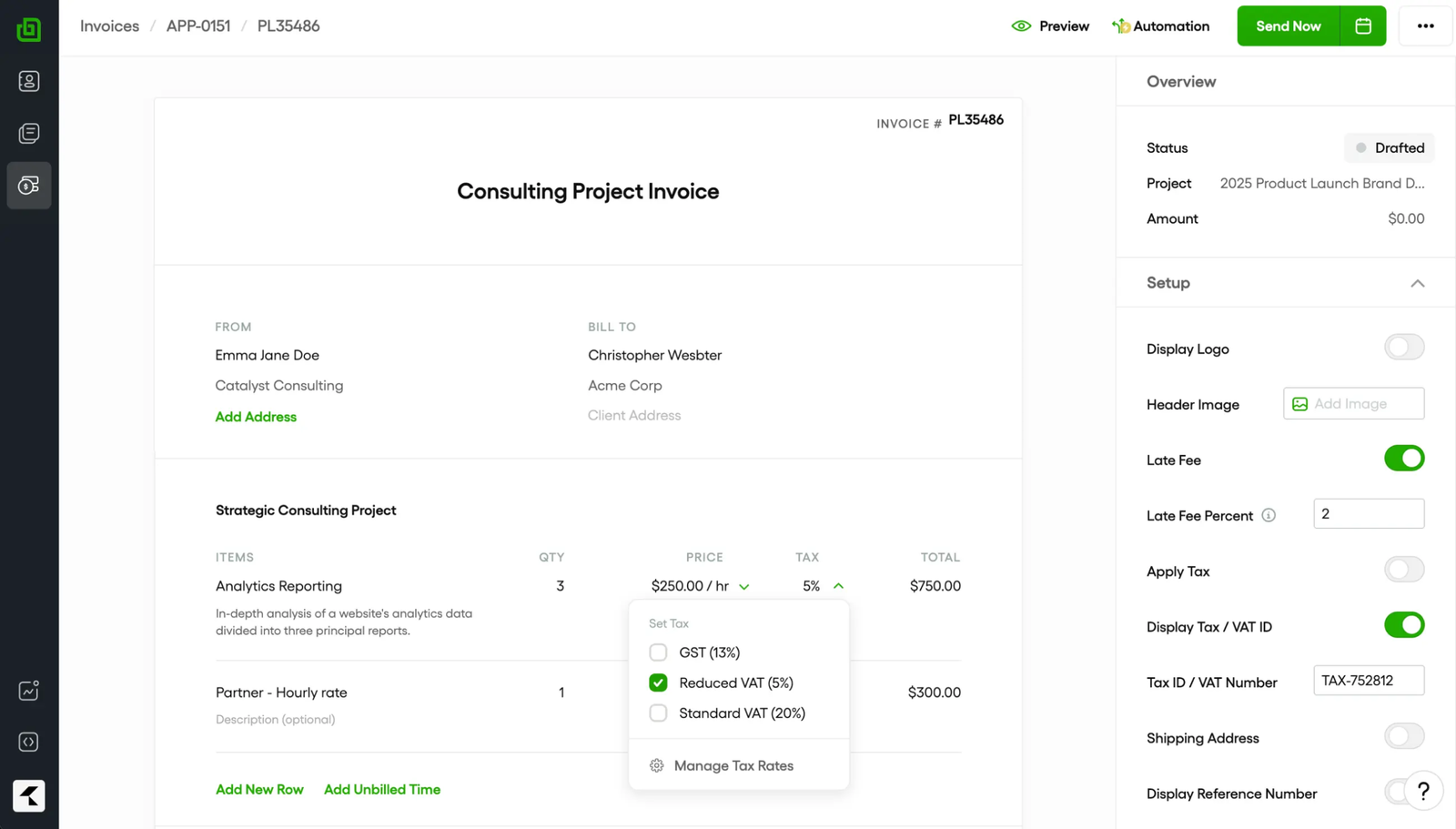
The distinction matters because Bonsai can now cover more of the actual delivery process. Premium goes further with Gantt views, workload management, project insights, project reporting, and client messaging.
For a freelancer whose work usually follows a clear commercial sequence — proposal, contract, project, invoice — that creates a useful connection between delivery and administration. You do not have to recreate client and project information in several systems.
The main question is whether you need those business functions. If you already run billing and contracts through another system, a more focused PM platform may give you more project depth for the money.
Bonsai’s Basic plan is listed at $15 per user per month when paid monthly or $9 per user per month when billed annually. Contracts, invoicing, and the client portal begin on the Essentials tier, listed at $25 monthly or $19 per user per month on annual billing.
Toggl Track — Best for Billable Time Tracking
For hourly freelancers, bad time records turn directly into bad billing. Toggl Track is built around preventing that.
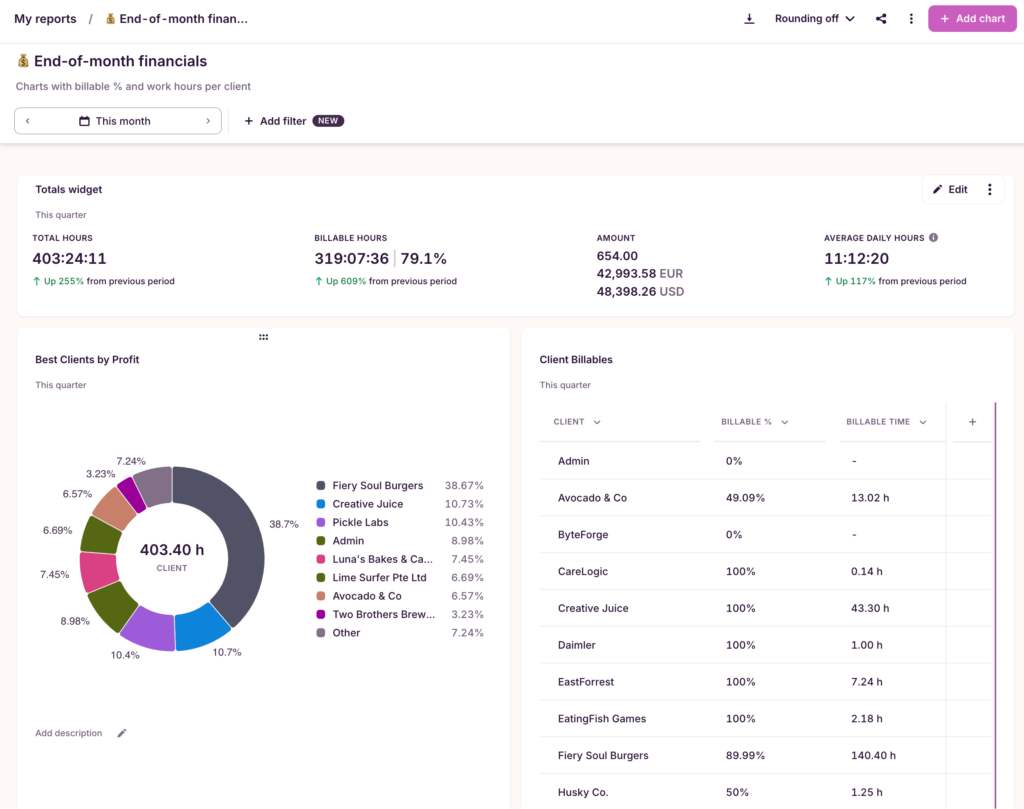
Its free tier includes manual and real-time timers plus simple planning with tasks and boards. That means it can handle a basic project structure, not just record a stopwatch total.
The bigger difference appears on Starter. Toggl adds billable rates, team-level reports, project estimates, timeline features, and milestones. Billable rates can be assigned at different levels so a freelancer can track the value of time across projects and clients.
That is particularly useful for consultants, developers, designers, and writers who bill by the hour or want to measure whether a fixed-fee project is consuming more time than expected.
Toggl Track is still not the best choice if your main problem is client onboarding, contracts, invoicing, or complex project delivery. Its planning tools support the time-tracking workflow; they are not a replacement for a full freelancer business suite.
The Free plan is a practical place to start. Starter is listed at $12 per license per month on monthly billing or $9 per license per month with annual billing.
Dubsado — Best for Client Onboarding and Repeatable Workflows
Dubsado is strongest when the same sequence happens every time a new client arrives.
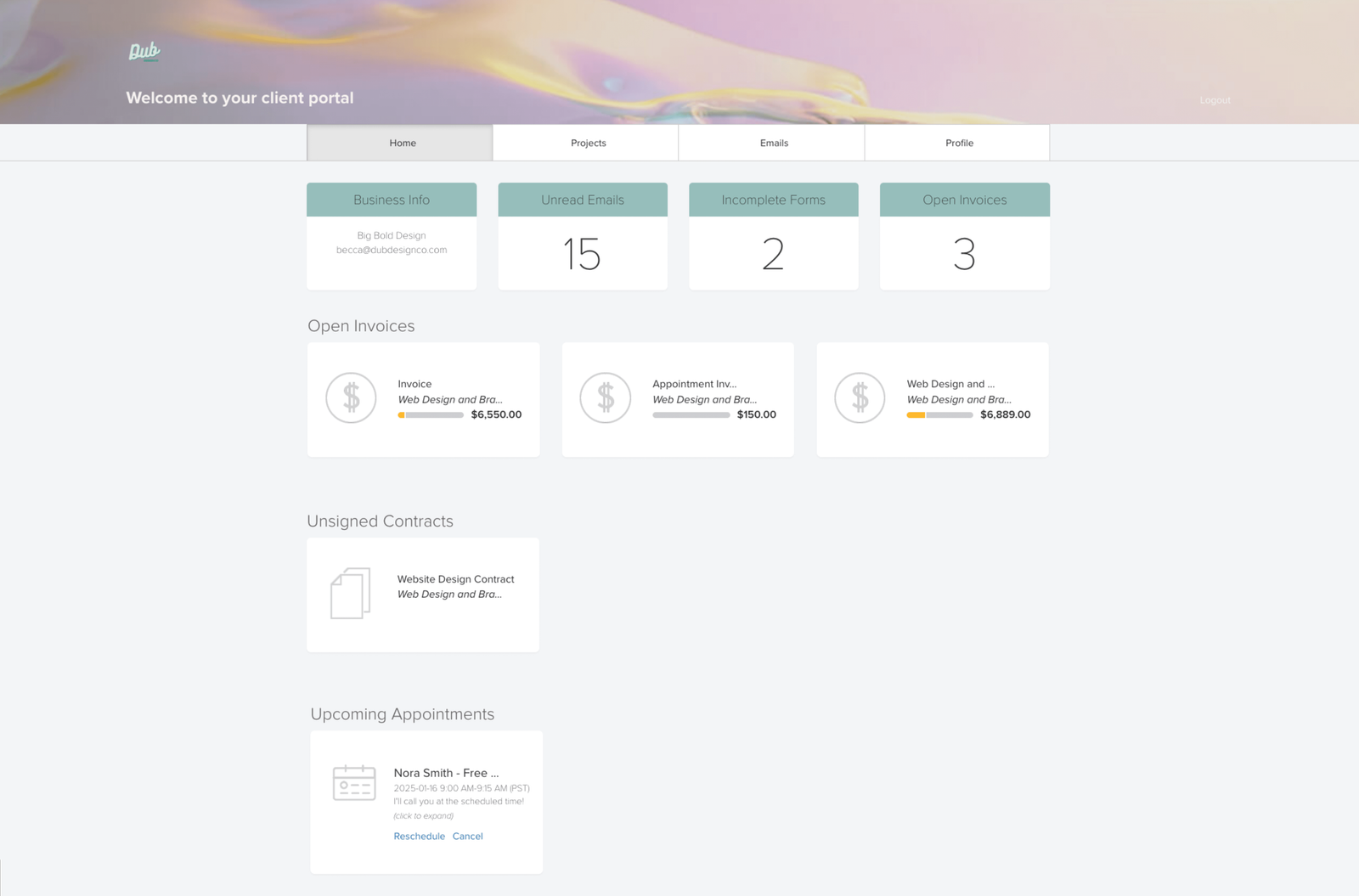
Think inquiry form, consultation, proposal, contract, scheduling, invoice, follow-up. Instead of manually moving each client through those steps, Dubsado is designed to make the process repeatable.
The Starter plan includes contracts, invoices, forms, client portals, email integration, and lead capture. Premier adds more automation and scheduling functionality. Dubsado also now includes native time tracking on Premier, allowing billable hours to be logged and applied to client invoices.
That makes the platform more useful during delivery than its onboarding-first reputation might suggest, but project execution is still not its strongest area. If you need detailed dependencies, resource planning, or sophisticated task views, you may still want a separate PM tool.
Dubsado is especially relevant to photographers, designers, coaches, consultants, and other service providers where the client experience is part of the product being sold.
The company currently lists Starter at $35 per month and Premier at $55 per month, with a 21-day Premier trial.
Zoho Projects — Best Budget Traditional PM Option
Zoho Projects is the most traditional project-management option in this list.
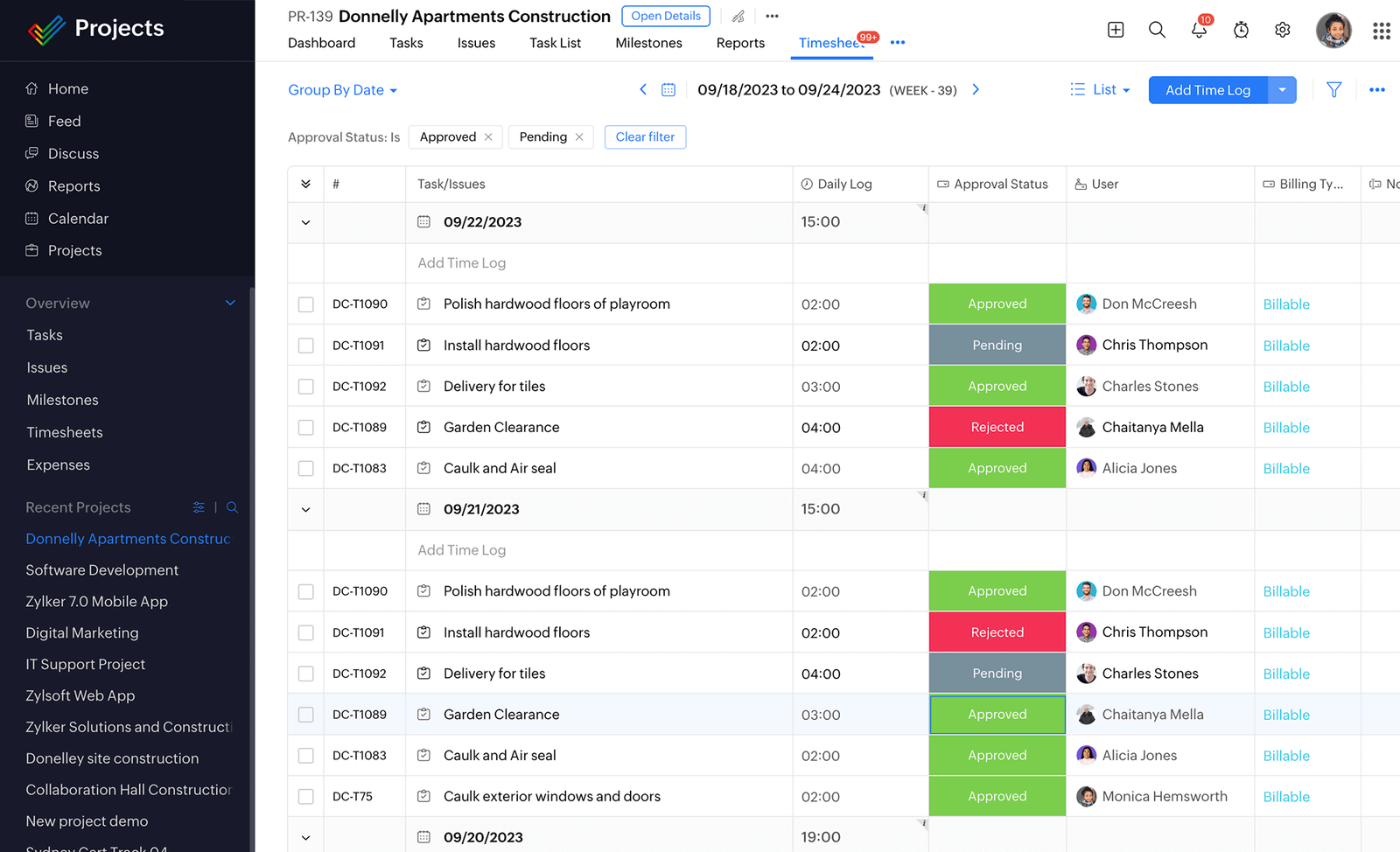
Instead of centering the workflow on proposals or invoices, it centers on projects, tasks, milestones, schedules, collaboration, time, and progress. That makes it a better fit for freelancers whose delivery work is genuinely complex.
A developer running a multi-stage build, a consultant managing a long engagement, or a content specialist coordinating many deliverables may get more value from that structure than from an all-in-one freelancer suite.
Zoho Projects also supports client users on paid plans, and its broader ecosystem can be useful if you already use other Zoho products.
The trade-off is fragmentation on the business side. Proposals, contracts, and accounting are not the core of Zoho Projects, so freelancers who want one system from lead through payment may prefer Moxie, Bonsai, Plutio, or Indy.
Zoho currently offers a Free plan as well as paid tiers. Its own help documentation contains inconsistent legacy references to older Free-plan limits, so check the live pricing comparison before relying on a specific project or user allowance.
Plutio — Best for Managing Clients and Projects Together
Plutio is one of the more complete freelancer-focused systems in this comparison.
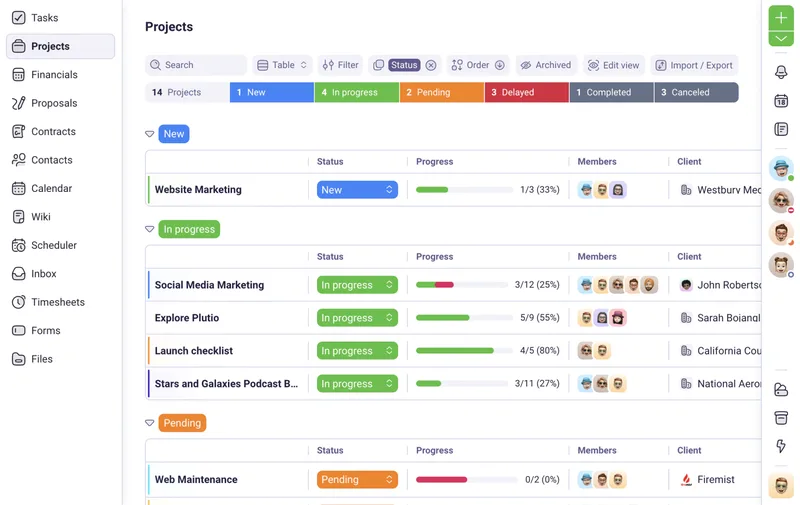
Its Core plan includes projects, task management, invoices, proposals, contracts, forms, time tracking, scheduling, and a client portal. Rather than gating basic functions behind several tiers, Plutio says all current plans share the core feature set and differ mainly in capacity and extras.
That gives a freelancer a relatively direct workflow: bring a client in, manage the project, track time, share information through a portal, and handle documents and billing without leaving the platform.
The $19-per-month Core plan is specifically positioned for solo work. It allows up to nine active clients and no additional contributors. Moving to Pro removes the active-client limit and adds contributor capacity.
That capacity model is important. A freelancer with only a few concurrent clients gets a lot of functionality at the entry price, while someone working with subcontractors may need to move up sooner.
Plutio is worth considering when client-facing organization is as important as task management. A freelancer who only wants a very simple to-do system will probably find it more platform than necessary.
monday.com — Best for Freelancers Growing Into a Team
monday.com fits a different stage of freelancing: the point where a solo workflow is starting to become a team workflow.
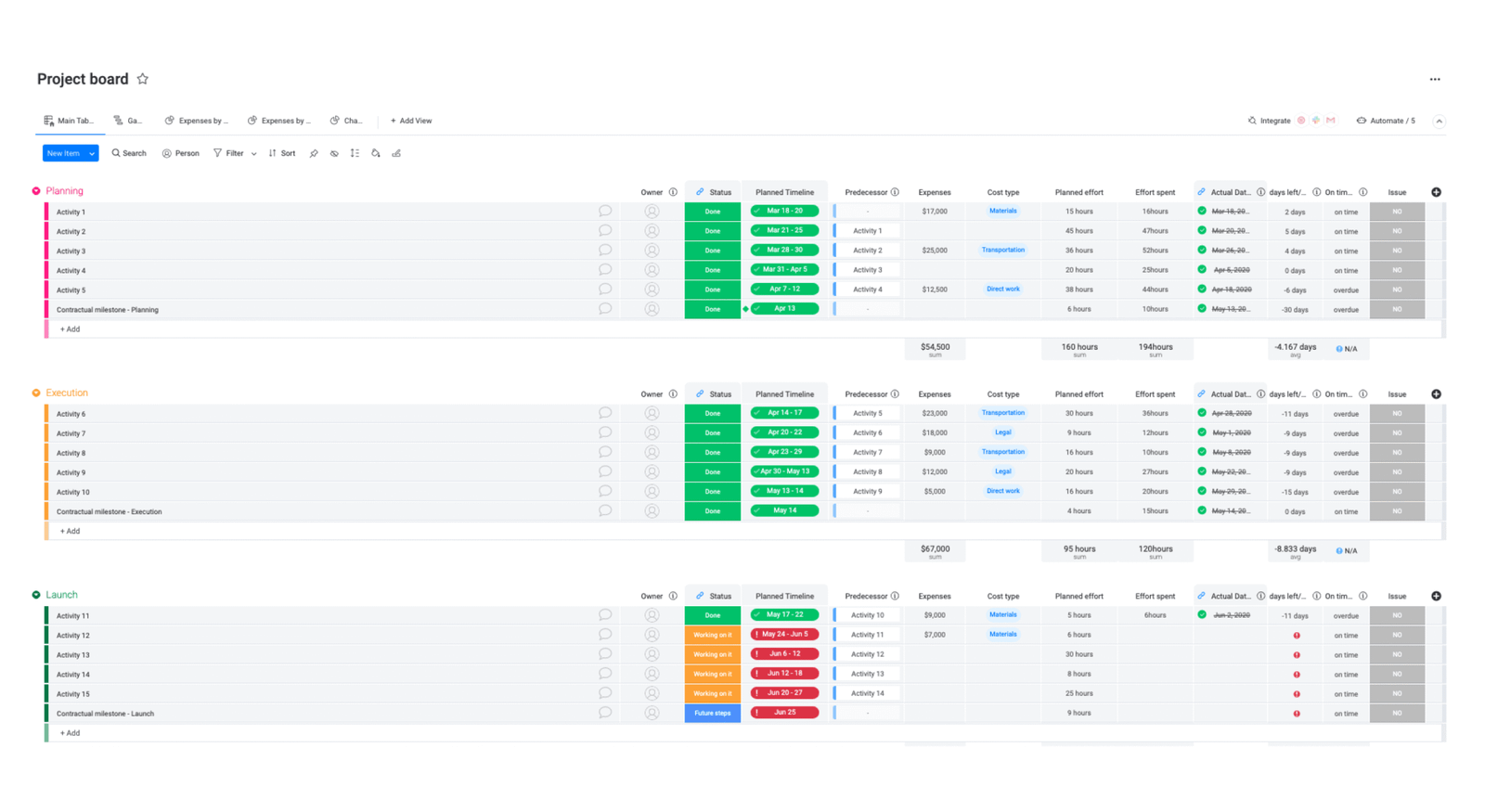
Its boards can be configured for client pipelines, project delivery, content calendars, production schedules, or other processes. Paid plans add automations, integrations, timeline and Gantt views, guest access, and more advanced workflow features.
That flexibility is valuable when you start bringing contractors or employees into delivery. Instead of moving from a personal freelancer tool to a completely different team platform later, you can build a structure that has room to expand.
For a true solo operator, however, the economics and setup deserve attention. monday.com’s Free plan is limited to two seats and three boards, with no guests, automations, or integrations. Paid plans use seat bundles and start with a minimum of three seats. Time Tracking is also not part of the Free tier.
That makes monday.com easier to justify when collaboration and scalability are real near-term needs rather than hypothetical future requirements.
If your freelance business is moving toward a studio or agency model, this is also where a more team-oriented platform starts to make more sense.
Indy — Best Lightweight Freelancer Business Toolkit
Indy covers much of the same freelancer lifecycle as the larger all-in-one platforms, but it keeps the entry point simple.
The Free plan includes Projects, Calendar, Forms, Tasks, Time Tracker, and file storage. It also allows limited monthly use of proposals, contracts, invoices, and clients. For someone starting out, that is enough to run a real client workflow without immediately paying for a large software stack.
The Pro plan removes those limits and adds features such as a branded client portal, recurring invoices, templates, larger storage, integrations, and white-labeling.
Indy is most attractive when ease of adoption matters more than advanced project mechanics. You can manage work, track time, create client documents, and invoice without designing a complicated operating system first.
The ceiling is lower than a platform built for complex team delivery. A freelancer with heavy dependencies, resource planning needs, or a growing multi-person team may eventually need something deeper.
For solo professionals who want the essential business workflow in one accessible package, however, Indy is a practical option.
Freelancer Project Management Software Comparison
| Tool | Best For | Free Plan / Trial | Time Tracking | Client Collaboration / Portal | Contracts / Invoicing | Starting Price |
|---|---|---|---|---|---|---|
| Moxie | All-in-one freelancer workflow | Free trial | Yes | White-label portal on Pro | Both | $12/mo monthly or $10/mo annually |
| Bonsai | Contracts and invoicing | Free trial | Yes | Client portal on Essentials+ | Both on Essentials+ | Basic $15/mo monthly or $9/mo annually |
| Toggl Track | Billable time tracking | Free plan | Core feature | Limited compared with client-suite tools | Not its core workflow | Free; Starter $12/mo monthly or $9/mo annually |
| Dubsado | Client onboarding and workflows | 21-day Premier trial | Premier | Client portal | Both | Starter $35/mo |
| Zoho Projects | Traditional project management | Free plan | Yes on paid plans | Client users on paid plans | Not a freelancer-business suite | Free plan available |
| Plutio | Clients + projects in one workspace | Trial available | Yes | Client portal | Both | Core $19/mo |
| monday.com | Growing from solo to team | Free plan | Available on higher paid tier | Guests from Standard+ | Not its core workflow | Free; paid plans use seat bundles |
| Indy | Lightweight freelancer toolkit | Free plan + 7-day Pro trial | Yes | Branded portal on Pro | Limited on Free; unlimited on Pro | Free; Pro available |
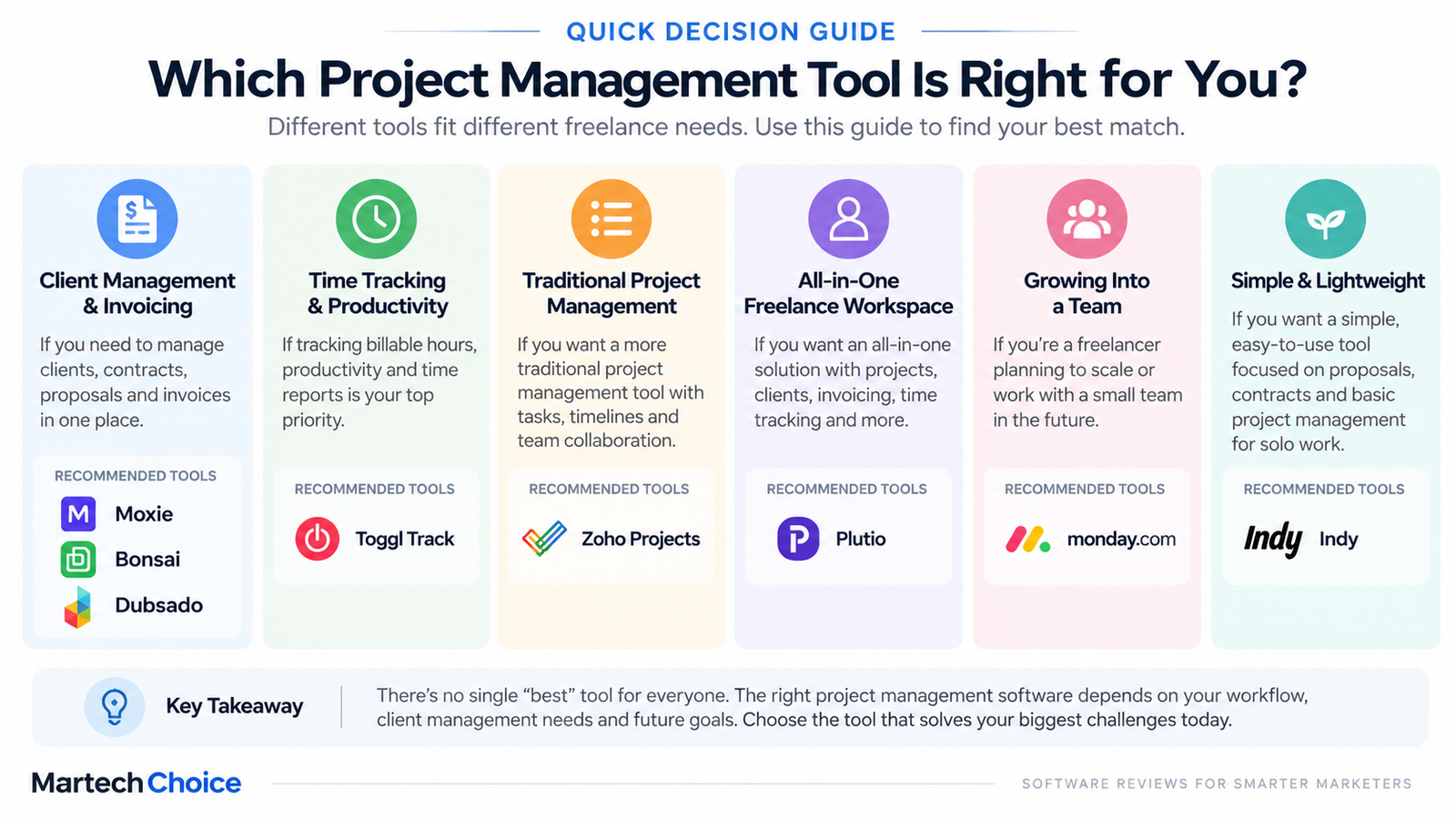
Pricing and plan features change. Verify the vendor’s live pricing page before choosing a plan.
Which Type of Freelancer Project Management Tool Should You Choose?
The fastest way to narrow the list is to decide which category solves your biggest problem.
Choose a traditional project management platform when delivery is complex
If your main difficulty is organizing multi-stage work, dependencies, deadlines, or collaborators, start with the project itself.
Zoho Projects fits this model well. monday.com can also fit when the work is becoming collaborative and you need more flexibility.
This path makes sense when contracts and invoicing already work fine somewhere else.
If your freelance work is becoming more complex, compare broader project management software options before choosing a platform.
Choose an all-in-one freelancer suite when administration is taking over your week
If you are constantly moving data between proposals, contracts, projects, time logs, invoices, and client records, consolidating those functions can remove a lot of repetitive work.
Moxie, Bonsai, Plutio, and Indy approach that problem with different levels of complexity. Moxie and Plutio are broader operating systems, Bonsai puts more emphasis on the commercial and financial workflow, and Indy is the lighter option.
Choose a client-workflow platform when onboarding is part of the service
Some freelancers have relatively simple project execution but complicated client handling.
If every engagement starts with forms, consultation scheduling, proposals, signatures, invoices, and automated follow-ups, Dubsado’s workflow model can be more valuable than another task board.
Choose a time-tracking-first tool when hours drive revenue
If accurate billable time is the biggest financial risk in your workflow, start there.
Toggl Track can sit alongside a lightweight task manager and separate invoicing tool. You do not necessarily need an all-in-one platform when one specialist tool solves the most expensive problem.
A quick way to decide
Ask which sentence sounds most familiar:
- “I lose track of what is due across clients.” Start with a traditional project-management platform.
- “I spend too much time moving between proposals, contracts, projects, and invoices.” Look at an all-in-one freelancer suite.
- “Every new client requires the same manual onboarding work.” Consider a client-workflow platform.
- “I am never completely sure my billable hours are captured.” Start with a time-tracking-first tool.
Creative freelancers may also want to compare tools built around asset reviews and visual workflows.
Best Creative Project Management Software
Freelance marketers managing campaigns across channels may have a different set of requirements.
Best Marketing Project Management Software
Free vs. Paid Project Management Software for Freelancers
A free plan can be completely adequate when the workflow is simple.
If you work alone, handle only a few active clients, do not need client portals, and are comfortable keeping invoicing or contracts elsewhere, there may be little reason to pay for a large platform.
Free software becomes more limiting when administrative work starts multiplying.
Paid plans tend to become easier to justify when you need several of the following:
- multiple active client workflows
- billable-rate reporting
- client portals or guest access
- contracts and proposals
- recurring invoicing
- workflow automation
- advanced timelines or reporting
- subcontractor or employee access
The calculation should be based on time and friction, not the number of features on a pricing page.
A $20 or $30 tool that removes hours of monthly administration can be cheaper than a free system held together with manual copying. The opposite is also true: paying for an all-in-one suite makes little sense if you only use its task list.
How We Selected These Tools
We compared these platforms around the workflows freelancers commonly need rather than treating the category as a generic project-management comparison.
The main criteria were:
- usefulness for a solo freelancer
- ability to keep multiple clients organized
- task and project-management capability
- time tracking and billable-hour support
- client collaboration
- proposals, contracts, and invoicing
- pricing practicality for a one-person business
- setup and learning overhead
- ability to add collaborators later
- current product and plan availability
The Best for labels are use-case classifications, not numerical rankings. A tool that is strong for one freelancer may be a poor fit for another because the underlying workflow is different.
FAQ
What is the best project management software for freelancers?
The best option depends on the workflow you need to fix. Moxie, Bonsai, Plutio, and Indy combine project work with freelancer business administration. Zoho Projects is closer to traditional project management. Toggl Track is stronger when billable time is the priority, while Dubsado focuses more heavily on client onboarding and workflow automation.
Do freelancers really need project management software?
Not always. One freelancer handling one or two straightforward clients can often manage with a calendar and task list.
Dedicated software becomes more useful when deadlines overlap, client information is scattered, hours must be tracked, or the administrative side of the business begins taking significant time.
What is the best free project management software for freelancers?
There is no single free option that is best for every freelancer. Toggl Track has a useful Free plan for time tracking and simple planning. monday.com, Zoho Projects, and Indy also offer free tiers, but their limits and strengths differ.
Choose based on the workflow you actually need, then check the current free-plan restrictions before moving client data into the system.
Is Trello enough for freelancers?
It can be. Trello is a reasonable choice when the main requirement is a visual board for simple tasks and deadlines.
It becomes less convenient when you also need native time tracking, contracts, invoicing, client portals, or a more detailed multi-project view. At that point, a freelancer-specific suite or a deeper PM platform may reduce the number of separate tools you maintain.
Should freelancers use project management software with invoicing?
It is useful when project data and billing data overlap.
A freelancer who bills from tracked time, milestones, or recurring client work can reduce double entry by keeping invoicing close to the project. But freelancers who already use accounting software they trust may prefer to keep financial records separate.
Is time tracking important if I charge fixed project fees?
It can still be valuable. Time tracking lets you compare the hours actually spent with the fee charged.
If a fixed-price project repeatedly consumes more time than expected, that information can guide future pricing even if the client never sees an hourly invoice.
Should I use one all-in-one tool or several specialist apps?
Use an all-in-one platform when switching between tools is creating more work than the specialist apps save.
Use separate tools when one part of your workflow genuinely needs deeper functionality — for example, advanced project planning or detailed time tracking — and the integrations between those systems are manageable.
Final Takeaway
Start with the part of your freelance workflow that costs you the most time or creates the most mistakes.
If project delivery itself is complicated, a traditional PM platform such as Zoho Projects may be the better foundation, with monday.com becoming more relevant as collaboration grows.
If the administrative chain from proposal to payment is the bigger problem, Moxie, Bonsai, Plutio, or Indy can consolidate more of the business.
Dubsado stands out when repeatable client onboarding is central to the service, while Toggl Track makes sense when accurate billable time is the priority.
The goal is not to buy the platform with the longest feature list. It is to remove the specific friction that is making client work harder to manage.