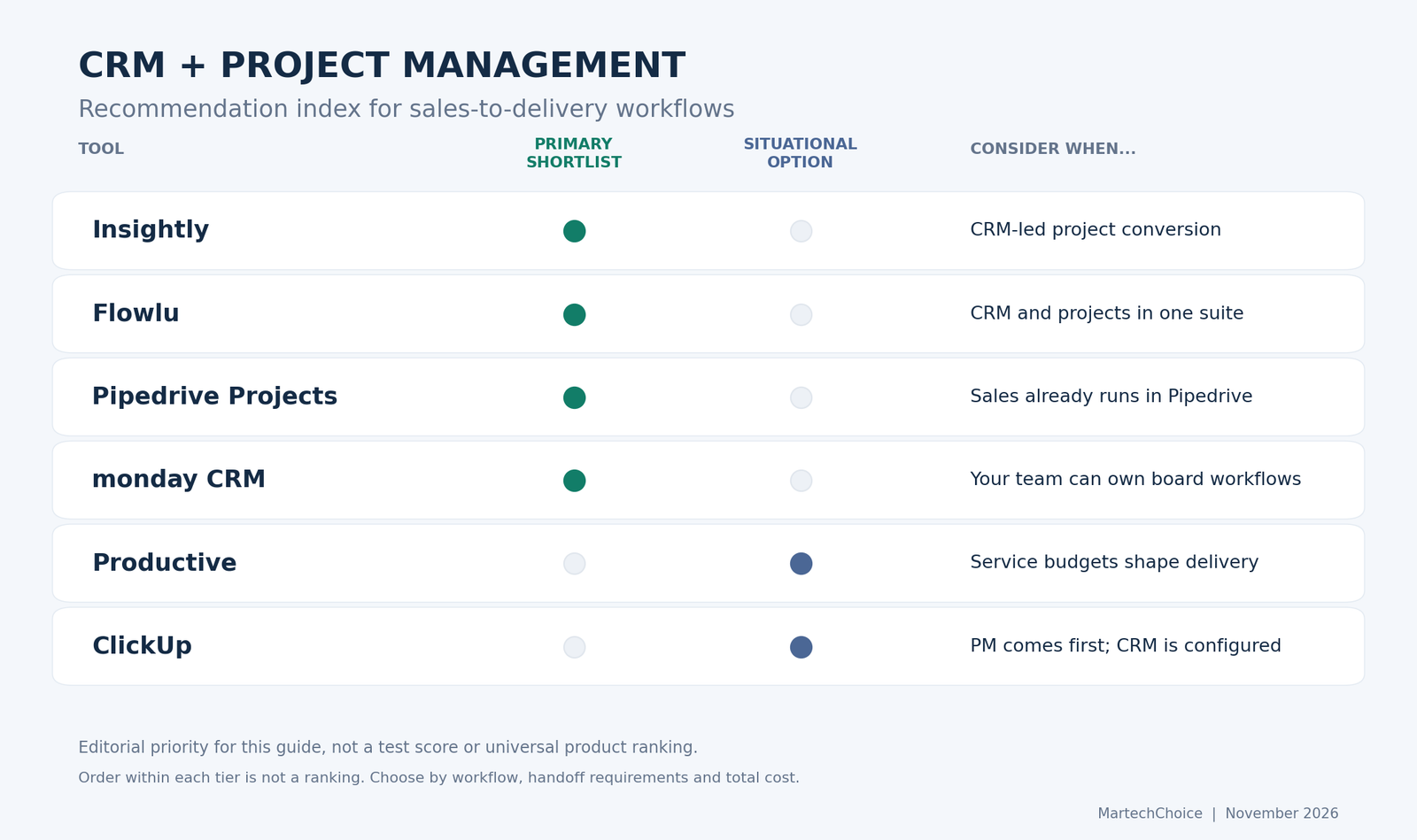
Project management with CRM works when a won deal becomes delivery work without someone retyping the promise. For a client-service business, we would shortlist Insightly or Flowlu if you want CRM and projects under one roof, Pipedrive Projects if the sales team already lives in Pipedrive, and monday CRM if you want configurable boards and can accept that project management may be a separate purchase. Productive suits services firms that think in budgets, and ClickUp suits teams willing to build CRM inside a project-management workspace.
None of these is a universal winner. A shared logo on the login page does not prove a finished handoff. Judge each route by what carries over, who owns the work afterward, and what the complete setup costs.
Compare CRM and project management options
The first four tools offer different CRM-led routes into delivery. Productive and ClickUp are additional options for services-led and PM-first teams. This is a research-based comparison of official documentation, not a hands-on test or a ranked league table.
| Tool | Handoff route | Context retained | Important boundary | Consider it when |
|---|---|---|---|---|
| Insightly | Convert an opportunity to a project | Linked records; optional emails, files and notes | External file links stay behind; custom fields need mapping | CRM-led delivery needs an explicit conversion step |
| Flowlu | Create from an opportunity or configure a rule | CRM customer association; configured variables | Automatic creation requires setup and a suitable tier | You want CRM and projects in one suite |
| Pipedrive Projects | Create and link delivery work inside Pipedrive | Linked deal, contact and organization; related history | Editors need paid CRM access; lower plans add Projects fees | Your sales team already uses Pipedrive |
| monday CRM | Configure onboarding items or board workflows | Selected mapped columns | Creating an item does not transfer update history | Your team can maintain its own board workflows |
| Productive | Turn won services into project/budget options | Service details and optional financial transfers | The original deal needs manual project association | Delivery budgets shape the business |
| ClickUp | Build CRM around tasks and relationships | Fields and links included in your configuration | No assumed full-record conversion | Delivery already runs in ClickUp |
For broader context on delivery-side tools, see our guide to the best project management software.
What must survive the sales-to-project handoff?
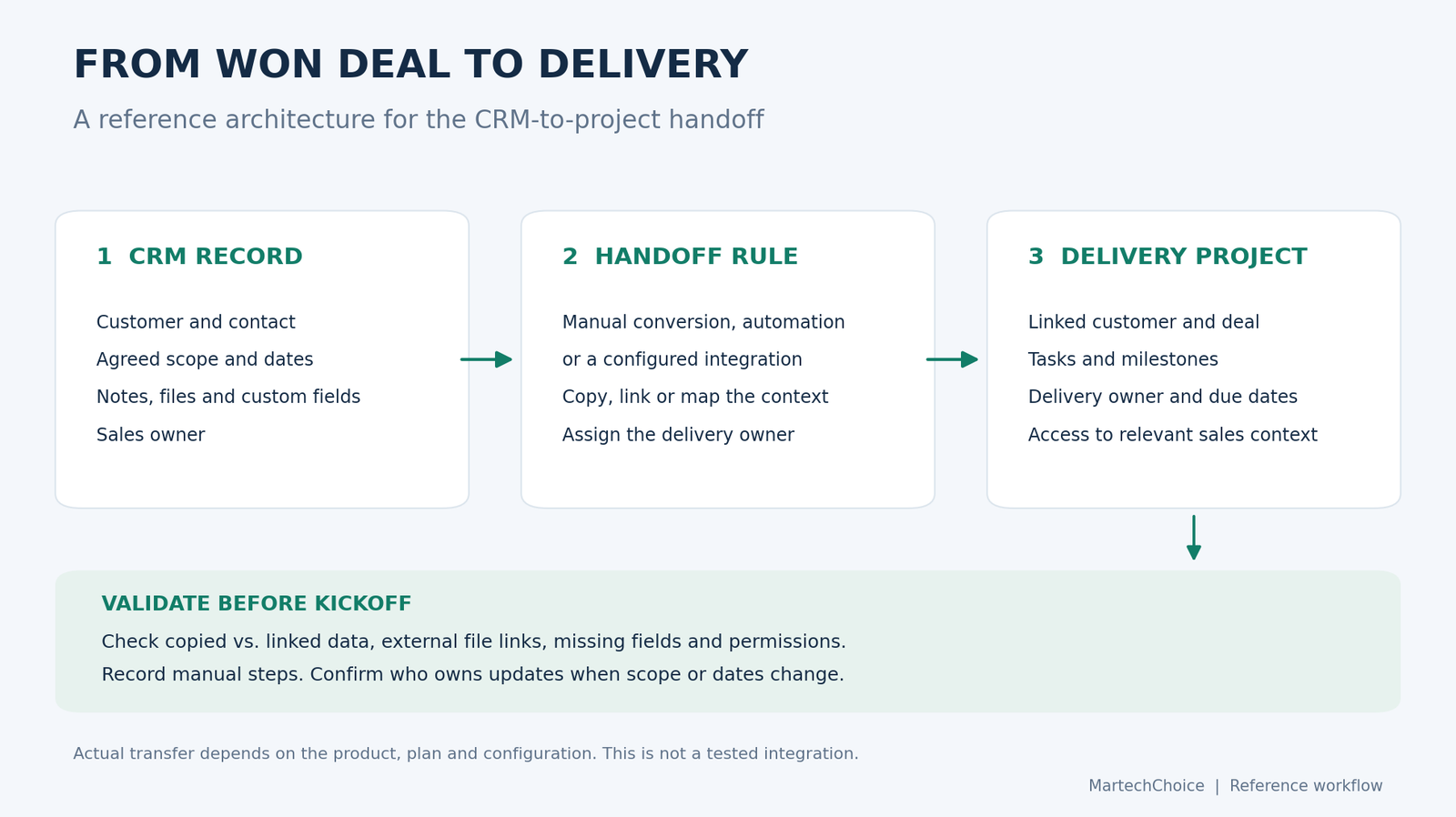
Creating a project container is easy. Preserving what the delivery team needs to do the work is the hard part. A project named “Acme Website” with no history is a folder with ambitions.
Six things deserve inspection:
- Customer and deal links. Can a delivery manager get from the project back to the account, contact and deal?
- Agreed scope and promised dates. Carry over the agreed scope and dates, and flag informal promises for confirmation rather than silently treating them as contracted work.
- Files and links. Uploaded attachments and links to external storage may behave differently.
- Custom fields. Inspect how budget type, contract term or an approval contact reaches delivery, and whether it remains structured data.
- Ownership and permissions. Who owns delivery, and who can see the commercial details?
- Ongoing consistency. If scope changes later, do the deal and the project agree?
Three distinctions run through the rest of this guide:
- Linked history is not copied data.
- A sentence pasted into a description is not a typed, mapped field.
- A field that fails to reach the new project has not been deleted from the original deal. It just isn’t where the delivery team is looking.
Four tools to compare closely
Insightly: native conversion for CRM-first teams
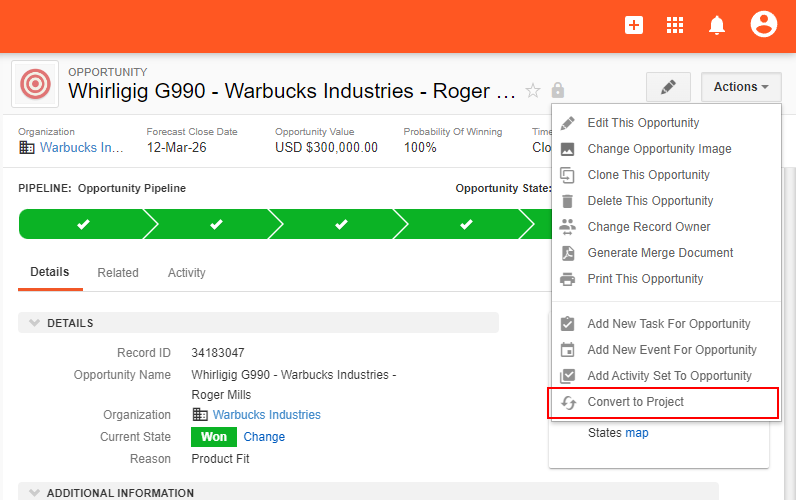
Insightly starts from the CRM side. Its opportunities documentation describes converting an opportunity into a project. The person converting chooses the project owner and can optionally copy emails, files and notes. The copy option is checked by default. Agree whether to keep it enabled so the delivery team receives the discussion behind the agreed work.
The boundaries matter more than the button. Links to files stored in external cloud services do not transfer, and custom fields require mapping. If a field is not carried across, it has not been deleted from the opportunity. Someone has to bring it over or accept looking in two places. The projects documentation covers the project side. Do not assume the whole customer record copies itself.
The Insightly pricing page lists CRM Plus at $29 per user per month billed annually, including project management, and Professional at $49 with workflow automation. A manual conversion does not require the same workflow design as a rule-driven process. Choose the tier for the actions you will actually use, rather than upgrading simply because the workflow includes a handoff.
We would shortlist Insightly when sales leads own the relationship, delivery is project-shaped, and a visible choice about what to copy suits your process. We would hesitate if your delivery process leans on external file links or heavily customized fields until the mapping is proven.
Flowlu: a suite that rewards configuration
Flowlu brings CRM, projects and business administration into one workspace. Its project-creation guide describes creating a project directly from an opportunity and selecting the customer, manager, template and team. That gives you a manual handoff before you consider automation.
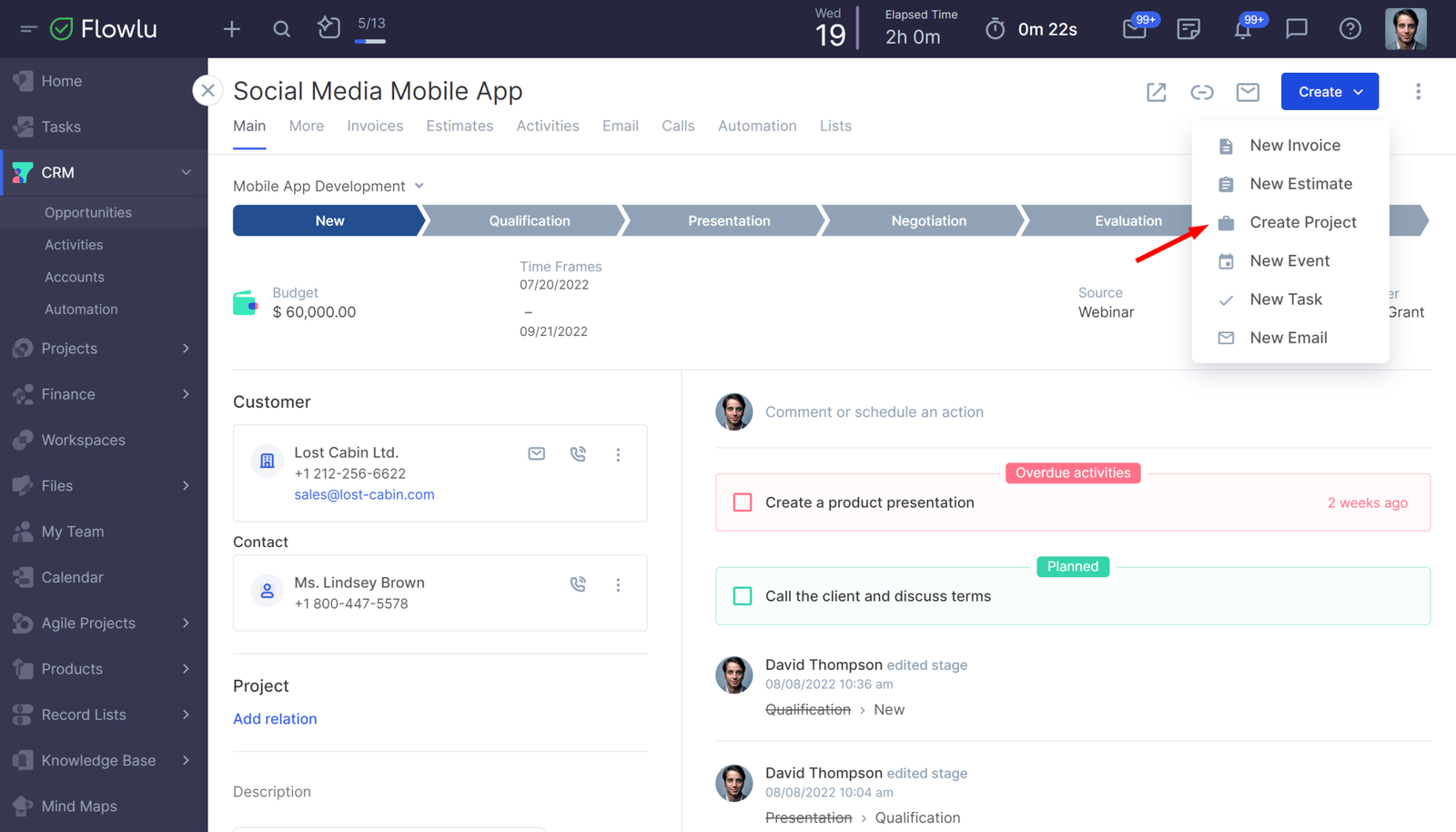
For repeatable delivery, its CRM automation guide shows an opportunity reaching Closed Won triggering project creation. A CRM administrator configures the rule; installing the suite does not design the process for you. Decide which deals should create projects, who should own them and which delivery template applies.
The Create Project action can insert opportunity variables into the project name and description, with an assignee-variable example for ownership. That is useful for a readable handoff summary. It does not establish that every original custom field becomes a corresponding project field: text in a description and structured field mapping remain different things.
For the automatic route, budget for Advanced: the pricing page lists sales and pipeline automation there, at $17 per user per month billed yearly. Essential is $9 on that basis; Free is a capped two-user workspace. Compare a simpler manual process with the automatic one before deciding which subscription saves work.
We would shortlist Flowlu when a small business wants one operating workspace and someone can maintain its rules. A good trial should check the fields delivery depends on, not just whether a project appears. An unmaintained rule set is a very organized way to create the wrong project.
This official Flowlu video demonstrates general project creation and setup; it does not demonstrate a won-deal-to-project conversion.
Pipedrive Projects: delivery attached to a sales CRM
Pipedrive Projects keeps delivery inside the sales CRM. You can create a project as you mark a deal won, or link one while the deal remains open. The Projects guide also describes boards, phases, templates and assigned work items. The practical attraction is continuity for a team that already trusts its sales records.
Projects can link to deals, a contact and an organization. Related deal files, notes and emails then appear in the project context; the documented history limit is 50 linked deals. That is linked context, not a promise that every custom deal field is copied into a project field. Include your own important fields in the trial checklist.
Check who needs to edit delivery work. Pipedrive’s billing documentation requires paid Deals app access for Projects users. Lite and Growth additionally need Projects seats; Premium and Ultimate include Projects. Someone without the Projects app can still view linked project information through records they can access, but cannot create or edit projects. Viewing and editing are different requirements.
The annual base prices are Lite $14, Growth $39, Premium $59 and Ultimate $79 per seat per month. The Projects add-on is advertised as starting from $16. Confirm the applicable billing cycle and assigned-seat charge for your account. For Lite or Growth, obtain the Projects charge for your assigned seats and billing cycle before comparing totals; the base price alone is not the workflow price.
We would shortlist this route when sales and delivery can work in the same customer record system. If many delivery staff need editing access, compare the total seat bill with keeping a separate PM tool. Do not assume everyone needs identical access just because they touch the same client.
monday CRM: configurable boards, with a separate PM question
monday CRM can organize sales and onboarding on configurable boards. It is also a separately priced product from monday AI work platform. First decide whether delivery can stay on CRM boards or needs a second product; sharing a brand does not include both subscriptions.
The CRM Ultimate guide shows won opportunities creating onboarding items. Treat that as a specific packaged workflow. For a custom setup, decide whether one shared delivery board or a new board for each engagement fits your business. Those choices require different automation steps.
Data mapping is where the choice becomes concrete. With cross-board automations, you select which columns populate the receiving item. Update-section content does not transfer when the automation creates a new item; moving an item behaves differently. Dependency, Link to Item and Time Tracking are excluded from that mapping mechanism. An onboarding item can exist while the conversation explaining the job remains elsewhere.
The CRM pricing page lists Standard at $17 per seat per month billed annually with 250 monthly custom automations. Pro is $28 with 25,000 and an AI workflow builder. Plans start at three users. A complex template-based flow should be checked against its required blocks and product entitlement; the Standard automation allowance alone does not establish that every workflow is included.
We would shortlist monday CRM when a team wants to shape its own delivery process and can own the mapping. For a wider comparison of the PM product, see ClickUp vs monday.
Two additional routes for specific teams
Productive: services-led continuity from deal to budget
Productive approaches the problem as a services business would, through budgets as well as projects. Its help article on winning a deal says that marking a deal won offers several routes. You can create a project and budget, add a budget to an existing client project, create a standalone budget, or only mark the deal won. Transferring time, expenses and bookings involves choices, so the handoff is a decision and not a reflex. Setup is covered in how to create a new project.
The caveat is specific. The help article on adding a deal to a project says a project created from a won deal is not automatically linked to that deal, and the user must assign the deal to the project. Make that association part of the handoff checklist so delivery can find the sales record. For deeper margin, utilization and quote-to-cash questions, our guide to project management software for consultants goes further than this one should. Productive has a three-paid-seat minimum; clients are not charged as employee seats.
ClickUp: a PM-first workspace configured for CRM
ClickUp’s CRM hierarchy represents leads, contacts, accounts and deals as tasks. Relationships and fields connect them. You are configuring a CRM inside the PM workspace rather than buying a dedicated sales data model.
The automation actions can create a task with a template and a relationship to its trigger task; custom fields can be set during creation. This gives you building blocks for delivery intake. A created task is still not the same thing as a complete project with all customer history, so define what should live on the task and what should remain linked.
We would consider ClickUp when delivery already runs there and CRM needs are modest. If the sales team needs a more specialized CRM, evaluate a connection to that system instead of forcing every relationship into a task. Whichever route you take, assign someone to maintain the configuration.
What the complete workflow will cost
Compare the tier that completes your handoff, not the cheapest subscription in the product family. Prices below are USD per user or seat per month on annual billing, checked on November 5, 2026, unless the row states otherwise. Taxes, add-ons and implementation can change the total.
| Tool | Relevant cost anchor | What to include in the decision |
|---|---|---|
| Insightly | Plus $29; Professional $49 | Manual project conversion versus paid workflow automation |
| Flowlu | Essential $9; Advanced $17 | Sales/pipeline automation is listed on Advanced |
| Pipedrive Projects | Lite $14; Growth $39; Premium $59; Ultimate $79 | Projects add-on advertised starting from $16; confirm billing cycle and assigned-seat charge on Lite/Growth. Included on Premium/Ultimate |
| monday CRM | Standard $17; Pro $28; three-user minimum | Required workflow blocks, action allowance and any separate PM subscription |
| Productive | Monthly or annual subscription; minimum three paid seats | Confirm the current selected plan total; client access is free |
| ClickUp | Core $9; Business $17 | Published monthly automation allowances: 1,000 and 10,000 respectively |
Productive’s public pricing content returned inconsistent amounts and billing labels during our review. We have left out a fixed dollar figure rather than label a monthly rate as annual. Its billing guide confirms both cycles and the three-seat minimum; check the selected plan total before purchase.
Three other costs deserve a line in your comparison. First, separate people who edit delivery work from those who only need status visibility. Permission rules matter as much as headcount. Second, account for building templates and mapping fields. Third, budget for maintaining the process after sales stages, service packages or team responsibilities change. A lower subscription is not a saving if every handoff still needs someone to reconstruct the agreement.
Run one deal through the handoff before you buy
Use this hypothetical website-redesign project as a trial checklist. It is a proposed exercise, not a test we performed; the checks do not assume every tool supports every behavior.
- Create the records. Add a sample company, contact and deal for a website redesign, with an agreed scope written down.
- Seed the awkward data. Attach an uploaded file, add a link to a file in external cloud storage, fill in a custom field such as contract type, and set a promised launch date.
- Win the deal. Trigger the handoff the product actually supports, noting whether it is a manual step, a configured rule or an integration.
- Inspect the project. Check that you can get back to the customer and deal, and that the scope, date, attachment, external link and custom field arrived. Note what is copied and what is only linked.
- Change the owner. Reassign delivery and check permissions: who can now see commercial details, and who cannot?
- Repeat the trigger. Click again or retry the automation and look for duplicate projects.
- Change the scope. Edit the deal and see whether the project and deal still agree, or whether someone must update both.
- Record the work left over. Record every piece of manual re-entry, every missing field and the subscription tier the trial required.
Compare the two shortlisted tools against the same information. A reliable manual step may be acceptable; an invisible gap in scope or ownership is harder to manage. Decide which gaps you can own before choosing the software.
Frequently asked questions
Do I need separate CRM and project management subscriptions?
Sometimes. monday’s products are priced separately, so a PM subscription is not automatically included with CRM. Pipedrive Projects requires a paid base seat and, on lower plans, an add-on. Insightly, Flowlu and ClickUp present project features inside the same product family, but check the tier for your specific handoff.
Can one platform manage both sales and project delivery?
It can, and the question is how completely. Same-brand tools do not guarantee that linked history, mapped fields and ownership all survive. The checklist above answers that for your data.
When should a team keep its existing CRM and connect a project tool?
When the CRM is deeply embedded and the delivery tool is already right, a connected route may beat migrating either one. Run the same exercise, paying close attention to duplicate creation and mapped fields.
Which route to shortlist
Choose two routes that fit your existing sales and delivery systems. Run the same sample deal through each, then compare missing context, manual steps and the full seat bill. Buy the setup your team can maintain, with a named owner for the handoff and a clear record of what was promised.